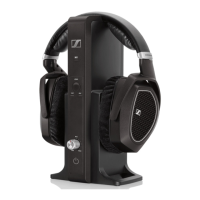
The Sennheiser RS 185 is a digital wireless headphone system designed for music lovers seeking high-fidelity sound at home without the constraints of wires. This system delivers precise sound reproduction in uncompressed digital quality, allowing users to move freely within a wide transmission range. The ergonomically designed, open circumaural headphones are lightweight and comfortable, suitable for extended listening sessions.
Function Description
The RS 185 system consists of two main components: the HDR 185 headphones and the TR 185 transmitter. The transmitter acts as a base station, connecting to audio sources and wirelessly transmitting audio to the headphones. It also serves as a charging cradle and docking station for the headphones. The headphones receive the digital audio signal and reproduce it with high clarity.
A key feature of the RS 185 is its ability to connect to two different audio sources simultaneously, supporting both analog and digital inputs. Users can toggle between these inputs using a switch on the transmitter. The system offers flexible input level control for analog signals, with options for Automatic Level Control (ALC) to automatically even out volume differences or Manual Level Control (MLC) to allow manual sensitivity adjustment. This ensures optimal sound quality regardless of the source's output level.
The headphones themselves incorporate convenient controls for volume and balance, allowing users to fine-tune their listening experience directly from the headset. The balance control is particularly useful for individual preference adjustments. The system supports multi-receiver transmission, meaning the transmitter can support up to two pairs of headphones simultaneously, allowing two people to enjoy the same audio source wirelessly.
Important Technical Specifications
- Headphone Type: Wireless, open, circumaural headphones.
- Audio Transmission: Uncompressed digital audio transmission.
- Transmission Range: Up to 328 ft / 100 m (line of sight).
- Audio Inputs (Transmitter):
- Digital Optical In (DIGITAL OPTICAL IN) for digital audio.
- RCA Audio Input (L, R RCA audio input) for analog audio.
- Input Level Control: Automatic Level Control (ALC) and Manual Level Control (MLC) for analog inputs.
- Power Supply (Transmitter): DC 9V 0.3A socket for the power supply unit.
- Batteries (Headphones): Low self-discharge NiMH rechargeable batteries, AAA size.
- Battery Charging Time: Indicated by charge status LED on the transmitter.
- Operating Temperature: 0 to 40 °C / 32 to 104 °F.
- Supported Digital Audio Stream: PCM audio output only (for optical digital input).
Usage Features
- Easy Setup: The system is designed for straightforward setup. The transmitter should be placed near the audio source, separated from other wireless devices by at least 50 cm/20" to avoid interference. Metal objects should be avoided near the transmitter to prevent a decrease in cover range.
- Audio Source Connection:
- Optical (Digital): Recommended for best listening experience with home cinema or hi-fi systems. Requires changing the audio stream to PCM output on the source device.
- RCA (Analog): Connects to RCA outputs of audio sources.
- 3.5 mm or 6.3 mm/1/4" Jack Socket (Analog): Connects to headphone sockets of audio sources, potentially requiring an adapter. Users should adjust the volume of the headphone socket on their audio source to at least a medium level.
- Powering On/Off: The transmitter enters standby mode when connected to an AC wall outlet. The headphones are switched on/off via the HDR power button.
- Volume Adjustment: Volume +/- buttons are located on the HDR 185 headphones.
- Balance Control: Balance L and Balance R buttons on the headphones allow for individual left/right balance adjustments.
- Input Selection: The AUDIO INPUT SELECTION switch on the transmitter allows toggling between digital and analog audio inputs.
- Level Control (Analog Input): The LEVEL button on the transmitter toggles between ALC and MLC modes. The MLC rotary knob allows manual adjustment of the input level when MLC is active.
- Pairing: The system supports pairing one or several headphones to the transmitter.
- LED Indicators: Both the headphones and transmitter feature LED indicators to show the current operating state, including connection status, battery charge, selected level control mode, and standby status. These LEDs dim automatically after approximately 30 seconds of inactivity to avoid disturbance.
- HDR Status LED (Headphones): Indicates power off, connected status, low battery, and disconnection.
- Charge Status LED (Transmitter): Shows charging status (charging, fully charged, fault) and approximate operating time/battery capacity after headphones are removed from the holder.
- ALC LED (Transmitter): Indicates whether Automatic Level Control is activated or deactivated.
- MLC LED (Transmitter): Indicates whether Manual Level Control is activated or deactivated, and if the input signal exceeds the maximum permitted level.
- ALC and MLC LEDs (Transmitter): Flash three times to indicate optical audio input selection.
- TR Status LED (Transmitter): Shows connection to AC wall outlet, standby mode, connected status with headphones, and detection of incompatible digital audio streaming input.
Maintenance Features
- Cleaning: The product should only be cleaned with a soft, dry cloth.
- Battery Management:
- The system uses rechargeable NiMH AAA batteries.
- Regular charging (about every 3 months) is recommended if rechargeable batteries are not used for extended periods.
- Remove standard/rechargeable batteries if the product is not used for an extended period.
- Only use Sennheiser-recommended rechargeable batteries and chargers.
- Dispose of defective or standard/rechargeable batteries at special collection points.
- Do not mix standard and rechargeable batteries.
- Ear Pad Replacement: The ear pads are replaceable, ensuring long-term comfort and hygiene.
- Storage: Keep the product dry and avoid extreme temperatures. Do not place headphones on objects that could widen the headband and reduce contact pressure.
- Troubleshooting: The manual provides guidance for common issues such as sound problems, other operational problems, and what to do when leaving the transmitter's range. It also includes instructions for clearing pair settings on the headphones.
The Sennheiser RS 185 is intended for private domestic use with hi-fi systems, TV sets, and home cinema systems, supporting both analog and digital inputs. It is not suitable for commercial use or use with portable audio devices.

 Need help?
 General









 To Next Page