Using the headphones
24 | ACCENTUM PLUS
The Transparency Mode optimally complements the active noise
cancellation ANC. With the Smart Control app, you can gradually
adjust the intensity of the Transparency Mode and the ANC. In this
way, you determine how much ambient noise reaches your ears or
whether you want to listen exclusively to your music (ANC at full
intensity).
When you use the Transparency Mode at full intensity, disturbing
sounds, e.g. low-frequency noise such as aircraft noise, are always
suppressed so that you can stay relaxed and in touch with your sur-
roundings.
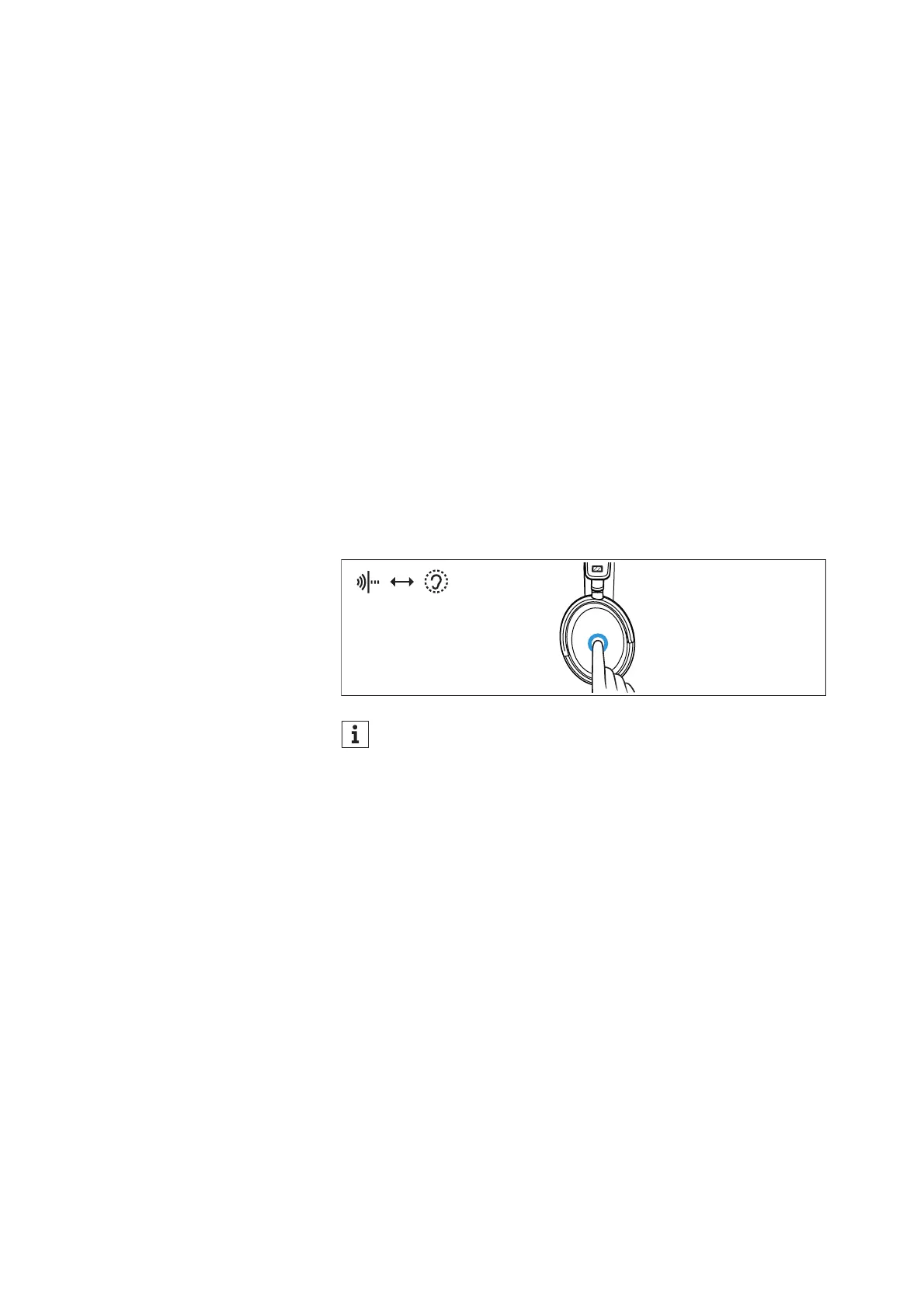
Switching between the active noise
cancellation ANC and the Transparency
Mode
You can use the gesture control on the touch pad to switch between
the active noise cancellation ANC and the Transparency Mode, e.g.
if you want to transition from ambient awareness to idle mode as
quickly as possible.
This function is not available during an active call, see: > 27
▷ To switch between the modes, press the touch pad 2x.
In the Smart Control app, the intensity of the Transparency
Mode and the active noise cancellation remains incrementally
adjustable (> 25).











 To Next Page