Cleaning and maintaining the headset system
34
Replacing the headset’s rechargeable battery
You can replace the rechargeable battery. Spare rechargeable batteries are
available from your Sennheiser partner. Only use spare rechargeable
batteries recommended by Sennheiser Communications.
왘 Remove the earhook or the headband (see page 16).
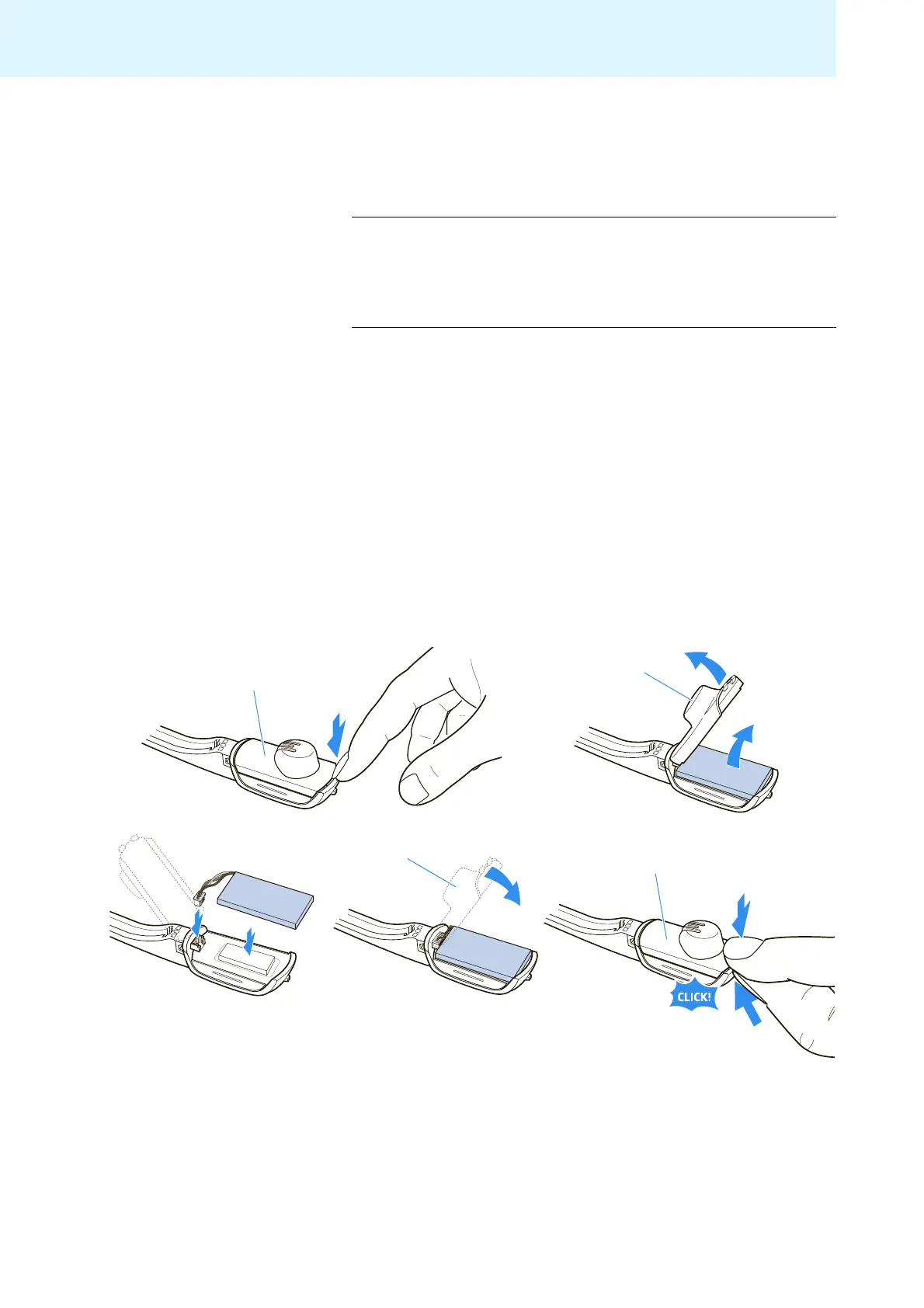
왘 Open the battery compartment cover using your finger nail (see first
diagram).
왘 Carefully move the battery compartment cover in the direction of
the arrow until you overcome a slight resistance.
왘 Remove the rechargeable battery and carefully loosen the connector
plug of the battery cable.
왘 Insert the connector plug of the new rechargeable battery into the
connection socket. Observe correct orientation of the connector plug.
왘 Replace the battery compartment cover onto the headset.
왘 Carefully lift the headset housing with your finger nail while fixing the
battery compartment cover with your thumb.
The battery compartment cover locks into place (see last diagram).
왘 Charge the new rechargeable battery (see “Charging the headset’s
rechargeable battery” on page 22).
CAUTION Damage to the product due to improper handling
The cable connections can be damaged when subjected to
mechanical stress.
왘 Open the battery compartment cover and carefully
loosen the connector plug of the rechargeable battery.
9
9
9
9



 To Next Page