22
Adjusting settings via the operating menu
The following figures are a guide to the best settings:
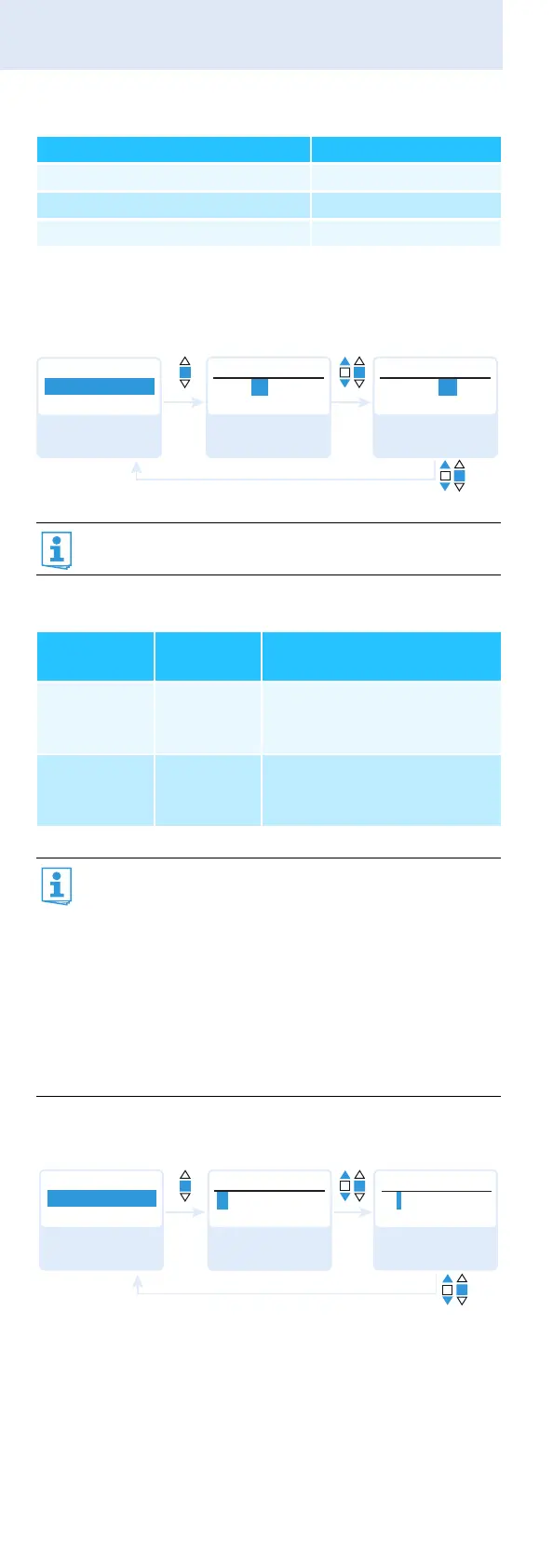
Selecting the frequency bank and the channel manually –
“Frequency Preset”
Overview of the frequency banks and channels:
Entering a name – “Name”
Via the “Name” menu, you can enter a freely selectable
name (e.g. the name of the performer) for the radio micro-
phone.
Transmission situation Sensitivity setting
Loud music/vocals −48 to −18 dB
Presentations −18 to −12 dB
Interviews −12 to 0 dB
When you are in the “Frequency Preset” menu item,
the RF signal is deactivated.
Frequency
bank
Channels Type
“1” to “20” up to 24 per
frequency
bank
System bank:
frequencies are factory-
preset
“U1” to “U6” up to 24 per
frequency
bank
User bank:
frequencies are freely
selectable
When setting up multi-channel systems, please
observe the following:
Only the factory-preset frequencies within one
frequency bank are intermodulation-free (see
page 27).
Radio microphone and receiver of a transmission
link have to be set to the same frequency.
It is vital to observe the notes on frequency
selection on page 27.
Menu
B.Ch:
1. 1
Frequency Preset
B.Ch:
MHz
Frequency Preset
1. 1
B.Ch:
MHz
Frequency Preset
20. 1
518.200 531.375
Call up “Frequency
Preset”
Select the frequency
bank and confirm
Select the channel;
store the setting
“Stored”
Menu
Lichael
Name
Name
Name
L ichael
Michael
Call up “Name” Enter a character
and confirm
Enter a character;
store the setting
“Stored”



 To Next Page