$
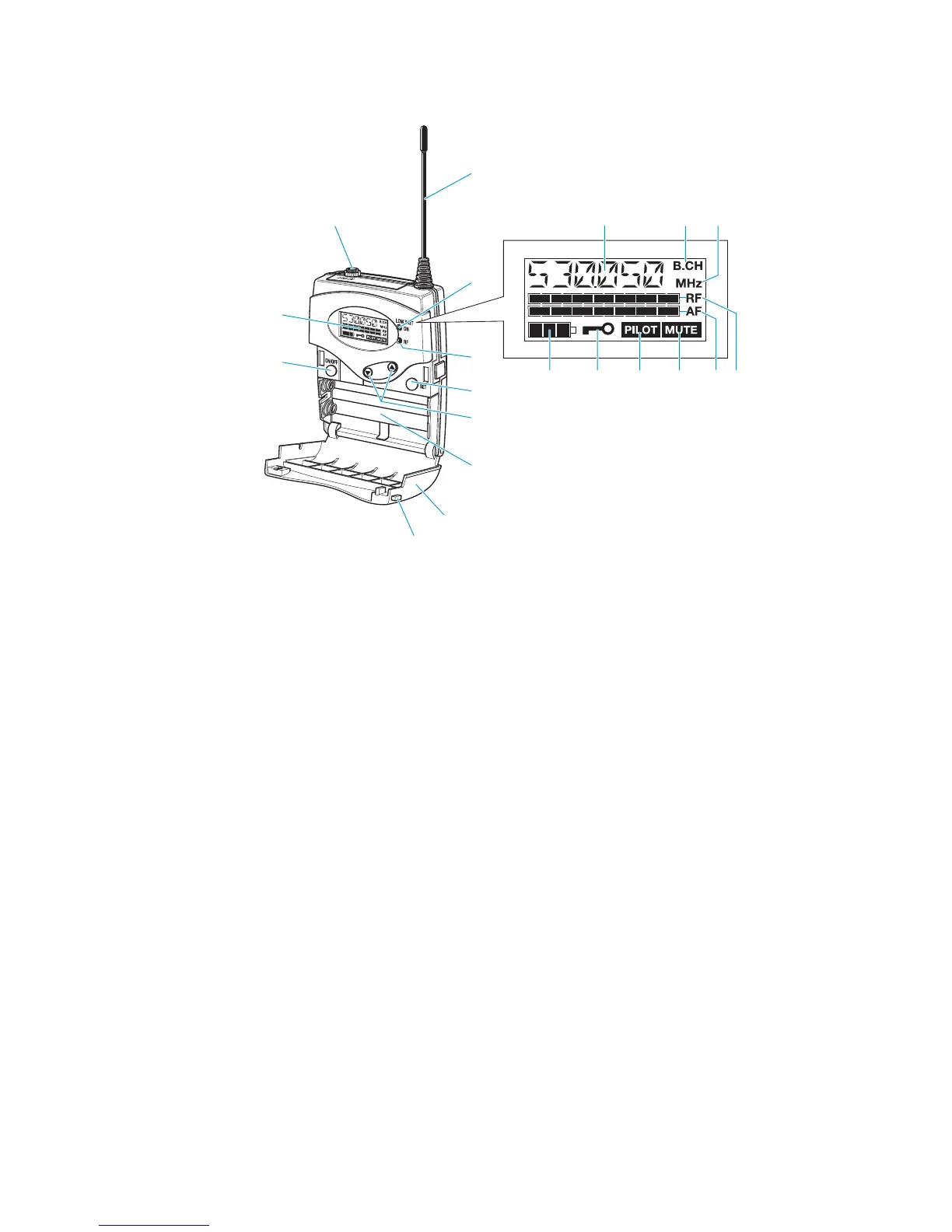
Operating controls LC display panel
! Audio output (AF OUT), 3.5 mm jack socket
(unbalanced)
" Antenna
# Red LED for operation and
battery status indication (ON/LOW BAT)
$ Green LED for RF signal indication (RF)
% SET button
1 " /! rocker button (DOWN/UP)
2 Battery compartment
3 Battery compartment cover
4 Unlocking button
5 ON/OFF button
(serves as the ESC (cancel) key in the
operating menu)
6 LC display
& Alphanumeric display
- “B.CH“ – appears when the channel bank and
the channel number are displayed
. “MHz“ – appears when the frequency is displayed
/ 4-step battery status display
, Lock mode icon
(lock mode is activated)
+ “PILOT” display
(pilot tone evaluation is activated)
0 “MUTE” display
(audio output is muted)
' 7-step level display for received audio signal “AF”
) 7-step level display for received RF signal “RF”







 To Next Page