29) Input 1,2: Linking, MS
STEREO RECORDING (MID-SIDE)
Make sure that INPUT 1 and INPUT 2 are set to MIC.
Turn INPUT 1 and INPUT 2 phantom power ON.
18) Input 1: 48V Phantom
19) Input 2: 48V Phantom
1 2
A
B
Set Input-to-Track routing
to 1 --> A and 2 --> B
(menu)
Set Headphone
Source to 1,2 (or A,B)
1,2
Set Input 1,2: Linking, MS to Linked 1/2 and MS
select
select
Input 1,2 Gain Controls
Unlinked
Linked 1,2
> Linked 1,2 and M/S <
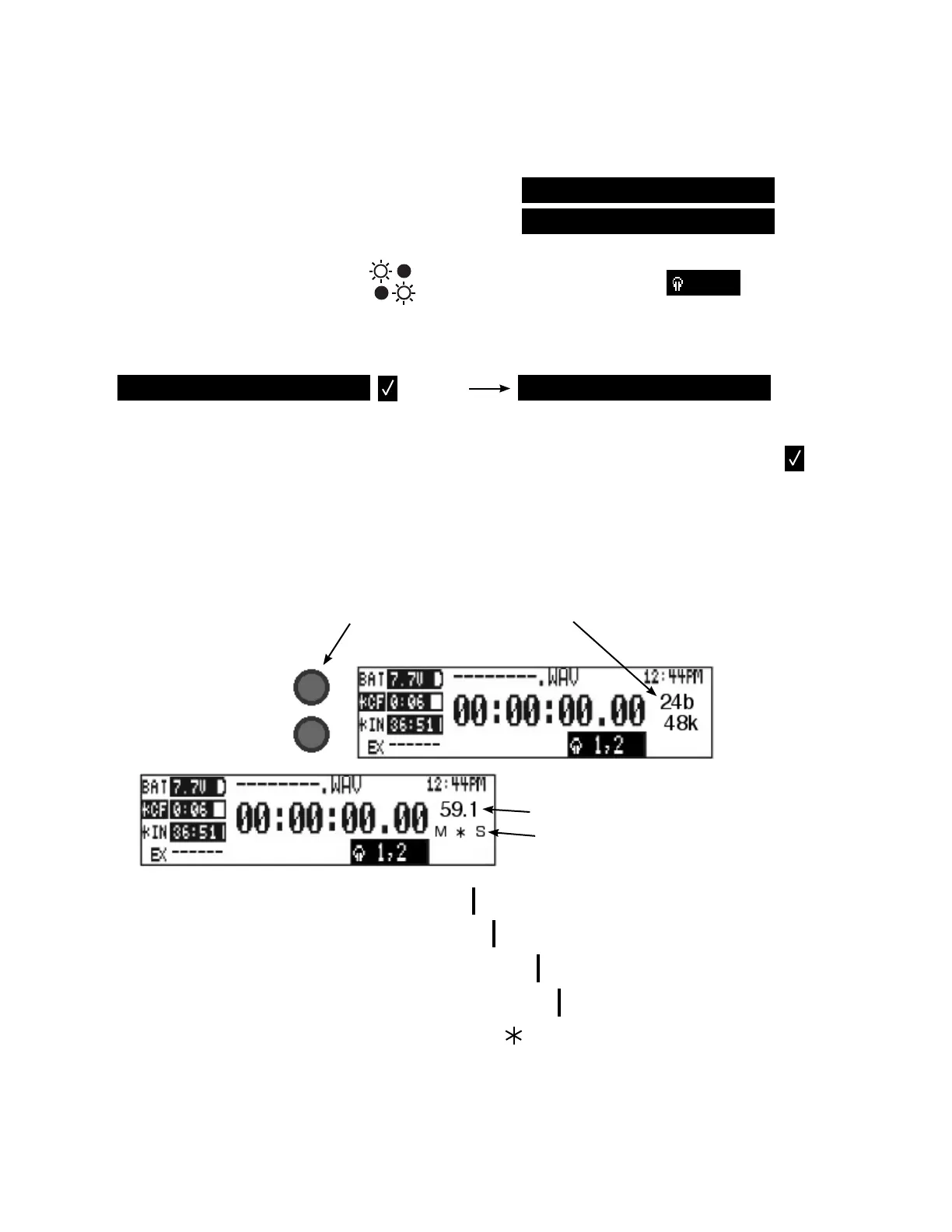
Input 1 and 2 Gain controls are now “linked.” This means that the Input 1 knob controls the
level of both Input 1 and Input 2, and the Input 2 knob controls the balance between them.
Selecting M/S activates the matrix circuit, sending normal L and R to your tracks.
Now when you adjust the Input Gain controls, the Bit-Depth / Sample Rate display...
...changes to
Gain (Input 1 control) and
Balance (Input 2 control).
A moving bar shows the balance.
M
M
M
M
M
S
S
S
S
S
all Mid
mostly Mid, some Side
mostly Side, some Mid
all Side
equal Mid and Side
At equal balance the bar turns into a star.
Start with the balance equal. Because of the high directionality of the Mid mic, you may want
to balance slightly (or not so slightly) in favor of the Side mic in order to achieve a natural-
sounding stereo. You are now ready to record.
5










 To Previous Page