Medium Range
Up to 50 m indoors
Short range Up to 10 m
indoors; for minimal
interference with other
DECT devices in dense
environments
Long range
Up to 100 m indoors
For more advanced configuration, install
“HeadSetup Pro” software on your computer:
www.sennheiser.com/cco/software
See User Guide for more information.
DIP 7: Ringing volume DIP 8: Ringtone
Volume Low
Volume Off
Volume High
7
Ringtone 2
Ringtone 3
Ringtone 1
83
DIP 3: Radio range
DIP 4: Call Answering
Fast Link
Audio link to base
station always open for
fast response times
Auto Hook
Automatic answering of
incoming calls when
headset undocked
Manual Hook
Manual answering of
calls via hook button
on headset
4
Better
Wideband calls,
Ultra-wideband music
Good
Narrowband calls,
Ultra-wideband music
Best
Super Wideband calls,
fullband music
DIP 5: Audio Quality
DIP 6: Audio limiter
EU/US limiter
Compliant with Directive
2003/10/EC
AU limiter
Compliant with Directive
AS/ACIF G616:2006
Off
6
5
Panasonic mode
Call control with
Panasonic phones
DHSG mode
Call control with
phones using DHSG
standard
Auto link
Wireless link between
headset and base
station established
automatically
MSH mode
Call control with
phones using MSH
standard
12
12
12
No assigned modes
12
DIP 1 & 2: Desk Phone Mode – BS 5 only
DIP 2: Voice prompts –
BS 3 only
Off
Voice prompts disabled,
tones used instead
On
Voice prompts
enabled
or
2
12
12
12
& &
Manual mode
Manual operation
of handset or
handset lifter
OptiPoint mode
Call control with
OptiPoint phones
12
12
CH 30
headset charger
MCH 7
multi-USB
power
source
optional
www.sennheiser.com/cco/support
For Instruction manual go to
?
For easy setup & configuration
install “Headsetup Pro” + “Headsetup”
for softphone call control go to
www.sennheiser.com/cco/software
For Compatibility guide go to
www.sennheiser.com/
telephone-headset-compatibility
Search devices...
BTD 800
Laptop Nick
3x
keyword: 0000
Pairing
successfull
<20 cm
Activate the Bluetooth
®
headset‘s
pairing mode: see headset User Guide
<20 cm
Bluetooth
Activate the mobile phone‘s
Bluetooth
®
function
Activate the dongle‘s
pairing mode
First time use:
Dongle switches to
pairing mode &
automatically
connects to your
Bluetooth device.
1A 2
34
1B
Search mode 1:
mobile phone
A
B
Search mode 2:
Bluetooth headset
standard quality
high quality
Music streaming
connecting
connected
2s2s
incoming call
on headset
outgoing/active call
0.2s 0.2s
pairing mode
(Search mode 1 or 2)
successful
LED flashes
Meaning
3x
failed
3x
Microphone muted
3s 3s
1s1s 1s1s
0.5s 0.5s 0.5s 0.5s
”Pairing“
I
II
III
optional
BTD 800 USB dongle not included in SDW 5013/SDW 5015
UI 10 BL
Busy light
2.5 mm jack plug
Manual Hook:
Manual answering
of calls via headset‘s
hook button.
1234 5678
Fast Link:
Audio link to base
station always open for
fast response times.
1234 5678
Auto Hook:
Automatic answering
of incoming calls
when the headset is
undocked.
1234 5678
Reconnect Bluetooth
Disconnect Bluetooth
Call
Answering
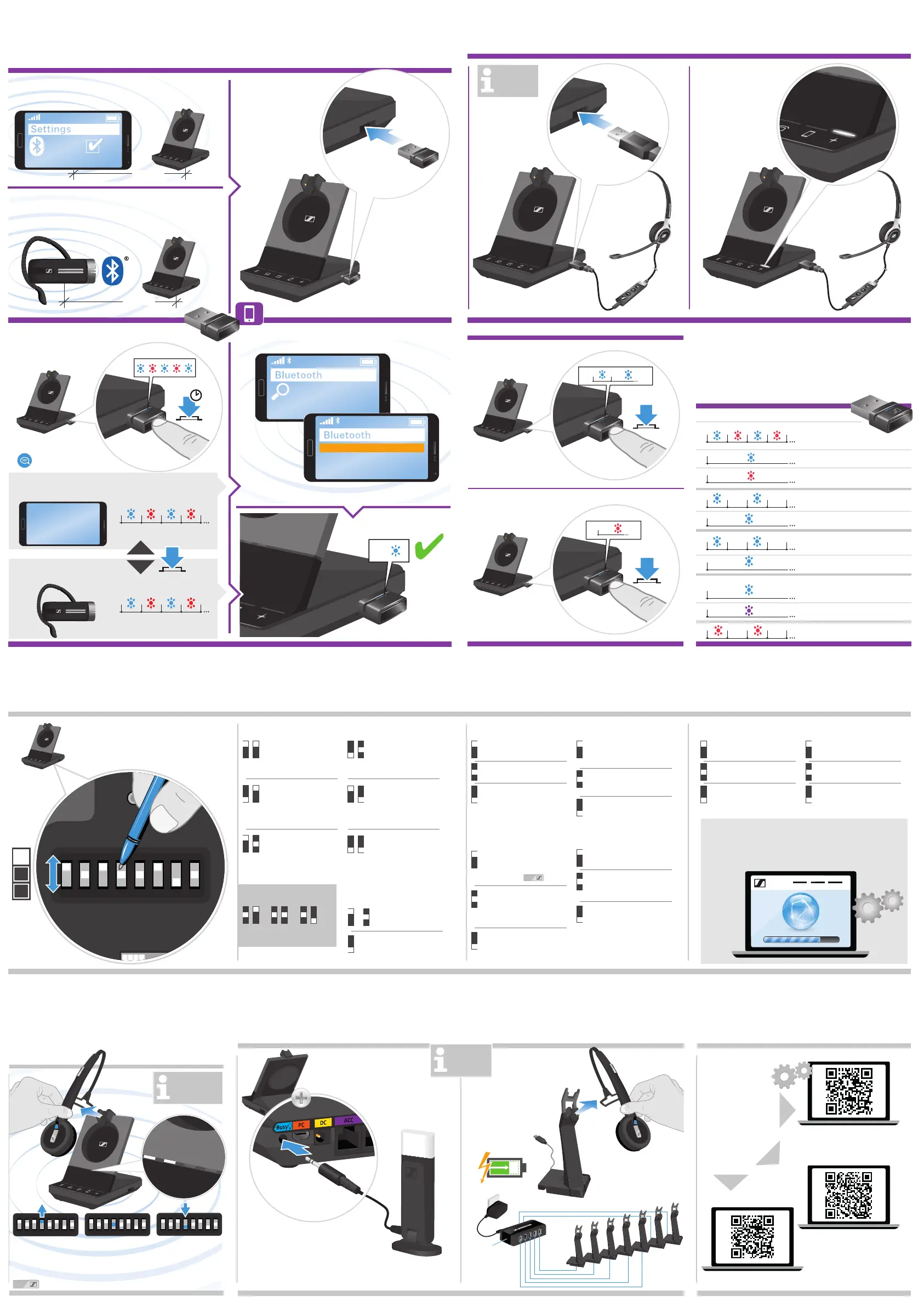
Adjusting the headset system using the DIP switches | Headset-System mit den DIP-Schaltern anpassen | Régler le micro-casque en utilisant le commutateur DIP | Regolazione del sistema delle cuffie utilizzando gli interruttori DIP |
Ajuste del sistema de auricular utilizando los interruptores DIP | Ajustar o sistema do headset usando os interruptores DIP | Headsetsysteem aanpassen d.m.v. DIP-schakelaars | Ρύθμιση του συστήματος ακουστικών με τους διακόπτες DIP |
Justering af headsetsystemet ved hjælp af DIP-kontakter | Justera headsetsystemet med hjälp av DIP-switchar | Headset-järjestelmän säätäminen DIP-kytkimillä | Regulacja systemu słuchawek za pomocą przełączników DIP |
Настройка системы гарнитуры с помощью переключателей DIP | DIP anahtarları üzerinden kulaklık sistemini ayarlama | DIPスイッチを使用するヘッドセットシステムの調整
Detailed information | Ausführliche Informationen |
Informations détaillées | Informazioni dettagliate |
Información detallada | Informação detalhada |
Gedetailleerde informatie | Λεπτομερείς πληροφορίες |
Detaljeret information | Detaljerad information |
Yksityiskohtaiset tiedot | Szczegółowe informacje |
Подробная информация | Ayrıntılı bilgi | 詳細情報
Automatic link establishment | Automatischer Verbindungsaufbau |
Établissement de liaison automatique | Creazione automatica del
collegamento | Establecimiento de conexión automática |
Estabelecimento de ligação automática | Automatische koppeling |
Αυτόματη δημιουργία σύνδεσης | Automatisk oprettelse af forbindelse |
Automatisk länketablering | Automaattinen yhteyden muodostaminen |
Automatyczne tworzenie połączenia | Автоматическое установление и
поддержание радиосвязи | Otomatik bağlantı kurulumu |
自動リンク確立
Charging several headsets | Mehrere Headsets laden |
Charger plusieurs micro-casques | Ricarica di più cuffie |
Carga de varios auriculares | Carregar vários headsets |
Meerdere headsets opladen | Φόρτιση διάφορων ακουστικών |
Opladning af flere headset | Ladda flera headset | Usean headsetin
lataaminen | Ładowanie kilku słuchawek | Зарядка нескольких
гарнитур | Birden çok kulaklığı şarj etme | 複数のヘッドセットの充電
Connecting a mobile phone or Bluetooth headset | Mobiltelefon oder Bluetooth-Headset verbinden |
Connecter un téléphone mobile ou un micro-casque Bluetooth | Connessione a un telefono cellulare o a un paio di cuffie Bluetooth |
Conexión de un teléfono móvil o un auricular Bluetooth | Ligar a um telemóvel ou headset Bluetooth | Een mobiele telefoon of Bluetooth-headset
aansluiten | Σύνδεση
ενός κινητού τηλεφώνου ή ακουστικού Bluetooth | Tilslutning af en mobiltelefon eller et Bluetooth-headset |
Ansluta en mobiltelefon eller ett Bluetooth-headset | Matkapuhelimen tai Bluetooth-headsetin kytkeminen |
Podłączanie telefonu komórkowego lub zestawu słuchawkowego Bluetooth | Подключение мобильного телефона или Bluetooth-гарнитуры |
Bir cep telefonu veya Bluetooth kulaklığı bağlama | 携帯電話またはBluetooth対応ヘッドセットの接続
Connecting a USB headset | USB-Headset anschließen | Connecter un micro-casque USB | Connessione a un paio di cuffie USB |
Conexión de un altavoz USB | Ligar um headset USB | Een USB-headset aansluiten | Σύνδεση ακουστικών USB |
Tilslutning af USB-headset | Ansluta ett USB-headset | USB-headsetin kytkeminen | Podłączanie zestawu słuchawkowego USB |
Подключение USB-гарнитуры | USB kulaklığı bağlama | USB ヘッドセットの接続
Overview of the LED indications | Übersicht der LED-Anzeigen |
Aperçu des indications LED | Panoramica degli indicatori LED |
Resumen de los indicadores LED | Vista geral das indicações LED |
Overzicht van de indicatielampjes | Επισκόπηση των ενδείξεων LED |
Oversigt over indikatorlampens signaler | Översikt av LED-belysningen |
LED-merkkivalojen yleiskatsaus | Przegląd stanów diody LED |
Обзор светодиодных индикаторов | LED göstergelere genel bakış |
LED表示の概要
Connecting the Busy light | Busy light anschließen |
Connecter la Busy light | Connessione alla Busy light |
Conexión de Busy light | Ligar o Busy light | De Busy light aansluiten |
Σύνδεση του Busy light | Tilslutning af Busy light | Ansluta Busy light |
Busy lightin kytkeminen | Podłączanie diody zajętości |
Подключение Busy light | Meşgul ışığı birimini bağlama |
Busy light の接続
C
M
Y
CM
MY
CY
CMY
K


 To Previous Page
 Loading...