INSTALLATION
• Position the modulator as high as possible (eye-level). Make sure
that the diodes point at the receivers.
• Do not cover the diodes! Do not obstruct the path of the light
between the modulator and the receiver.
MAINS CONNECTION
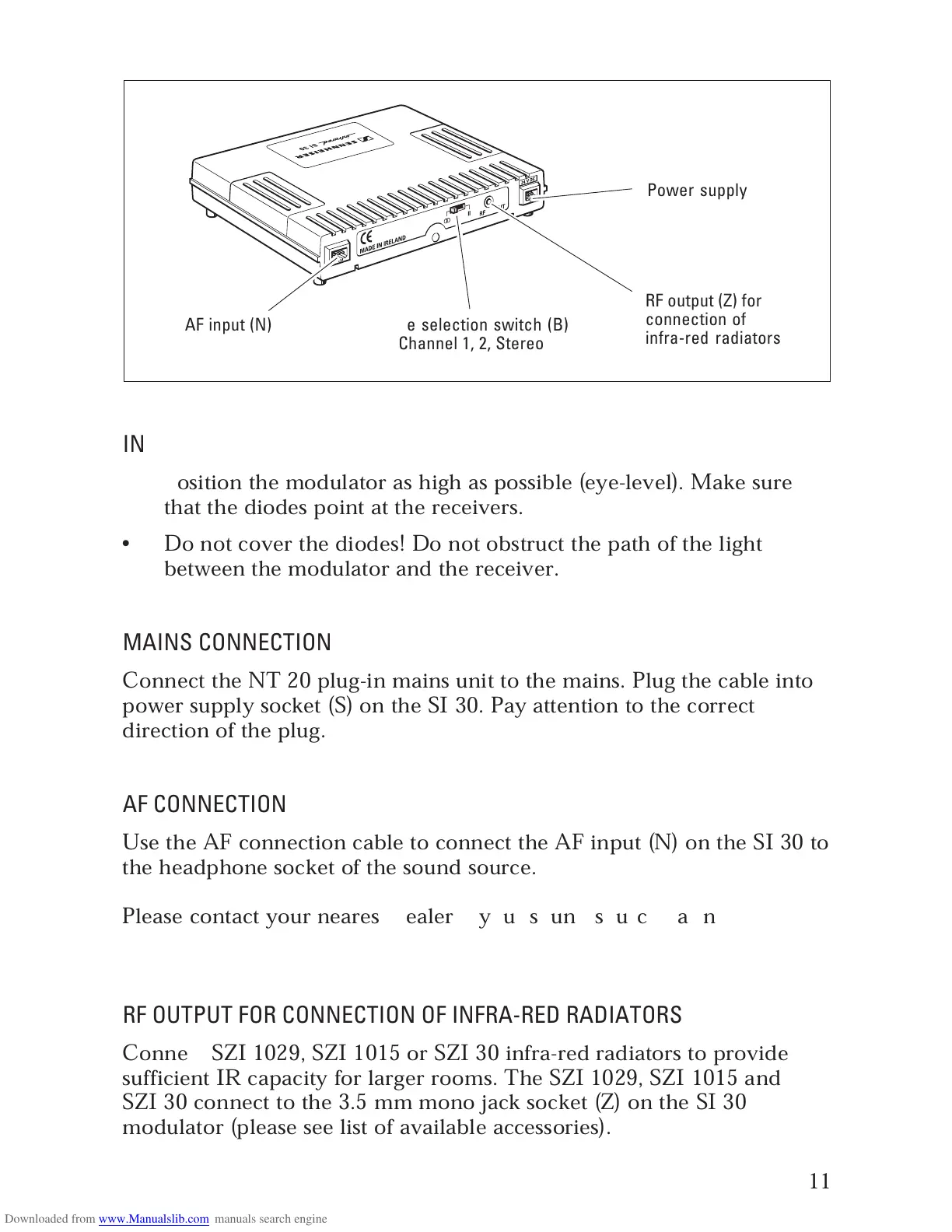
Connect the NT 20 plug-in mains unit to the mains. Plug the cable into
power supply socket (S) on the SI 30. Pay attention to the correct
direction of the plug.
AF CONNECTION
Use the AF connection cable to connect the AF input (N) on the SI 30 to
the headphone socket of the sound source.
Please contact your nearest dealer if your sound source has no
3.5 mm or 6.3 mm socket.
RF OUTPUT FOR CONNECTION OF INFRA-RED RADIATORS
Connect SZI 1029, SZI 1015 or SZI 30 infra-red radiators to provide
sufficient IR capacity for larger rooms. The SZI 1029, SZI 1015 and
SZI 30 connect to the 3.5 mm mono jack socket (Z) on the SI 30
modulator (please see list of available accessories).
Power supply socket
(S)
Mode selection switch (B)
Channel 1, 2, Stereo
RF output (Z) for
connection of
infra-red radiators
AF input (N)



 To Next Page