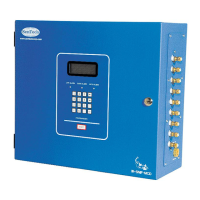
This document describes the SENTECH iSOBER 30 Breathalyzer, a device designed to measure alcohol in human breath using Fuel Cell Sensor Technology.
Function Description
The iSOBER 30 is a breath alcohol tester that measures Blood Alcohol Concentration (BAC) in human breath. It is designed for ease of operation, portability, and high accuracy, offering various functions for a comprehensive user experience. The device displays results in %BAC with three decimal points (e.g., 0.010%BAC).
Important Technical Specifications
- Accuracy: ±5% at 0.050%BAC.
- Indication of B.A.C: 0.000 to 0.400%BAC by FND Display.
- Warm-up time: 3 seconds to 4 minutes.
- Response time: Within 10 seconds at 0.100%BAC.
- Mouthpiece: Provided individual packed mouthpiece.
- Power supply: Two 1.5V "AAA" Alkaline batteries only.
- Weight: 2.33 oz (Including batteries).
- Dimensions (Inches): 3.94(H) X 1.73(W) X 0.59(T).
- Temperature conditions: Operation 41°F to 104°F / Storage 32°F to 122°F.
- Calibration interval: 12 months or 1,000 tests (whichever comes first).
Usage Features
The iSOBER 30 is operated with a single power button.
- Power On: Press the power button for 2 seconds. The battery level (Full, Middle, Low) will be displayed.
- Warm-up: Wait until "0" appears on the display, indicating the device is warming up.
- Breath Sampling: Once "0" is displayed, blow through the mouthpiece into the unit for 4 seconds until a "click-crack" sound is heard.
- Result Display: The result is displayed for 10 seconds, after which the device automatically turns off.
- Continuous Testing: To test continuously, press the power button once while the result is still displaying.
- Passive Mode: If the button is pressed during breath sampling, the device will show "P" (PASS) or "F" (FAIL) based on a pre-set limit of 0.02%BAC.
Warning Displays:
- "Flo": Breath sample was not strong enough. Power on again and ensure strong, steady breath during sampling.
- "bAt": Low battery power. Replace batteries.
- "CAL": Unit is in the grace period for calibration. Contact the local distributor.
- "E.Lo E.H": Out of operating temperature range. Follow operating temperature conditions.
- "Err": Required calibration period has passed. Contact the local distributor.
- "Er.2": Problem with the sensor. Contact the local distributor.
The device stores various information related to test counting and time. This includes warnings for remaining counts and dates until the next calibration.
- Entering Menu Mode: Hold the power button for 5 seconds. The latest test result will be shown briefly, followed by three selectable menus: "0.L r", "1.Ct", and "2.Cd".
- Navigating Menus: Press the power button once to move between the three menus.
- Confirming Menu: Press and hold the power button for 3 seconds to confirm the target menu.
- Exiting Menu Mode: Select "ESC" or press and hold the power button for 3 seconds while toggling through the display.
- Recall Last 10 Test Results ("0.L r"): Displays the last 10 test results with time records. For example, "L.01 03.H 020" means the latest result was 0.020%BAC 3 hours ago. "L.10 02.d 017" means the 10th latest result was 0.017%BAC 2 days ago.
- Recall 3 Types of Test Counting ("1.Ct"):
- "Cn.C 005. 162": "Unit's tested 5,162 times after calibration" (dot indicates thousands).
- "Cn.t 005. 162": "Unit's tested 5,162 times in total".
- "Cn.A 005. 162": "Unit's detected positive alcohol 5,162 times in total".
- Recall Remaining Calibration Information ("2.Cd"):
- "CAL in 53DAY or 991tEST": "Unit will be required calibration service in 53 days or 991 tests" (whichever comes first).
Maintenance Features
- Calibration: To maintain accuracy, professional calibration of the iSOBER 30 must be performed every 1000 tests or at least once a year, whichever comes first. The device needs to be mailed to Sentech USA INC for recalibration, with details and related fees available upon contact.
- Battery Replacement: When "bAt" is displayed, replace the two AAA Alkaline batteries.
- Cleaning: Do not blow smoke, saliva, or other contaminants into the mouthpiece, as this can damage the sensor.
Warnings for Use:
- Wait at least 20 minutes after eating or drinking before testing to avoid interference from mouth alcohol or saliva.
- Avoid testing in high wind or enclosed spaces, as poor ventilation can prolong warm-up times.
- Do NOT use the iSOBER 30 as a tool to drink and drive.
- Keep the device out of extreme temperatures and out of reach of children.
- A low BAC reading does not guarantee that the test subject's physical or mental performance is unimpaired.
- The device is a screening product and cannot precisely determine blood alcohol concentration.
Warranty:
Sentech USA INC provides a ONE (1) YEAR limited warranty from the date of retail purchase against defects in materials and workmanship under normal use. The warranty covers repair, exchange, or refund at Sentech USA INC's option. The warranty is limited to the original end-user purchaser and is not transferable.
Disclaimers:
Sentech USA INC disclaims warranties regarding the product's ability to determine mental or physical functioning or judgment impairment due to alcohol. It disclaims liability for direct, indirect, incidental, special, or consequential damages. Use of the product is at the test subject's or user's own risk. The warranty does not cover consequences caused by accident, abuse, tampering, misuse, external causes, operation outside intended uses, unauthorized service, or modifications.

 Need help?
 General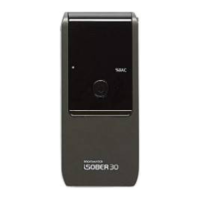

 To Next Page