16
4.6 Pulse Oximeter
About Pulse Oximeter
Warnings and Cautionary Advice
Before using this function, please read the Section 4.1.
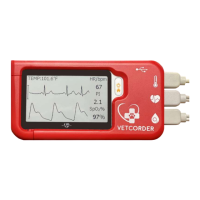
The Pulse Oximeter measures the amount of oxygen in the blood,
pulse rate and perfusion index. The SpO2 sensor works by
transmitting red and infrared light through the skin to the small
blood vessels or capillaries, reflecting the amount of oxygen in the
blood and displaying the measurement on the screen. The oxygen
saturation (SpO2) is measured and displayed as a percentage of
full capacity. Pulse rate (PR) and perfusion index (PI) will also be
measured and displayed. The Perfusion Index is a relative
assessment of the pulse strength at the monitoring site.
Measuring
1. Connect the external SpO2 sensor to the Vetcorder Pro
Monitor.
2. Attach the external SpO2 sensor to your Pet.
3. If the device is in Calendar Screen, press the Home button.
4. Tap the <Pulse Oximeter> icon.
5. The display will then show your PLETH waveform, SpO2
and pulse rate.
The device will monitor continuously, however no data will
be saved until you press the button.
6. Press the button to start collecting your SpO2 data. The
countdown bar moves from left to right.
7. When the bar is filled, the device will analyze your data, and
show the measurement result.
17
Please refer to Section 2.5 to understand the result screen.
4.7 Internal Temperature
About temperature probe
Warnings and Cautionary Advice
The thermometer is only designed for the measuring core
temperature via the esophagus or the rectum. It is
recommended to use the probe in one area on the animal and
mark probe exclusively for use in that area.
Before each use, check that the probe is intact. If it is
damaged, do not use, please contact your distributor or
Sentier.
Holding the device in your hand or carrying it in a pocket
can cause the device to warm up, which may result in
incorrect readings.
Monitor will measure temperature between 50 °F to 122 °F (10 °C
to 50 °C)
Influences on temperature include but not limited to
Individual metabolism
Age
Environmental temperature
Time of day
Activities
Taking Temperature Measurement
To start a temperature measurement,
18
If the device is in Calendar Screen, press the Home button.
In the Main Screen, select <Thermometer>.
Insert probe
In Temperature Mode readings will display as seen below.
The Temperature will display in the upper left corner of the
screen in Monitor Vitals.
Please refer to Section 2.5 to understand the result screen.
4.8 Monitor Vitals
About Monitor Vitals
Warnings and Cautionary Advice
Before using this function, please read the Section 4.1.
The Monitor Vitals feature on the Vetcorder allows for continuous
monitoring of ECG, SpO2, Temperature and Heart Rate. An
audible “beep” can be heard whenever a heart rate is detected by
the ECG. Up to 12 hours of battery life means you can monitor
several patients from intake through recovery before recharging.
Continuous monitoring via Bluetooth with our mobile app (called
Monitor Vitals) will allow you to monitor your patient from a
distance while performing other tasks in the clinic. Please
download Monitor Vitals on your Apple App or Google Play store.
To begin Monitoring Vitals,
Connect the external SpO2, ECG, and Internal Temperature
low.
2. The device might be
and try again.
2. Please contact
exerted on the
electrode(s) is not
stable or too much.
2. Leg or body may be
moving.
electrode(s), hold the
device stably and
gently.
2. Try to keep animal
perfectly still and test
measure again. If the
error persists, contact
27
9. Accessories
Warnings and Cautionary Advice
Use accessories specified in this chapter. Using other accessories
may cause damage to the device or not meet the claimed
specifications.
Small Animal SPO2 Lingual Sensor (2 ft)
Small Animal SPO2 Lingual Clip
USB Charging Cable, Micro D
Adaptor Plug Type I (AUS/NZ)
Large Animal Accessory Kit
Zumaya Exotic Electrode Kit (pair)
EC Directive
MDD, 93/42/EEC
R&TTE, 1999/5/EC
ROHS 2.0, 2011/65/EU
Degree protection against electrical
shock
Type BF
Item Operating Storage
Temperature 5 to 45°C -25 to 70°C
Relative humidity (noncondensing) 10% to 95% 10% to 95%
Barometric 700 to 1060 hPa 700 to 1060 hPa
Degree of dust & water resistance IP22
Drop test 1.0 m
Size 88×56×13 mm
Packing size 178*123*75 mm
Weight Less than 80 g (main unit)
Display Vetcorder: 2.7” touch screen, HD
Connector Micro D connector
Wireless connectivity Built-in Bluetooth dual mode, support 4.0 BLE
Charge adapter input AC100-240V 50/60Hz
Charge adapter output DC5V 1.0A
Battery type Rechargeable lithium-polymer battery 560 mAh
Battery run time Only daily check: > 1000 times
Continuous sleep monitoring: > 12 hours
Pure standby calendar mode: > 3 months
Charge time Less than 2 hours to 90%
Lead type
Integrated ECG electrodes
External ECG cable and electrodes
Lead set Lead I, lead II
Measurement mode Episode, continuous
Sampling rate 500 Hz
Sampling accuracy 16 bit
Display Gain 1.25 mm/mV, 2.5 mm/mV, 5 mm/mV


 To Next Page
 Loading...