1
1. The Basics
This manual contains the instructions necessary to operate the
product safely and in accordance with its function and intended
use. Observance of this manual is a prerequisite for proper
product performance and correct operation and ensures user and
operator safety.
1.1 Safety
Warnings and Cautionary Advice
Before using the device, please ensure that you have read
this manual thoroughly and fully understand corresponding
precautions and risks.
The data and results displayed on the device are for
reference only and cannot be directly used for diagnostic
interpretation or treatment.
Do not use this device with a defibrillator.
Do not use this device during MRI examination.
Do not use the device in a combustible environment (i.e.,
oxygen-enriched environment).
Never submerge the device in water or other liquids. Do not
clean the device with acetone or other volatile solutions.
Do not drop this device or subject it to strong impact.
Do not place this device in pressure vessels or gas
sterilization device.
Do not dismantle the device, as this could cause damage or
malfunctions or impede the operation of the device.
Do not allow the electrodes to contact other conductive parts
(including the ground).
Do not store the device in the following locations: locations
in which the device is exposed to direct sunlight, high
temperatures or levels of moisture, or heavy contamination;
locations near to sources of water or fire; or locations that
are subject to strong electromagnetic influences.
2
2. Introduction
2.1 Intended Use
The Vetcorder Pro Multi-Parameter Monitor is intended to be used
for the measuring, displaying, reviewing, and storing of multiple
physiological parameters including ECG, pulse oxygen saturation
(SpO2), perfusion index (PI), pulse rate and internal temperature.
It is not intended for use on humans.
2.2
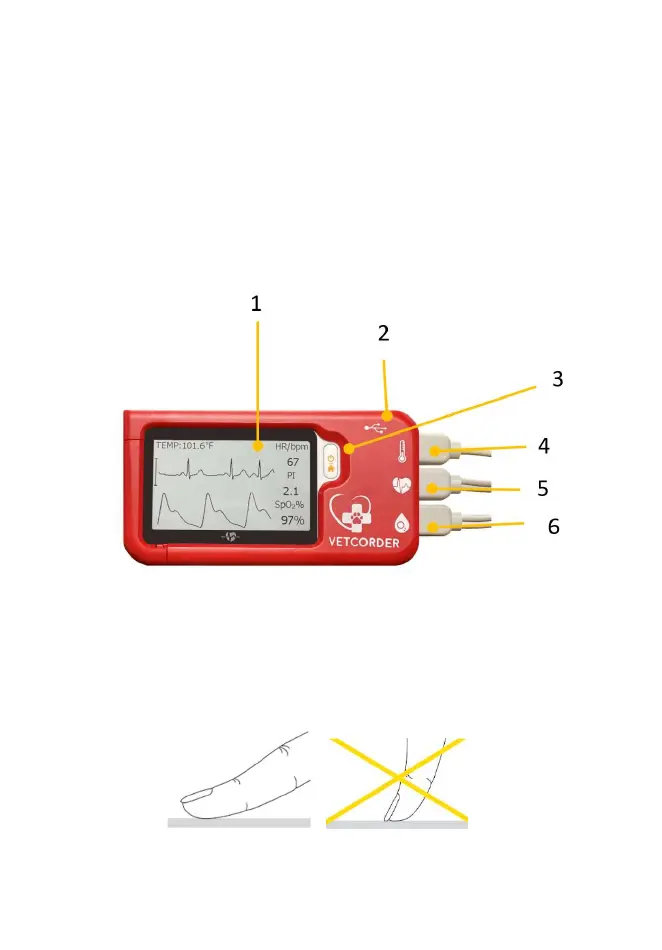
1. Touch Screen
Use the pad of your finger to tap or swipe the touch screen.
Do not use your fingernail or any other object to tap the
screen.
2. Charging Connector Port
3. Home, Power On/Off
3
When the monitor is off, press this button to power it
on.
When the monitor is on, press and hold it for 2
seconds to turn it off.
During operation, pressing this button will switch to
Main Screen, or Calendar Screen, or return to Home
Screen.
4. Temperature Probe Connector Port
5. ECG Connector Port
6. SpO2 Connector Port
7. Speaker
8. Serial Number
2.3 Main Screen
The Main Screen is shown as below. Swiping your finger from
right to left can switch to the second page, and vice versa.
Pressing a button in the Main Screen will start a measurement,
activate a function, or open corresponding menu.


 To Next Page
 Loading...