STEP 2: TURN ON THE UNIT AND ALLOW TO WARM UP
■
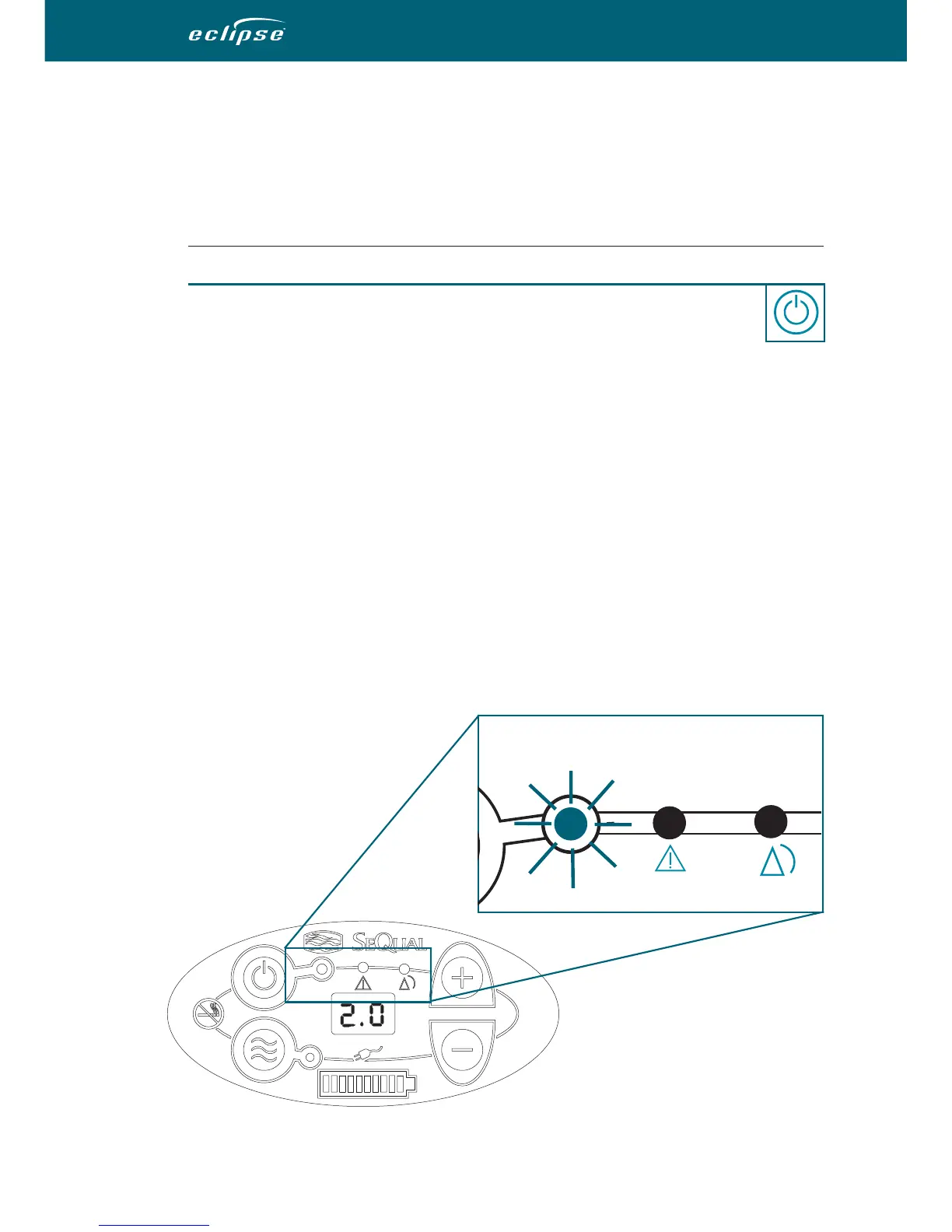
Press and hold the “ON/OFF” Button for one (1) second to turn ON
your ECLIPSE. A brief self-test will happen. Verify that all the indicators
are lit and a 3-second buzzer sounds, indicating the system is in
working order.
■
Warm-up Period
• Oxygen Monitoring - The ECLIPSE Oxygen System has an oxygen
monitoring system with a yellow (alert) and red (alarm) visual indicator and
buzzer. The buzzer will activate in the event of an internal malfunction or power
outage (external power loss with no Power Cartridge installed). The red,
yellow, and green (all OK) indicators will initially light up and then the red
and yellow indicators sequentially go out when the oxygen purity is within
specification.
• After initially turning ON the unit, allow up to five (5) minutes for the unit
to reach its specified performance. The control panel will indicate when
the unit is done warming up. When the green ON indicator is lit, the system
is ready for use.
Operating Instructions (continued)
26
|
ECLIPSE
TM
Model 1000 User Manual
Red light
(alarm)
Yellow light
(alert)
Green light
(ready)


 To Next Page