2
Setup
Overview
Serato Software
The Numark NS4FX is a “Serato DJ Lite hardware unlocked” device, meaning it works with Serato DJ Lite
out of the box.
It is also a “paid upgrade to Serato DJ Pro device”, meaning it requires the purchase & activation of a Serato
DJ Pro license, in order to be used with Serato DJ Pro.
You can also try Serato DJ Pro, before making a purchase.
Click here to learn about buying or activating Serato DJ Pro
or
Click here to learn about trying Serato DJ Pro
Please ensure you have the latest version of Serato DJ Pro installed:
Click here to download Serato DJ Pro
Driver Software
The Numark NS4FX does not requires manufacturer specic drivers on either macOS or Windows operating
systems, simply connect your NS4FX with a USB cable to your computer, and launch the latest version of
Serato DJ Pro.
# Numark NS4FX
CONTROL
FUNCTION
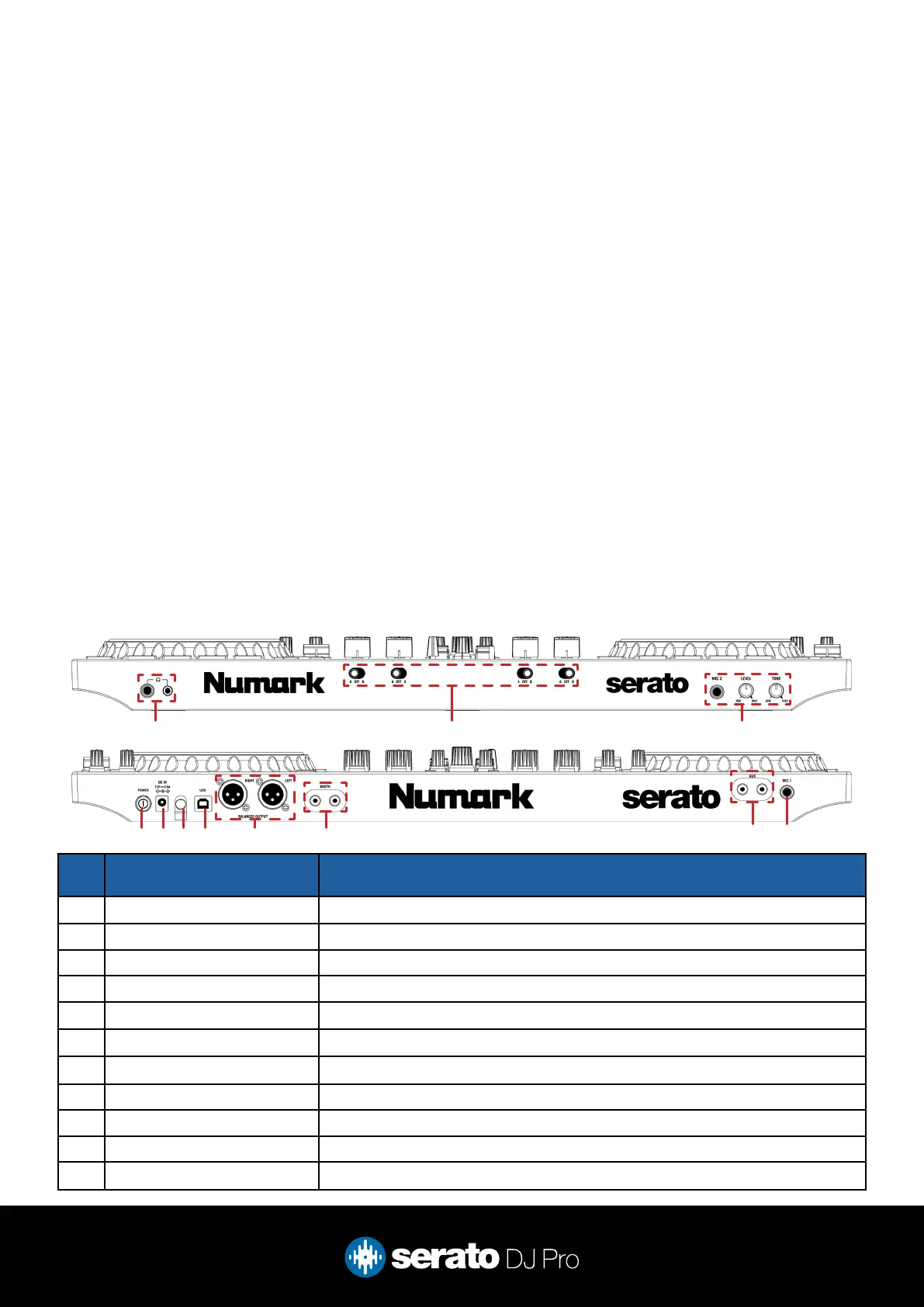
1 1/8” & 1/4” HEADPHONE JACK Connect your headphones via 1/8” or 1/4” outputs
2 A-OFF-B (section) Assign crossfader, per channel, to deck A, OFF, or B
3 MIC2/LEVEL/TONE Connect microphone via 1/4” / TRS jack / Adjust MIC2 level / Adjust MIC2 tone
4 POWER Press to turn device power on/off
5 DC IN Connect power adapter
6 KENSINGTON LOCK Secure device
7 USB Connect USB cable to PC
8 BALANCED OUTPUT Connect (main) output via XLR
9 BOOTH Connect (booth) output via RCA
10 AUX Connect (auxilliary) input via RCA
11 MIC1 Connect microphone via 1/4” / TRS jack
1
4 5 6 7 8 9
10 11
2 3



 To Next Page