
 Need help?
Do you have a question about the Serato Numark and is the answer not in the manual?
Details on Serato DJ Lite and DJ Pro compatibility and installation.
Guidance on acquiring and installing necessary drivers for Windows.
Explains the 4 performance pads and their modes: CUE, LOOP, SAMPLER, EFFECT.
Details on using DJ-FX, powered by iZotope, and Serato DJ Lite's Multi FX Mode.
Describes the reactive Party Ball lights and their various modes and software control.
Instructions on accessing tooltips, tutorials, and the Serato DJ Lite knowledge base.
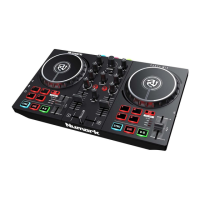
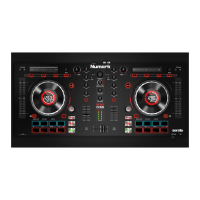
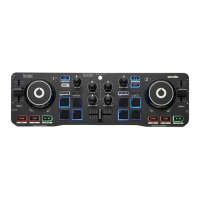
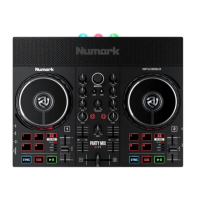
The Numark Party Mix Live is a compact DJ controller designed for aspiring DJs and casual users, offering a straightforward and engaging experience for mixing music. It functions as a "Serato DJ Lite hardware unlocked" device, meaning it integrates seamlessly with Serato DJ Lite software right out of the box, providing immediate access to its core features without additional setup. For those looking to expand their capabilities, the device also supports Serato DJ Pro as a paid upgrade, offering a more advanced suite of tools and functionalities. Users can even trial Serato DJ Pro for up to 14 days to explore its professional-grade features before committing to a purchase.
Getting started with the Party Mix Live is designed to be user-friendly. The first step involves ensuring the latest version of Serato DJ Lite is installed on your computer. For macOS users, the device is plug-and-play, requiring no specific manufacturer drivers. Windows users, however, will need to install the necessary drivers, which can be found on the Numark support page. Once the software and any required drivers are in place, simply connect the Party Mix Live to your computer via USB, and launch Serato DJ Lite to begin mixing.
The controller features a comprehensive layout that mirrors the essential elements of a traditional DJ setup, scaled down for portability and ease of use. At its heart are two jog wheels, allowing for precise control over track playback, scratching, and pitch bending within Serato DJ's vinyl mode. Each deck is equipped with a tempo slider for adjusting the speed of the track, and a play/pause button for controlling playback.
Audio mixing is managed through a central mixer section. This includes channel faders for adjusting the volume of each deck, and a crossfader for smoothly transitioning between tracks on channel 1 and channel 2. For sound shaping, each channel has EQ/Gain controls (treble and bass) and a filter knob, which acts as a low & high pass combo filter, allowing users to sculpt the sound of their tracks. The master output level is controlled by a dedicated main knob.
The Party Mix Live provides flexible audio monitoring options. A headphone output (3.5mm or 1/8") allows DJs to cue up tracks privately before playing them live. The headphone level knob adjusts the output volume for monitoring. For public playback, the device offers a main output (3.5mm or 1/8") to connect to external speakers. Additionally, the controller features built-in speakers, which can be toggled on or off using the "Speakers On/Off" button, making it suitable for impromptu performances or practice sessions without needing external audio equipment.
Browsing and loading tracks are made intuitive with the dedicated browse knob. This knob allows users to scroll through their music library and crate selections within Serato DJ Lite. Pressing the browse knob toggles between track and crate selection, streamlining the process of finding the next song. Once a track is highlighted, the "Load 1/2" buttons are used to load it onto the respective deck. A double press of these buttons triggers an "Instant Double," quickly loading the same track onto the other deck, a useful feature for quick transitions or effects.
A key feature for creative mixing is the set of four performance pads located on each deck. These pads are highly versatile and can operate in four different modes, cycled through by repeatedly pressing the "PAD MODE" button. An LED indicator illuminates to show the currently active mode:
The DJ-FX in Serato DJ Lite are powered by iZotope™, offering high-quality audio effects. The "FX" button opens the FX panel in the software. In Multi FX Mode, users can select up to three effects per FX bank and adjust a single parameter, the FX Depth, providing a layer of sonic manipulation. The pads in effect mode can be used to hold and release effects for Slot 1, 2, or 3, or to cycle the beats multiplier, offering hands-on control over the effects.
Adding a visual dimension to performances, the Numark Party Mix Live is equipped with "Party Ball" lights. These lights are reactive to the Serato software and can be cycled through different modes by repeatedly pressing the dedicated button on the left side of the unit. In compatible modes, the lights respond to the RGB settings from Serato software. Additionally, three further programs can be selected via the Setup --> Mixer --> Lighting Control section in Serato DJ Lite:
Numark and Serato provide ample support to help users get the most out of their Party Mix Live controller. Within Serato DJ Lite, several helpful resources are easily accessible:
The Numark Party Mix Live is designed to be a comprehensive yet accessible DJ controller, combining essential mixing tools with fun, reactive lighting and robust software integration, making it an excellent choice for anyone looking to dive into the world of DJing.
 General
| Software | Serato DJ Lite |
|---|---|
| Type | DJ Controller |
| MIDI | Yes |
| Pitch Control | Yes |
| Jog Wheels | Yes |
| Crossfader | Yes |
| Compatibility | Mac |
| Outputs | RCA |

 To Next Page