22
Operation: Control panel
Operation
Control panel
Risk of electric shock
An electric shock can cause severe burning and in most extreme cases shock to the brain,
strain to the heart, injury to other organs or result in death.
• Switch o the power on the main switch, while you open the dehumidier.
• Remember also to switch o the power, while you close the dehumidier.
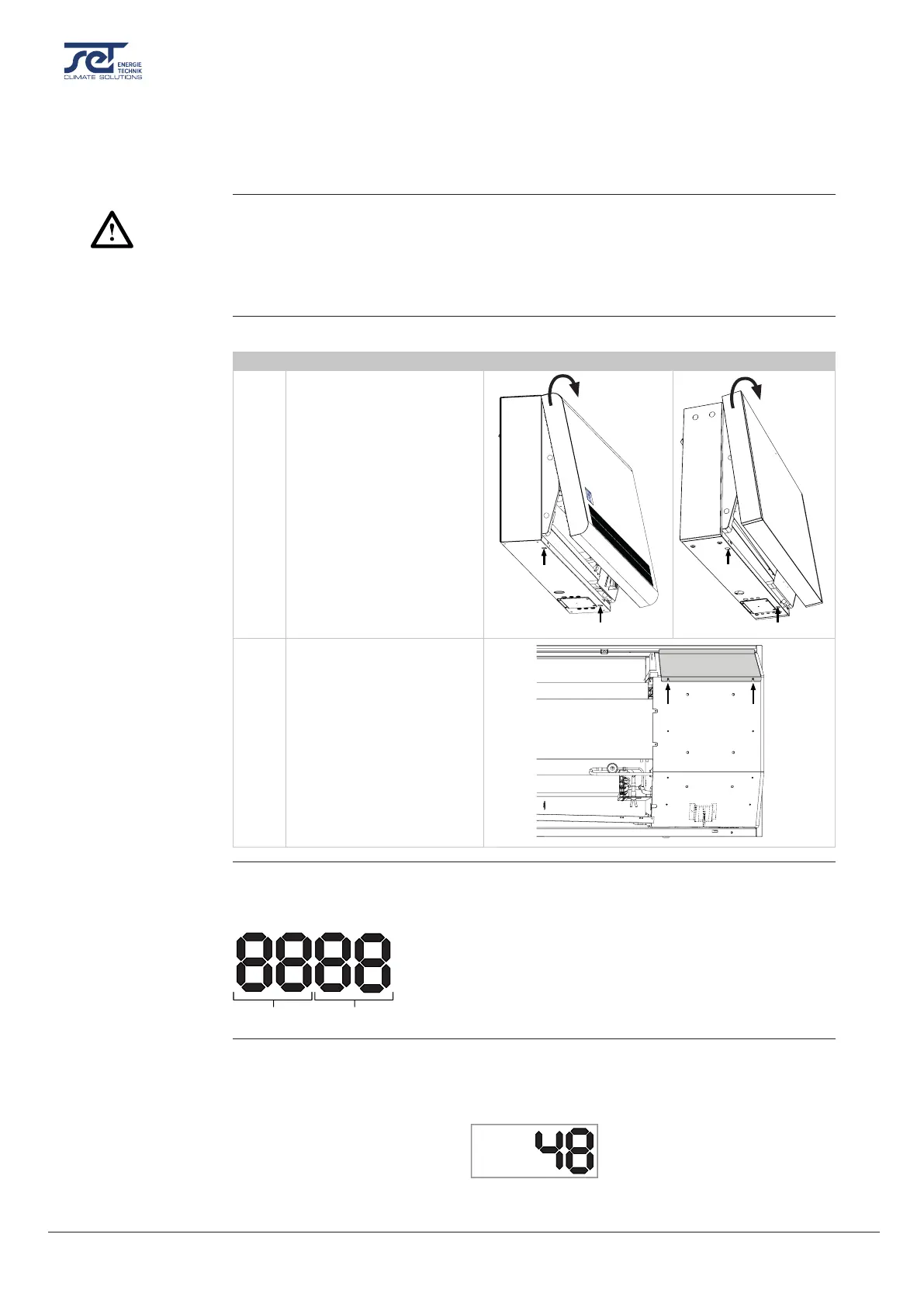
Follow the steps below in order to access the control panel.
Step Description Illustration
1 Open the dehumidier:
a) Loosen the two screws
at the bottom of the
unit. Check that the
locks release the front
cover.
b) Pull upwards and re-
move the front cover.
a
b
2 Loosen the two screws and
remove the upper plate (cov-
ering the control panel).
4 digit Display divided into 2 sections: The rst 2 digits show the code and the last 2 show the
value of the code.
Code
Value
By default the display will show the relative humidity RH %. This reading can be from the
external humidity/temperature sensor when available, if not the RH will be from the internal
humidity sensor.
Example
DANGER
Accessing the
control panel
a
b
Display
Default view



 To Next Page