
 Need help?
Do you have a question about the Sevio Basic and is the answer not in the manual?
Web application for configuring and viewing Sevio system device status.
Procedure to enable Local Control Stations to access the automation network (LAN).
Step-by-step guide to configure a VPN connection on Windows 10 for local access.
Step-by-step guide to configure a VPN connection on Windows 7 for local access.
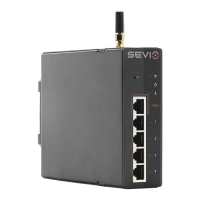
The Sevio Router is a device designed to provide secure local access to automation devices and data processing/IT systems, aligning with the Industry 4.0 model. Its core functionality revolves around an internal firewall that ensures network isolation and secure communication.
The Sevio Router acts as a gateway, facilitating secure local communication between automation devices and IT systems. It achieves this by implementing an internal firewall that provides network isolation, preventing direct exposure of automation networks to external threats. This firewall is a fundamental feature, offering several advantages:
The "Secure Local Access" feature, enabled by the Sevio Router, allows for the configuration of one or more exclusive and protected accesses from the WAN (Wide Area Network) to the automation devices. This is achieved while preserving the firewall's isolation, thereby avoiding complex configurations like port forwarding, which can introduce security vulnerabilities.
The device integrates with the Sevio Portal, a web application used for configuring and monitoring Sevio system devices within a "Realm." Through the portal, users can enable the Secure Local Access feature, set up static IP addresses for the Sevio Router on the WAN network, and configure Local Control Stations.
The Sevio Router is configured through the Sevio Portal, which provides a user-friendly interface for managing device settings. Key usage features include:
Sevio Portal Configuration:
Local Control Station Configuration (Windows 10® and Windows 7®):

 To Next Page

 General