14
Operating instructions
Turn ON/OFF
1. Connect the power cord and signal cable of the player.
5. Put the power button on the rear side into OFF position to completely power off the player.
Pause Playback
Press the [ ] button on player or remote to pause playback. Press the button again to resume
playback. " " Icon will be displayed while playback is paused.
Previous Track
Press the [ ] button on player or remote. If the current track played for less than 3 seconds, it will switch
to previous track. If the current track played for more than 5 seconds, it will jump to the beginning of the
current track. Press the button again to switch to previous track.
Next Track
Rewind / Fast Forard
Press the [ ] button on player or remote to switch to the next track.
Long press the [ ]or [ ] button to rewind or fast forward in the current track.
Volume Control
Select Input Source
2. Put the power button on the rear side of the player into On position. Indicator on display should turn
red/blue and then red.
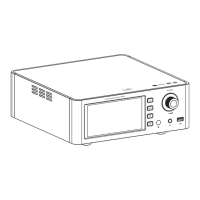
3. Press down volume wheel for 2 seconds. Indicator will turn blue and device power On. the [ ]
/ MENU
4. Press down the volume wheel for 2 seconds. Indicator will turn red and device power off. [ ]
/ MENU
EH3
Desktop DAC Amplifier
Press the [ SOURCE ] button on the machine or the [ INPUT ] button on the remote control to switch
between the audio input "USB DAC, , COAXIAL, OPTICAL, I2S, AUX Analog , USB Drive".
Turn the wheel on the machine or press the [VOL +/- ] buttons on the remote control to increase or
decrease the volume.


 To Next Page