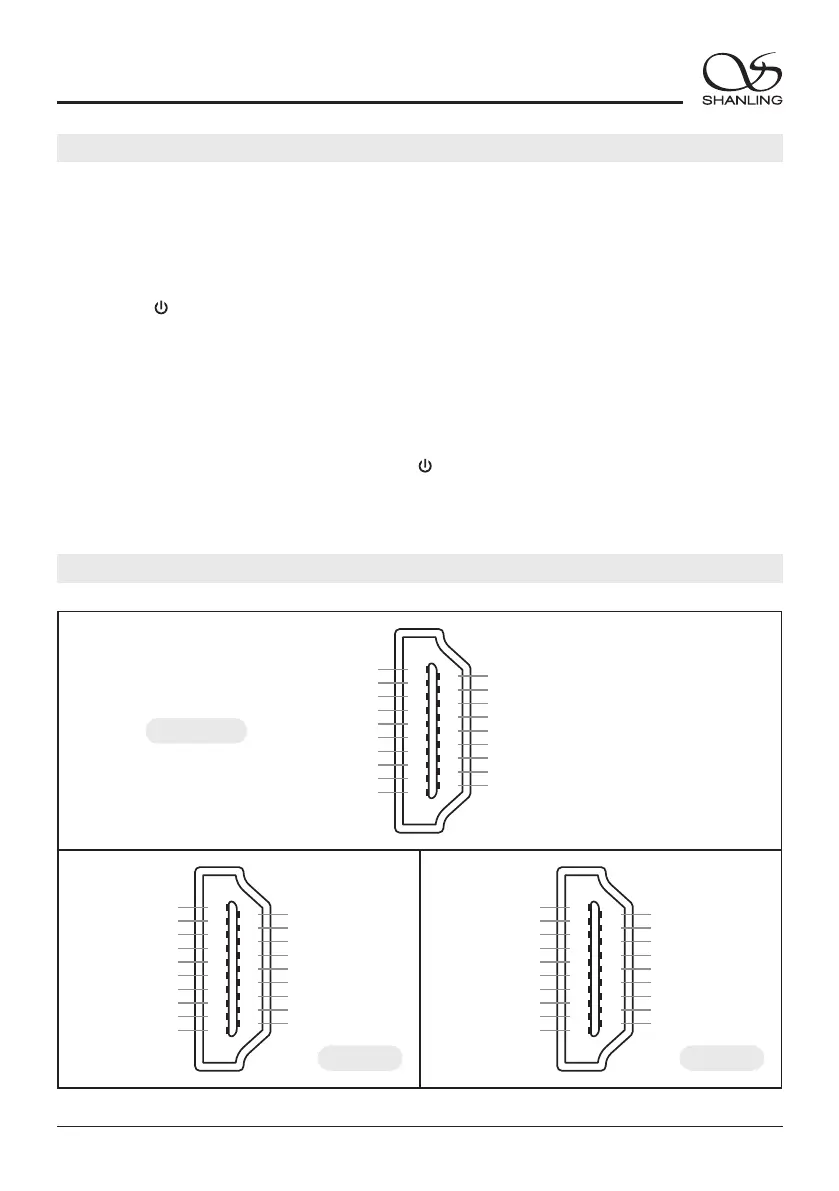
Model 1 Model 2
1
3
5
7
9
11
13
15
17
19
2
4
6
8
10
12
14
16
18
DATA/DSDL+
DATA/DSDL-
GND
LRCK/DSDR+
LRCK/DSDR-
GND
NC
NC
GND
GND
GND
BCLK/DSDCLK+
BCLK/DSDCLK-
GND
MCLK+
MCLK-
NC
NC
NC
1
3
5
7
9
11
13
15
17
19
2
4
6
8
10
12
14
16
18
DATA/DSDR-
DATA/DSDR+
GND
LRCK/DSDL-
LRCK/DSDL+
GND
NC
NC
GND
GND
GND
BCLK/DSDCLK+
BCLK/DSDCLK-
GND
MCLK+
MCLK-
NC
NC
NC
1
3
5
7
9
11
13
15
17
19
2
4
6
8
10
12
14
16
18
DATA/DSDR-
DATA/DSDR+
GND
LRCK/DSDL-
LRCK/DSDL+
GND
NC
F_MUTE
GND
GND
GND
BCLK/DSDCLK+
BCLK/DSDCLK-
GND
MCLK+
MCLK-
NC
F_DSD
NC
ET3 Model
17
EH3
Desktop DAC Amplifier
2.
"System Setting - System Update - Local Update" and confirm to start the update process.
Connect the USB Drive to the device. Press the [ ] knob to enter the settings menu. Go to
1.
root/main directory of USB Drive.
Download the firmware update from Shanling official website. Copy the "update.bin" file to
/ MENU
USB Drive Update
IIS-LVDS Input Interface
Do not do operate the player during the update process.
Firmware Update
1. Turn on WiFi in the player and connect to an available network.
Over-the-Air Update
2. Press the [ ] knob to enter the settings menu. Go to "System Setting - System Update -
Network Update" to update to the latest firmware automatically.
/ MENU


 To Next Page