EasyManua.ls Logo

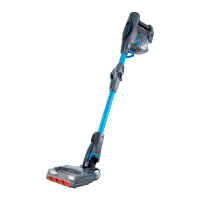
Shark DuoClean IF200UK Series - User Manual

Shark DuoClean IF200UK Series
24 pages
Print Icon
To Next Page IconTo Next Page
Loading...
IF200UK
IF250UK
Series
INSTRUCTIONS
sharkclean.eu
0800 862 0453
DuoClean
Cord-Free
Vacuum

Questions and Answers

  • J
    Jason NguyenAug 13, 2025
    Why is my Shark Vacuum Cleaner not picking up debris?
    • A
      Alicia SchwartzAug 13, 2025
      If your Shark Vacuum Cleaner isn't picking up debris and has no or light suction, here are a few things to check: * Clean the filters, rinsing them and letting them air-dry completely before putting them back. * Empty the dust cup if it's full. * Check the floor nozzle and the connection between the handvac and wand for any blockages and clear them. * Remove any string, carpet fibres, or hair that may be wrapped around the brushroll and Soft Roller or trapped behind the Soft Roller.
  • T
    timothy29Aug 17, 2025
    What to do if my Shark DuoClean IF200UK turns off on its own?
    • J
      Jocelyn WilliamsAug 17, 2025
      If your Shark Vacuum Cleaner is turning off by itself, there could be several reasons: * Check the LED lights on the Lithium ION Power Pack to see if it needs to be recharged. If it doesn't, turn off the vacuum and remove the power pack, then return the power pack to the vacuum and press the Power button. * Empty the dust cup and clean the filters. * Check the wand, accessories, and inlet openings for any blockages. * The unit and Lithium ION Power Pack may be overheating. Allow them to cool for at least 45 minutes, until they return to room temperature.
  • B
    Beth MelendezAug 20, 2025
    What should I do if my Shark DuoClean IF200UK detects a blockage?
    • K
      Kim WoodAug 21, 2025
      If your Shark Vacuum Cleaner detects a blockage, turn off the unit and remove the blockage.
  • R
    Ronald Allen MDAug 25, 2025
    Why does my Shark Vacuum Cleaner brushroll/soft roller not spin?
    • C
      Caleb VelazquezAug 26, 2025
      If the brushroll or Soft Roller on your Shark Vacuum Cleaner isn't spinning, it could be due to: * A blockage in the brushroll and/or Soft Roller. If the Brushroll Indicator Light on the floor nozzle turns red, immediately turn off and remove the Lithium ION Power Pack from the handheld vacuum and remove the blockage before reconnecting and turning the vacuum back on. * A connection issue between the handheld vacuum, wand, and nozzle. If the headlights are not illuminated, try disconnecting and reattaching the pieces.
  • R
    robert82Aug 28, 2025
    What to do if my Shark DuoClean IF200UK Vacuum Cleaner lifts rugs?
    • J
      Jennifer WolfeAug 29, 2025
      If your Shark Vacuum Cleaner is lifting rugs, ensure that the vacuum is in EXTENDED RUNTIME mode and take extra care when vacuuming rugs with delicately sewn edges. You can also turn off the unit to disengage the brushroll and restart it using the Power button.
  • D
    David LongSep 1, 2025
    What does it mean if the LED lights on my Shark Vacuum Cleaner ION Power Pack are flashing?
    • K
      Kristin TateSep 1, 2025
      If the LED lights on your Shark Vacuum Cleaner ION Power Pack are flashing: * If the top 2 or bottom 2 LED lights are flashing, call Customer Service at 0800 862 0453. * If the bottom LED light is flashing, the Lithium ION Power Pack needs to be charged. * If the top and bottom LED lights are flashing, the Lithium ION Power Pack temperature is not optimal, so charging is temporarily paused. Leave the power pack plugged in, and charging will resume soon.
  • E
    Erin JonesSep 5, 2025
    What to do if my Shark Vacuum Cleaner unit temperature is high?
    • W
      William MontgomerySep 5, 2025
      If your Shark Vacuum Cleaner unit temperature is high, allow the unit to cool. While it's cooling, check for blockages and remove any that you find. Also, the filters may need to be cleaned.
  • A
    Amanda HarrisSep 8, 2025
    How to properly close the brushroll garage on my Shark DuoClean IF200UK Vacuum Cleaner?
    • C
      Chad MunozSep 8, 2025
      To properly close the brushroll garage on your Shark Vacuum Cleaner, close the door by inserting the tabs on the lid into the slots in the floor nozzle, then pressing down on the lid, above the headlights, until both sides click into place.

Summary

Shark DuoClean Cord-Free Vacuum

Important Safety Instructions

Lithium Ion Power Pack Battery Safety

Getting To Know Your Vacuum

Using Your Lithium Ion Power Pack Battery

Installing the Lithium Ion Power Pack Battery

Steps for correctly inserting the lithium-ion power pack into the handheld vacuum unit.

Charging the Lithium Ion Power Pack Battery

Guidance on how to charge the lithium-ion power pack using the provided charger or dock.

Maintaining Your Vacuum

Checking for Blockages

How to identify and clear blockages in the handheld, wand, and floor nozzle for restored airflow.

Troubleshooting Guide

Vacuum Not Picking Up Debris

Steps to resolve issues with weak suction or the vacuum failing to pick up dirt effectively.

Brushroll;Soft Roller Does Not Spin

Troubleshooting steps for when the brushroll or soft roller fails to spin during vacuum operation.

Vacuum Turns Off On Its Own

Reasons and solutions for the vacuum shutting down unexpectedly due to overheating or blockages.

Five (5) Year Limited Warranty

Two (2) Year Limited Battery Warranty

Shark DuoClean IF200UK Series Specifications

General IconGeneral
TypeCordless Stick Vacuum
Battery TypeLithium-ion
Run TimeUp to 22 minutes
Charge Time3.5 hours
Weight4 kg
Floor TypesCarpet, Hard Floor
Power SourceBattery
FeaturesDuoClean Technology, LED Headlights
FiltrationHEPA filtration
Warranty5 years extended manufacturer's warranty upon registration

Related product manuals