EasyManua.ls Logo

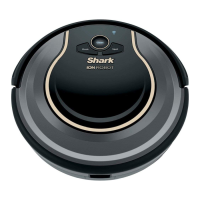
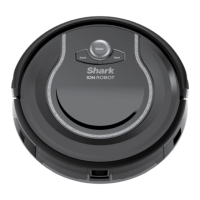
Shark ION RV750 series - User Manual

Shark ION RV750 series
16 pages
Print Icon
To Next Page IconTo Next Page
Loading...
RV750
Series
INSTRUCTIONS
sharkclean.com
1-800-798-7398
ION ROBOT

Other manuals for Shark ION RV750 series

Questions and Answers

  • M
    Michelle TaylorAug 16, 2025
    What to do if the Shark ION RV750 '!' symbol is flashing?
    • C
      chrisriggsAug 16, 2025
      If the '!' symbol is flashing on your Shark Vacuum Cleaner, it indicates a suction motor failure. To resolve this, remove any blockages, clean the filters, and ensure nothing is blocking the suction where the dust bin is located.
  • M
    mcdowellnicoleAug 19, 2025
    What does it mean if CLEAN is flashing blue on my Shark ION RV750?
    • A
      Amy ThorntonSep 12, 2025
      If the CLEAN light is flashing blue on your Shark Vacuum Cleaner, the front wheel sensor, drop sensor, or bumper is reporting an error. First, move your robot to a new location on a level surface to ensure it can move freely. Also, check that the front bumper isn't stuck. If the CLEAN light continues to flash blue, remove the front wheel and clean the wheel cavity.
  • A
    Ashley SchmittAug 22, 2025
    Why is the DOCK and SPOT lights flashing together on my Shark ION RV750 Vacuum Cleaner?
    • K
      Kristen JohnsonAug 22, 2025
      If the DOCK and SPOT lights are flashing together on your Shark Vacuum Cleaner, it means something is stuck in the main brushroll. Remove the obstruction to resolve the issue.
  • P
    prichardsAug 25, 2025
    What to do if CLEAN is flashing red on my Shark ION RV750 Vacuum Cleaner?
    • J
      Jennifer GomezAug 26, 2025
      If the CLEAN light is flashing red on your Shark Vacuum Cleaner, it indicates that the cliff sensors are reporting an error. Wipe the cliff sensors with a clean cloth. Also, ensure your robot is on a level surface with no obstructions, as the robot cannot start due to this error.
  • L
    lynn45Aug 28, 2025
    What to do if the SPOT light is flashing blue on my Shark ION RV750 Vacuum Cleaner?
    • S
      Shawn Brown MDAug 28, 2025
      If the SPOT light is flashing blue on your Shark Vacuum Cleaner, it means the unit cannot move due to the surface or an obstruction. Move the robot to a new location to resolve this issue.
  • M
    murphycoreyAug 31, 2025
    Why are the DOCK and SPOT lights alternating flashing on my Shark ION RV750?
    • M
      Monique ClarkAug 31, 2025
      If the DOCK and SPOT lights are alternating flashing on your Shark Vacuum Cleaner, a side brush is stuck. Remove any debris from the side brushes.
  • J
    justin26Sep 2, 2025
    What does it mean if the CLEAN light is solid red on my Shark ION RV750 Vacuum Cleaner?
    • T
      Tara TaylorSep 2, 2025
      If the CLEAN light is solid red on your Shark Vacuum Cleaner, it means the dust bin has been removed and needs to be reinserted.
  • C
    Cory WardSep 6, 2025
    What does it mean if the CLEAN light is solid blue on my Shark ION RV750?
    • M
      Mr. John MccallSep 6, 2025
      If the CLEAN light is solid blue on your Shark Vacuum Cleaner, your robot is in sleep mode. Press any button on the robot or remote to start it again.
  • A
    Austin FreySep 9, 2025
    Why is the red 'Replace' LED light on my Shark ION RV750?
    • K
      klesterSep 9, 2025
      Your battery is ready to be replaced. Visit sharkclean.com for replacement.
  • R
    Richard ReynoldsSep 12, 2025
    What to do if all LED lights are off on my Shark ION RV750?
    • A
      amanda62Sep 12, 2025
      If all the LED lights are off on your Shark Vacuum Cleaner, the unit is turned off. Cycle the power switch. If there's no response, plug it in to charge.

Summary

Important Safety Instructions

General Use Safety Precautions

Essential safety guidelines for operating the robot in general home environments.

Battery and Charging Safety

Critical safety instructions for charging and handling the robot's battery.

Charging Your Shark ION ROBOT

Installing the Charging Dock

Instructions for setting up the charging dock in an accessible location.

Setting Up Your Shark ION ROBOT

Installing the Side Brushes

Procedure for attaching the side brushes to the robot.

Maintaining Your Shark ION ROBOT

Emptying the Dust Bin

Step-by-step guide for removing and emptying the dust bin.

Cleaning the Filters

Instructions for cleaning the robot's dust bin and HEPA filters.

Maintaining Your Shark ION ROBOT Continued

Cleaning the Brushroll

Procedure for cleaning the main brushroll using the provided tool.

Replacing the Battery

Steps for replacing the robot's battery when the indicator lights up.

Troubleshooting Guide

Robot Error Codes and Solutions

A chart detailing error codes and their corresponding solutions.

Shark NINJA ONE (1) YEAR LIMITED WARRANTY

Initiating a Warranty Claim

Instructions on how to contact customer service and start a warranty claim.

Shark ION RV750 series Specifications

General IconGeneral
Stylerobotic vacuums
Colorsmoke/ash, gray
Floor Typeall floors
Dust Bin Capacity0.11 gallons
Filterother
Washable Filterno
Pet Modeyes
Baglessyes
Wet And Dry Cleaningno
?leaning Area5.9 inches
Cleaning Mopno
Brushes and Accessoriesside brush (2x)
Edge Cleaningyes
Cliff Sensoryes
Self-Emptyingno
Room-by-Room Navigationno
Connectivitywi-fi
Remote Controlyes
Smart Applicationsamazon alexa, google assistant, true
Voltage14.4 volts
Current1.8 amperes
Battery Life90 minutes
Battery Charging Time180 minutes
Weight and Dimensions IconWeight and Dimensions
Length12.4 inches
Height3.54 inches
Width12.6 inches
Net Weight6.6 pounds

Related product manuals