12
TOLL FREE: 1-800-798-7398
Maintenance
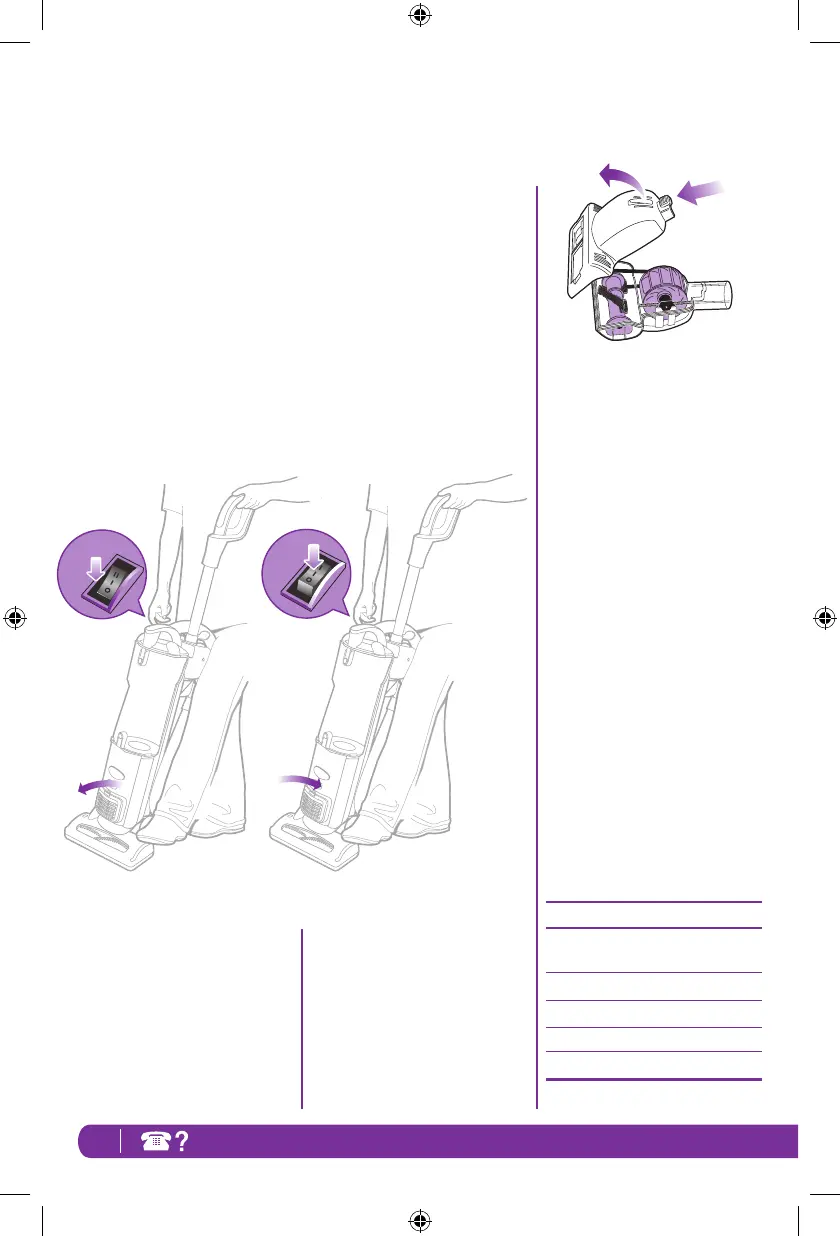
Resetting the Motor Thermostat
Your Shark
®
Navigator
®
Plus
Upright Vacuum is equipped with
aprotectiveMotorThermostat.If
the motor should overheat, the
thermostat shuts off the power.
To reset the Motor Thermostat:
MovethePowerButtontothe
“
O
– Off” position.
Unplug the vacuum.
Check for clogged hose or filter;
unclog hose and replace filter.
Refer to Checking for Blockages
on page 11.
Wait 45 minutes for vacuum to cool;
then plug in the vacuum.
Turn the Power Switch to the
“I – On” position to start the
vacuum.
Note: if vacuum still does not start,
contact Customer Service at:
1-800-798-7398.
1 Cleaning the Power Brush -
Turn the Power Brush over and
slide locking latch (A) forward.
Gently tilt brush housing upward
to open.
Remove debris from turbine
wheel and air passage.
To reassemble, insert the tabs on
the front edge of the cover into
the matching holes in the top
half and tilt the cover back down
until it clicks into place.
Ordering Replacement Parts
To order additional parts and
accessories, go to
www.sharkclean.com
or call 1-800-798-7398.
PART PART NO.
Dusting Brush &
Crevice Tool 1115FC
Foam & Felt Filters XFF36
Power Brush 143FFJ
Cleaning Wand 1116FC
24"Crevice Tool 1124FC
A
NV44_26_IB_E_130124_1.indd 12 13-01-24 11:36 AM





 To Next Page