Need help?
Do you have a question about the Sharkoon RGB FLOW and is the answer not in the manual?
Features a tempered glass side panel with an LED strip for showcasing hardware.
Enables manual RGB control via the reset switch for motherboards without RGB headers.
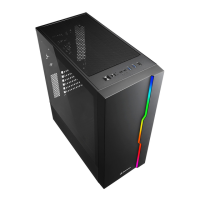
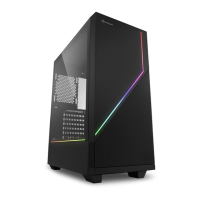
The Sharkoon RGB FLOW is an elegant and unobtrusive ATX midi tower PC case designed to house and display your hardware with an atmospheric highlight. Its minimalistic design features a black chassis with clear lines, complemented by a tempered glass side panel that showcases the internal components. A distinctive stream of colors flows through two integrated LED strips, visually connecting the front panel to the side of the case, adding a vibrant touch to your setup.
Beyond its aesthetic appeal, the RGB FLOW is a functional and versatile case. The front panel incorporates a mesh element, ensuring optimal air intake for efficient cooling. It offers numerous installation possibilities for data storage and provides locations for up to six fans or a radiator, making it an ideal home for various hardware configurations.
The RGB FLOW is equipped with addressable LED strips that visually connect the front and side panels. These strips are daisy-chained and can be easily operated using the integrated four-port RGB controller. Users can select from fourteen illumination modes via the case's reset switch. Alternatively, the LED strips and up to three additional RGB components can be controlled via a mainboard with appropriate software and an RGB header with a 5V-D-coded-G or 5V-D-G pin configuration, offering flexible customization options.
For mainboards without headers for addressable LED components, the RGB FLOW provides a manual color control function. In this setup, the RGB controller is connected directly to the power supply and the PC case's reset switch. The reset switch's function is then replaced, allowing users to cycle through and select up to fourteen lighting modes or turn off the lighting entirely.
The tempered glass side panel, which displays the installed hardware, is designed for a clean look without obvious fastenings. It is attached only to the back of the case with easily removable thumb screws, simplifying access for installation and maintenance. An LED strip at the bottom of the glass panel further illuminates the hardware, putting it into perspective with a choice of colors.
The RGB FLOW case is designed for easy integration with various RGB ecosystems. It is certified for Asus Aura Sync, MSI Mystic Light Sync, Gigabyte Fusion, and ASRock Polychrome SYNC. This compatibility ensures that all Sharkoon products marked with the "ADDRESSABLE RGB" logo, including optionally available SHARK Blades RGB fans and strips, can be seamlessly incorporated into existing systems. The case supports mainboards with addressable RGB LED fan and strip headers, typically with a 5V-D-coded-G or 5V-D-G pin configuration. While the RGB pin configuration is standard, the naming and marking of these connections may vary between manufacturers, so users are advised to consult their mainboard manual or the manufacturer's website for compatibility information.
Despite its compact design, the RGB FLOW does not compromise on compatibility or cooling. It features a power supply tunnel for a clean internal layout. The case includes removable dust filters, simplifying maintenance and ensuring optimal airflow. A 4-port addressable RGB controller is pre-installed for convenience.
The HDD/SSD cage is removable and adaptable, offering flexibility for storage configurations. If additional space is needed behind the front panel, the cage can be quickly and easily repositioned using extra-long thumbscrew slots on the bottom of the case. If the cage is not required, it can be completely removed, and a single 3.5" HDD can still be installed on the bottom panel. The HDD/SSD cage also features decoupled mounting for noise reduction from vibration, contributing to a quieter system.
For optimal airflow, the ATX midi tower is equipped with a fine mesh grille beneath the LED strip on the front panel, ensuring excellent air intake. A 120 mm fan is pre-installed to facilitate this. The case offers additional installation possibilities for up to five more fans: two 120 mm fans can be placed behind the front panel, one 120 mm fan on the back panel, and two 120 mm fans under the top panel. Despite its compact size, the RGB FLOW also accommodates radiators (including fans), with 6.4 cm of space behind the front panel and 5.5 cm under the top panel. The front panel is detachable, simplifying access for fan or radiator installation and cleaning. The case also features stable feet to ensure secure placement.
 Fan Configuration
| front panel fan size | 120 mm |
|---|---|
| top panel fan size | 120 mm or 140 mm |
| rear panel fan size | 120 mm |
Compatibility| max height cpu cooler | 16.5 cm |
|---|---|
| max length power supply | 21.5 cm |
| radiators front panel | 360 mm |
 Ports & Interfaces
| usb 3.0 ports | 2 |
|---|---|
| usb 2.0 ports | 1 |
| audio port | Yes |
 Weight and Dimensions
| weight | 6.0 kg |
|---|---|
| dimensions | 42.4 x 20.6 x 48.1 cm |
| max length graphics cards | 35 cm |

 To Next Page