15
L HOW TO SET V-CHIP
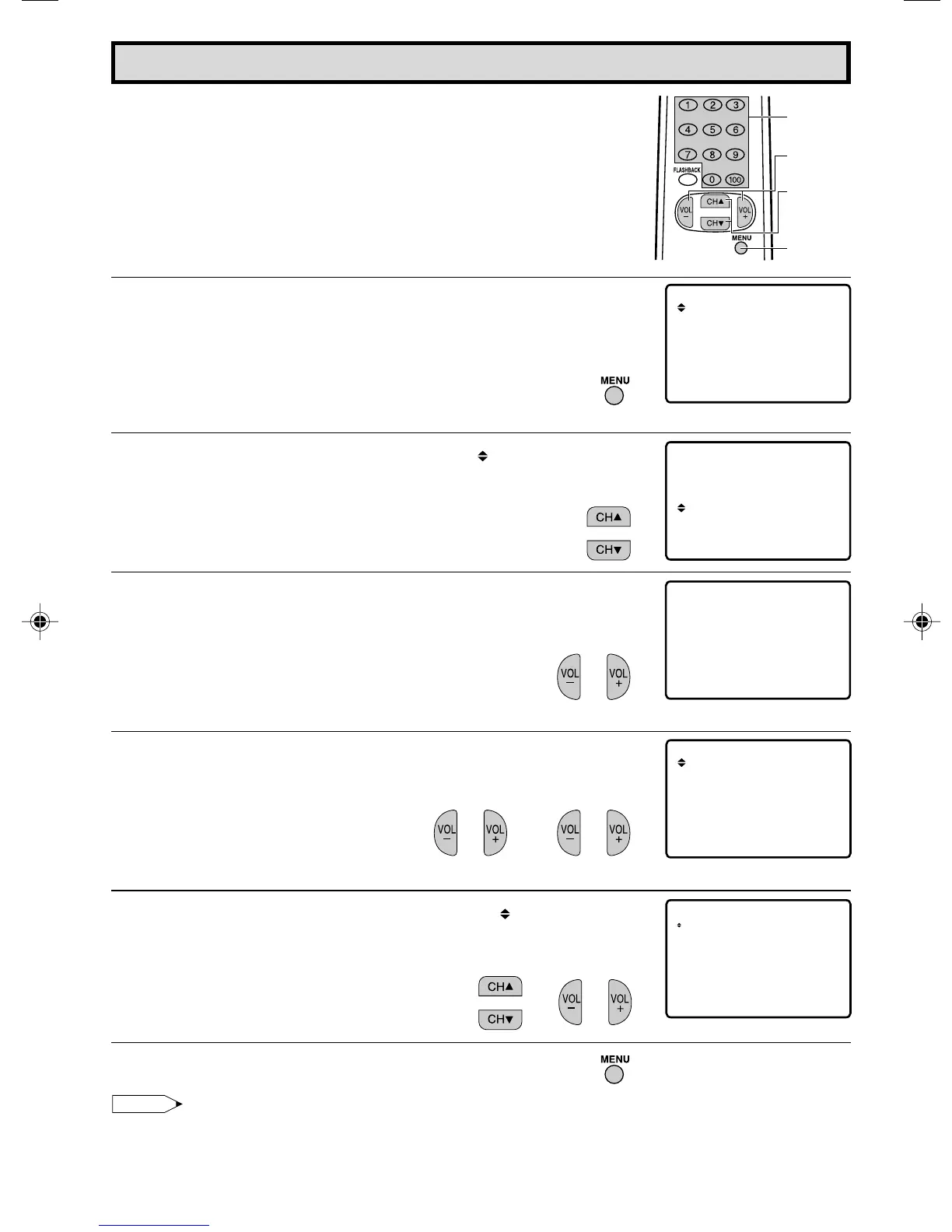
[1] MPAA RATING
1 Press
MENU
to access MAIN MENU screen.
2 Press
CH UP (
8
)
or
DOWN (
9
)
to move the “ ” mark to “PARENT
CONTROL”.
3 Press
VOL (+)
or
(–)
to access PARENT CONTROL mode, then
“PARENT CONTROL V-CHIP BLOCK” is displayed.
4 Press
VOL (+)
or
(–)
to access V-CHIP select mode, then press
VOL (+)
or
(–)
to select “MPAA RATING”.
5 Press
CH UP (
8
)
or
DOWN (
9
)
to move the “ ” mark to "PG",
then press
VOL (+)
or
(–)
to select BLOCK. If you set “PG” to
BLOCK, “PG-13”, “R”, “NC-17” and “X” are automatically blocked.
6 Repeat pressing
MENU
to return V-CHIP select mode exit.
Note:
Ex.
• If you set “G” to BLOCK , all RATING are automatically blocked.
• If you set “X” to BLOCK, “G”, “PG”, “PG-13”, “R” and “NC-17” are not blocked.
VOLUME
(+)/(–)
CHANNEL
UP (8)/
DOWN (9)
REMOTE
KEYPAD
SL EP TIMER
SET UP
E
VIDEO ADJUST
CAPT I ONCLOSED
CONTROLPARENT
ENERGY SAVE
MENU
SL EP TIMER
SET UP
E
VIDEO ADJUST
CAPT I ONCLOSED
CONTROLPARENT
ENERGY SAVE
IP BLOCK
V–C
H
PARENT CONTROL
(PARENT CONTROL mode)
MP AA
TV GUIDELINES
AD : OFFDO
W
NLO
STATUS :OFF
(V-CHIP select mode)
G
PG
PG–1 3
R
NC– 17
X
B:LOCK
B:LOCK
B:LOCK
B:LOCK
B:LOCK
–: ––––
MENU : RETURN
→
→
Parent Control (V-CHIP Operation Continued)
(MAIN MENU screen)
12-16 13N-M100/150[B].p65e 31/07/2000, 11:51 PM15


 To Next Page