21B-FX1(AF);11-15; 00/5/27/18:00 G. K. Associates, Tokyo
E 12
ENGLISH
Settings and adjustments
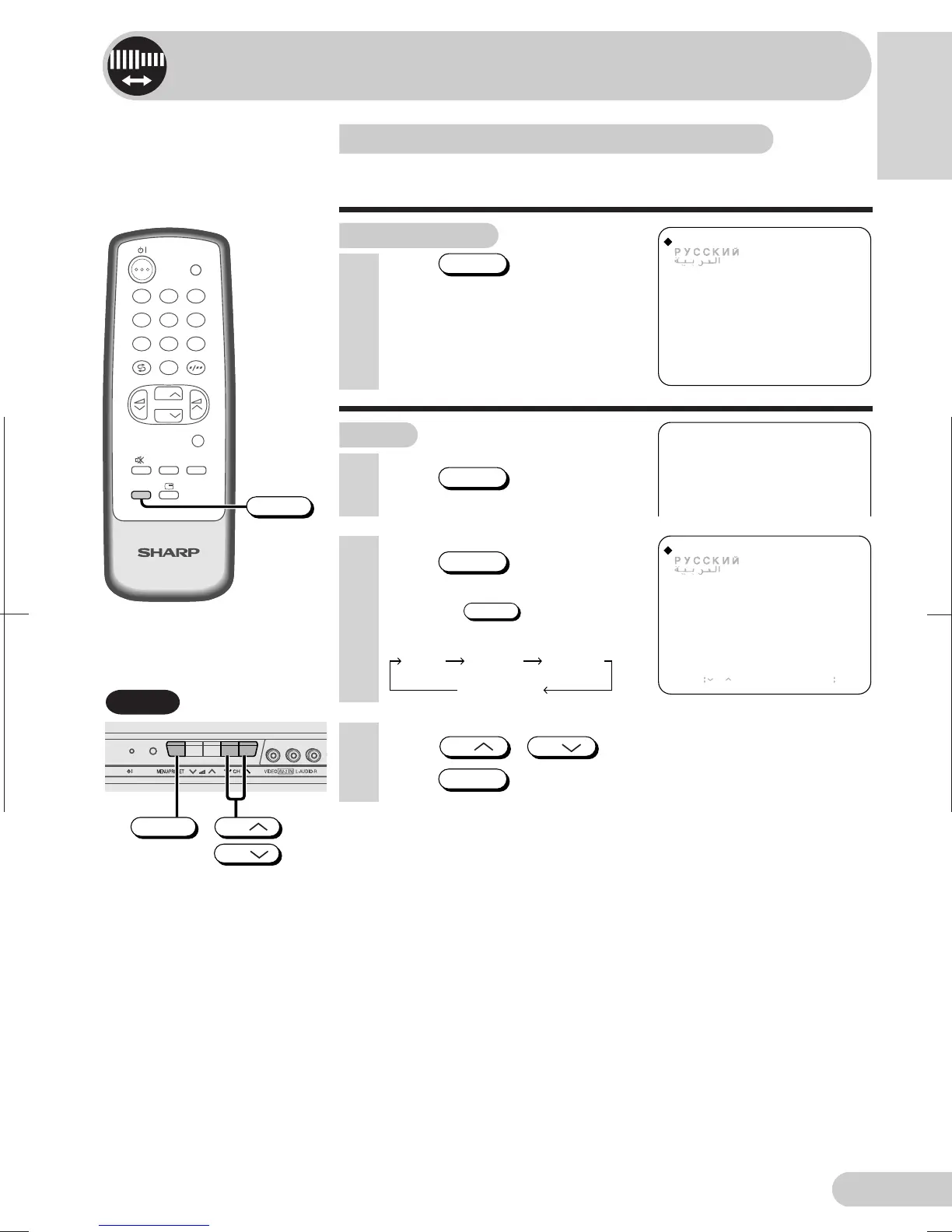
On-screen display language selection
The on-screen display language can be set to English,
Russian, Arabic or French.
Remote control
Press
LANGUAGE
to select desired
language.
• The language menu will
automatically disappear.
ENGLISH
FRANCAIS
AUTO(B/G)
VHF 1
48.25MHz
ENGLISH
FRANCAIS
SELECT CH RETURN MENU
3 Press
CH
/
CH
to select desired language.
4 Press
MENU/PRESET
to display normal screen.
2 Press
MENU/PRESET
twice to display
language mode screen.
• Pressing
MENU/PRESET
changes the
screen as shown below.
TV
4
7
2
8
3
6
9
0
MENU
NORMALSURROUND
1
5
CH
CH
TV/VIDEO
LANGUAGE
LANGUAGE
TV Set
TV set
1 Press
MENU/PRESET
for more than
two seconds.
LanguageMANUAL
Normal screen
AUTO
CH
CH
MENU/PRESET


 To Next Page