21B-FX1(AF);21-24; 00/5/30/18:00 G. K. Associates, Tokyo
E 22
ENGLISH
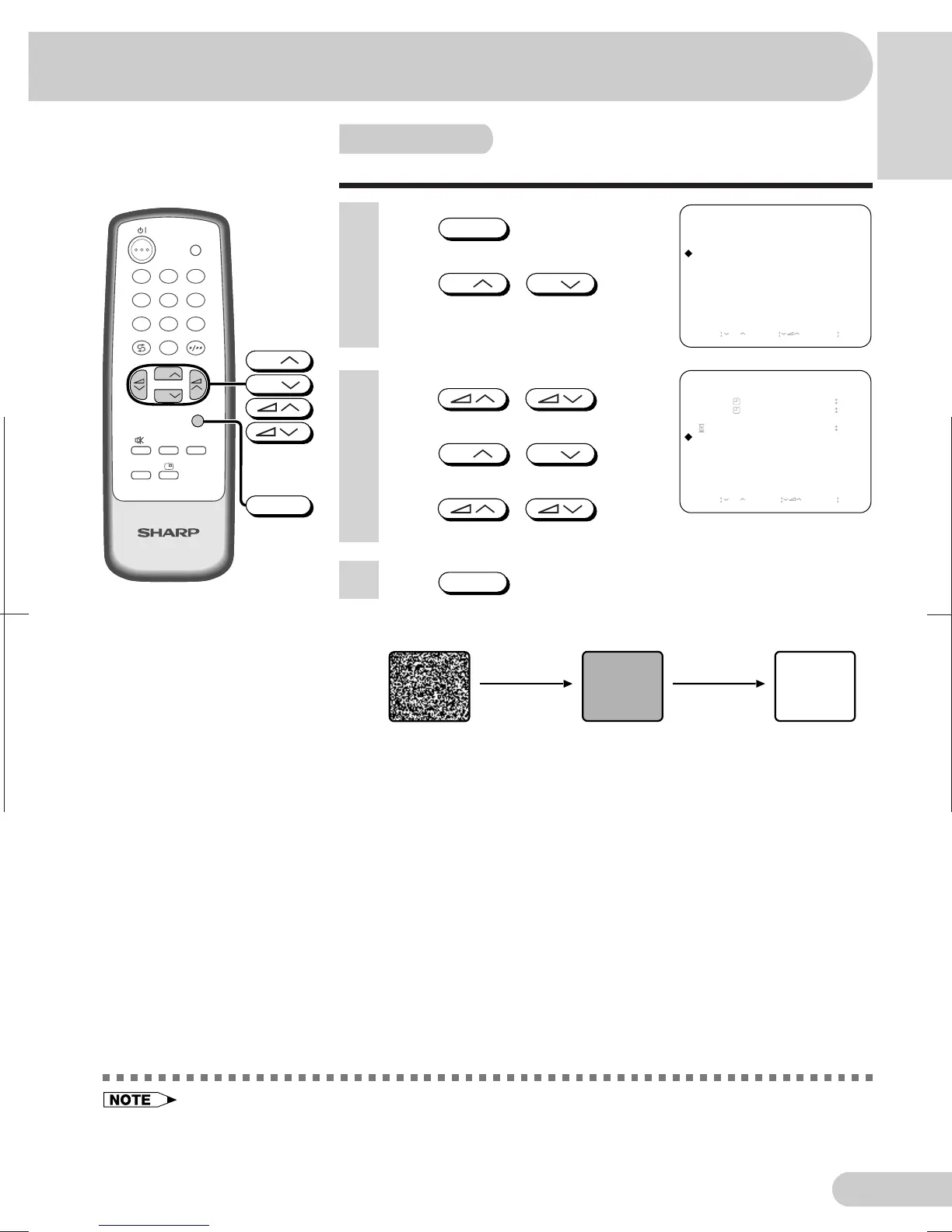
Automatically turns the screen blue if a broadcast signal is not received.
• Poor reception due to weak signals and too much noise may activate Blue back, despite the presence of
a broadcast signal. To continue watching TV under these conditions, switch “BLUE BACK” to “OFF”.
• When Off timer is set, the setting has priority over Blue back.
Blue screen
TV
TV/VIDEO
4
7
2
8
3
6
9
0
NORMALSURROUND
LANGUAGE
CH
CH
MENU
1
5
CH
CH
MENU
MENU
PICTURE
SOUND
FEATURE
CH-SETTING
SELECT CH ENTER RETURN MENU
1 Press
MENU
to call MENU
screen.
2 Press
CH
/
CH
to
select “FEATURE ”.
3 Press / to
display FEATURE menu.
4 Press
CH
/
CH
to
select “BLUE BACK”.
5 Press / to
select “ON” or “OFF”.
6 Press
MENU
twice to display normal screen.
after five seconds after 15 minutes
No signal
When Blue back is set to “ON”
Blue screen TV off
Standby mode
FEATURE
OFF
ON
VOLUME
BLUE BACK
-- --
-- --
--
-- --
ON
SELECT CH ADJUST RETURN MENU



 To Next Page