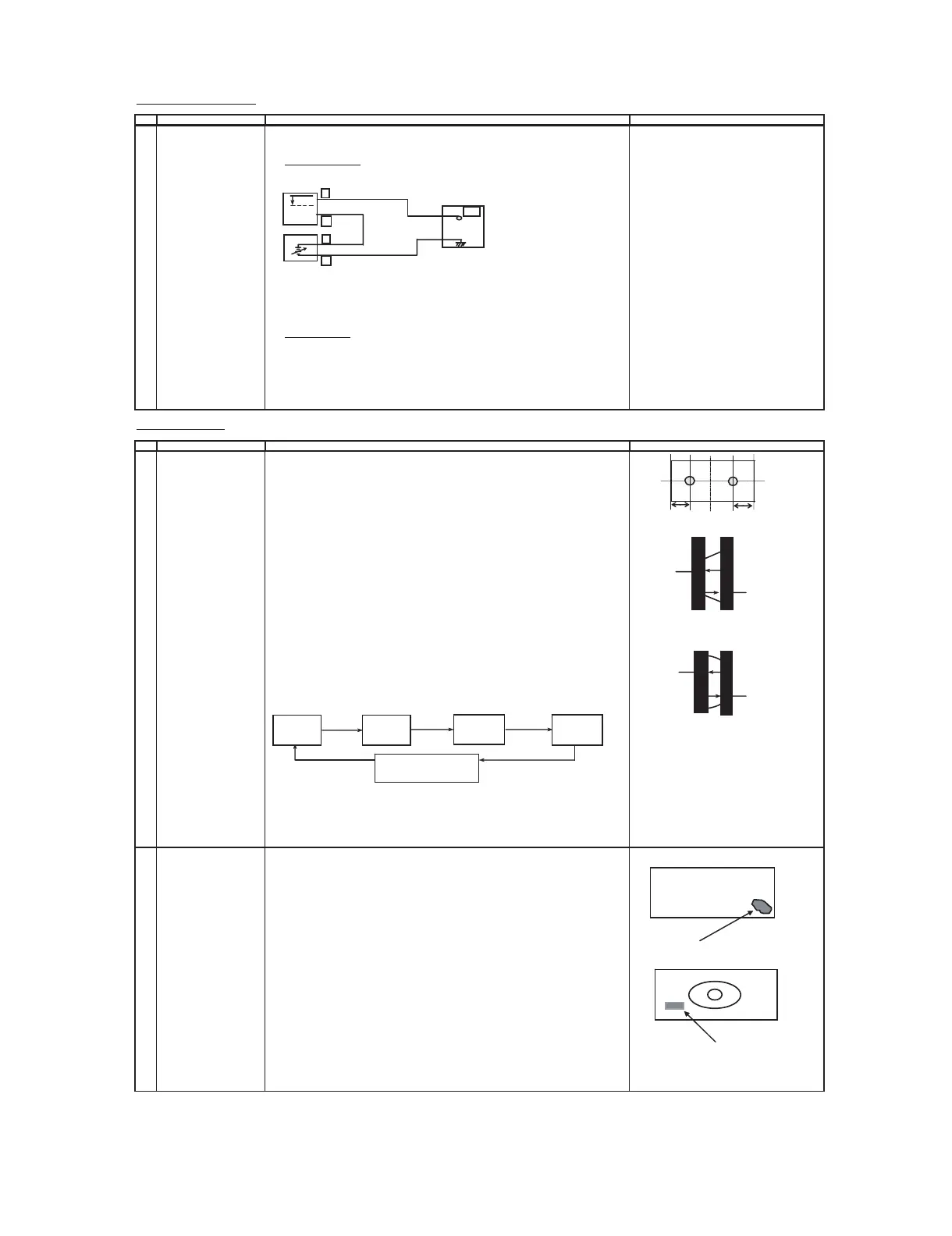
1 PURITY ADJ. (1) Select the green monocolor screen with remote contoller, and set the beam current of
900±200µA with the contrast control.
(no need this adjutment for
(2) Degauss the CRT enough with the degausing coil. a b
ITC AK MASK CRT type)
NOTE: Follow the job instruction manual to adjust the magnetic field.
(3) The purity magnet must be previously set at the 0 magnetic field, and the
convergence must be adjusted to be rough. 90 mm 90mm
With P-MAG, adjust it to the center - rank A. Fig. 1 -1
(4) Observe the points a,b, as shown in Fig.1-1 through the microscope.
Move DY fore and aft to set the landing at the point to be
"inside 20±10µm (for MTPDT)" or "inside 0±10µm (for MTPDM)".
(5) If the a/b balance is poor, compensate it to the center "Rank AB".
(6) Aline it to zero, keeping the raster rotation in the east direction. A
(7) Tighten the deflection coil fastening screws. A=B
Tightening torque : 108N ± 20N ( 11Kgf ± 2Kgf ) B
(8) Checking the CRT corner area, bond the magnetic sheet to set the landing at
rank A for compensation.
Fig 1 -2 . Inside 20±10µm (for MTPDT);
Note: Apply the adjustment after aging with the beam current 900±200µA or more Inside 0±10µm (for MTPDM)
for 30 minutes or more.
Note: Select the service mode, and press the monocolor key of R/C for process,
and the monocolor screen (green) will be selected. A
A=B
* Every push of the monocolor key, changes the screen as follows. B
Fig 1 -3 . Inside 20±10µm (for MTPDT);
Inside 0±10µm (for MTPDM)
*Continuously press the monocolor key
1 second or more, and the monocolor mode
will be selected without the service mode.
*Even with TEXT key or "R/G/B" key,
it can be directly switched to each monocolor
screen.
2 UNIFORMITY Before adjustment begin,Horizontal magnetic field = 0G
ADJUSTMENT Vertical magnetic field = Each destination's adjustment magnetic field
(To perform after the
purity and
convergence (North direction red uniformity)
adjustment) (1) Horizontal mf = Set to monocolor screen red and adjust to +0.20G.
(2) Pay attention to the edge of CRT,if the landing is poor adjust by attaching the
the compensation magnet at the back of CRT. (CRT surface)
(refer to Fig-1)
Mislanding
(South direction red uniformity)
(1) Horizontal mf = Set to monocolor screen red and adjust to -0.20G.
(2) Pay attention to the edge of CRT ,if the landing is poor adjust by attaching the
compensation magnet at the back of CRT.
(The same method is applied for adjustment of monocolor screen blue for
blue uniformity ,and changing both the magnetic field for north and south
direction.) (CRT back)
*During the pasting of compensation magnet , use the crosshatch pattern .



 To Next Page