EN-4
USING THE REMOTE CONTROL
Use this mode when the remote control
is not available.
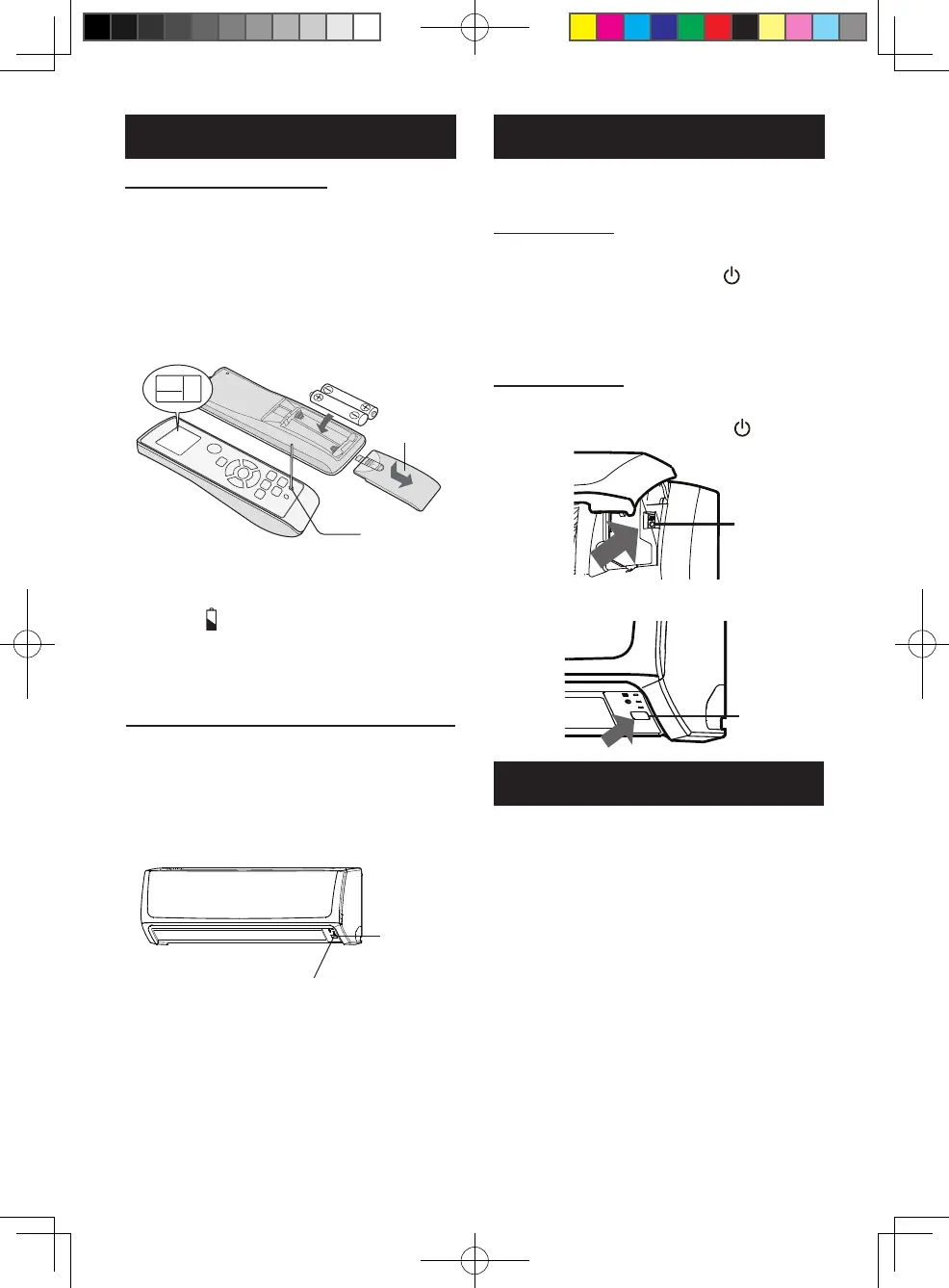
TO TURN ON
Press the ON/OFF button.
•ThegreenOPERATIONlamp( )willturn
onandtheunitwillstartoperatinginthe
AUTOmode.
•Thefanspeedandtemperaturesettingare
settoAUTO.
TO TURN OFF
Press the ON/OFF button again.
•The greenOPERATIONlamp( )will turn
off.
AUXILIARY MODE
TIPS ON SAVING ENERGY
Below are some simple ways to save
energy when you use your air conditioner.
Set the proper temperature
•Settingthetemperaturelowerthannecessary
duringcoolingoperationwillresultin
increasedpowerconsumption.
Block direct sunlight and prevent drafts
•
Blockingdirectsunlightduringcoolingoperation
willreducepowerconsumption.
•Closethewindowsanddoorsduringcooling
andheatingoperations.
Keep lter clean to ensure the most
efcient operation
Disconnect the power cord when the
unit is not used for an extended period
time
•Theindoorunitstillconsumesasmallamount
ofpowerwhenitisnotoperating.
LOADING BATTERIES
1
Remove the battery cover.
2
Insert two batteries.
(AAA(R03))
Makesurethe(+)and(-)polaritiesare
correctlyaligned.
3
Reinstall the battery cover.
4
Press the RESET button using a
thin stick.
NOTE:
•
Thebatterylifeisapproximately1yearin
normaluse.
•
Replacethebatterieswhentheremotecontrol
displays“ ”.
•Whenreplacingthebatteries,alwayschange
bothandusethesametype.
•Ifyouwillnotbeusingtheunitforalongtime,
removethebatteriesfromtheremotecontrol.
HOW TO USE THE REMOTE CONTROL
Point the remote control towards the
receiver window and press the desired
button. The unit generates a beep when
it receives the signal.
•Makesurenothing,suchascurtains,blockthe
signalreceiverwindow.
•Thesignaleffectivedistanceis7m.
CAUTION:
•Donotexposethereceiverwindowtodirect
sunlight.Thismayadverselyaffectitsoperation.
•Useofcertainuorescentlampinthesame
roommayinterferewithtransmissionofthe
signal.
•Donotleavetheremotecontrolindirect
sunlightornearaheater.Protecttheremote
controlfrommoistureandshock.
Batterycover
RESETbutton
7m
Receiver
window
NOTE:
ForAH-X10series,ON/OFFbuttonisatbelow
position.
ON/OFF
ON/OFF
B129_EN.indd 4 2021/11/10 14:27:22



 To Next Page