54
Using external equipment
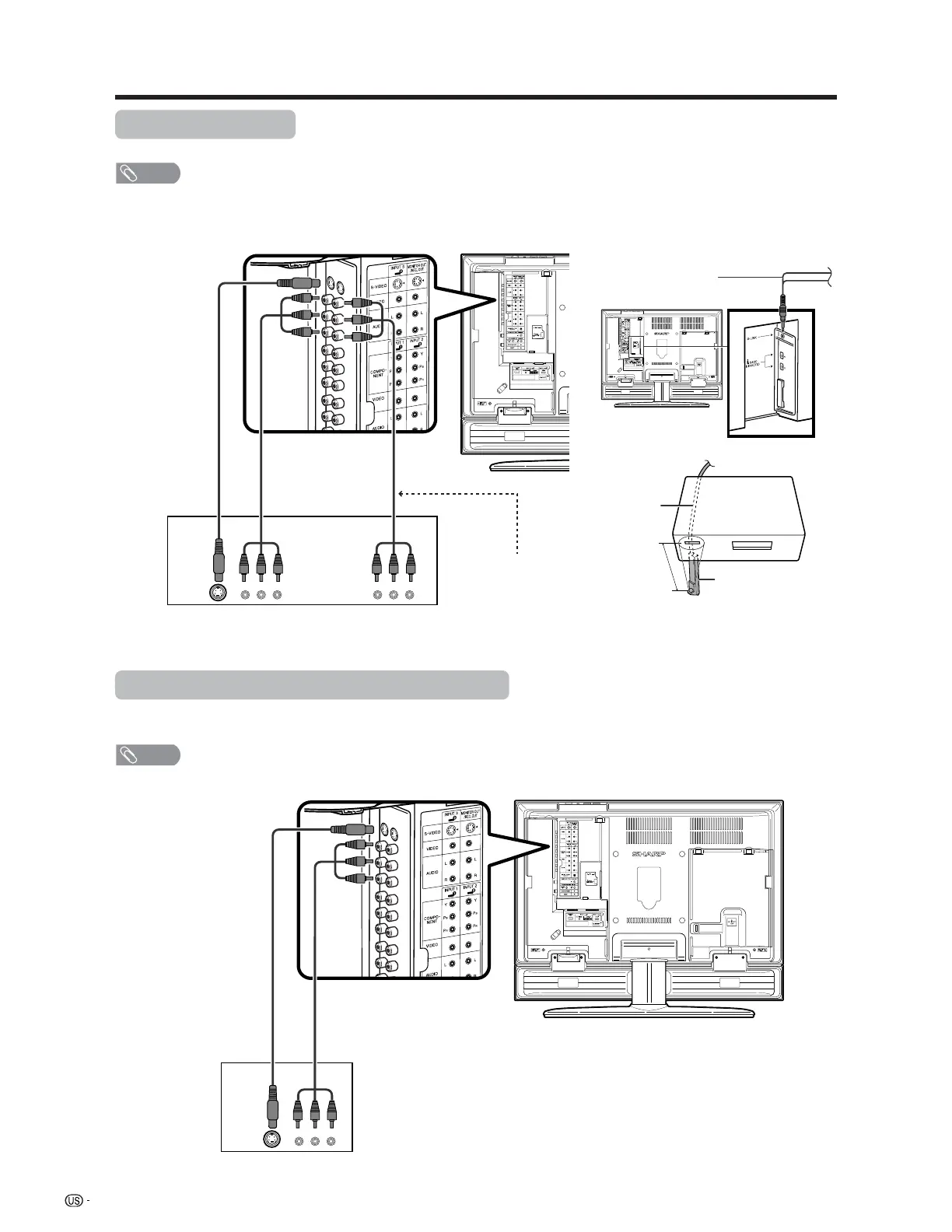
VCR
AV cable
(commercially
available)
Connecting a VCR
You can use the INPUT 3 terminal when connecting a VCR and other audiovisual equipment.
Game console/Camcorder
S-video cable
(commercially
available)
Connecting a game console or camcorder
A game console, camcorder and some other audiovisual equipment are conveniently connected using the
INPUT 3 terminals.
NOTE
• The S-video terminal has priority over the video terminals.
• The G-LINK cable connection is necessary if you want to use the recording features of the TV Guide On Screen system
with your VCR.
AV cable
(commercially available)
S-video cable
(commercially
available)
NOTE
• The S-video terminal has priority over the video terminals.
This connection is necessary
when using TV Guide On
Screen’s recording function.
(commercially available)
(INPUT)(OUTPUT)
G-LINK cable
G-LINK
cable
This end is connected
to the TV.
1 inch
VCR
G-LINK wand








 To Next Page