55
Using external equipment
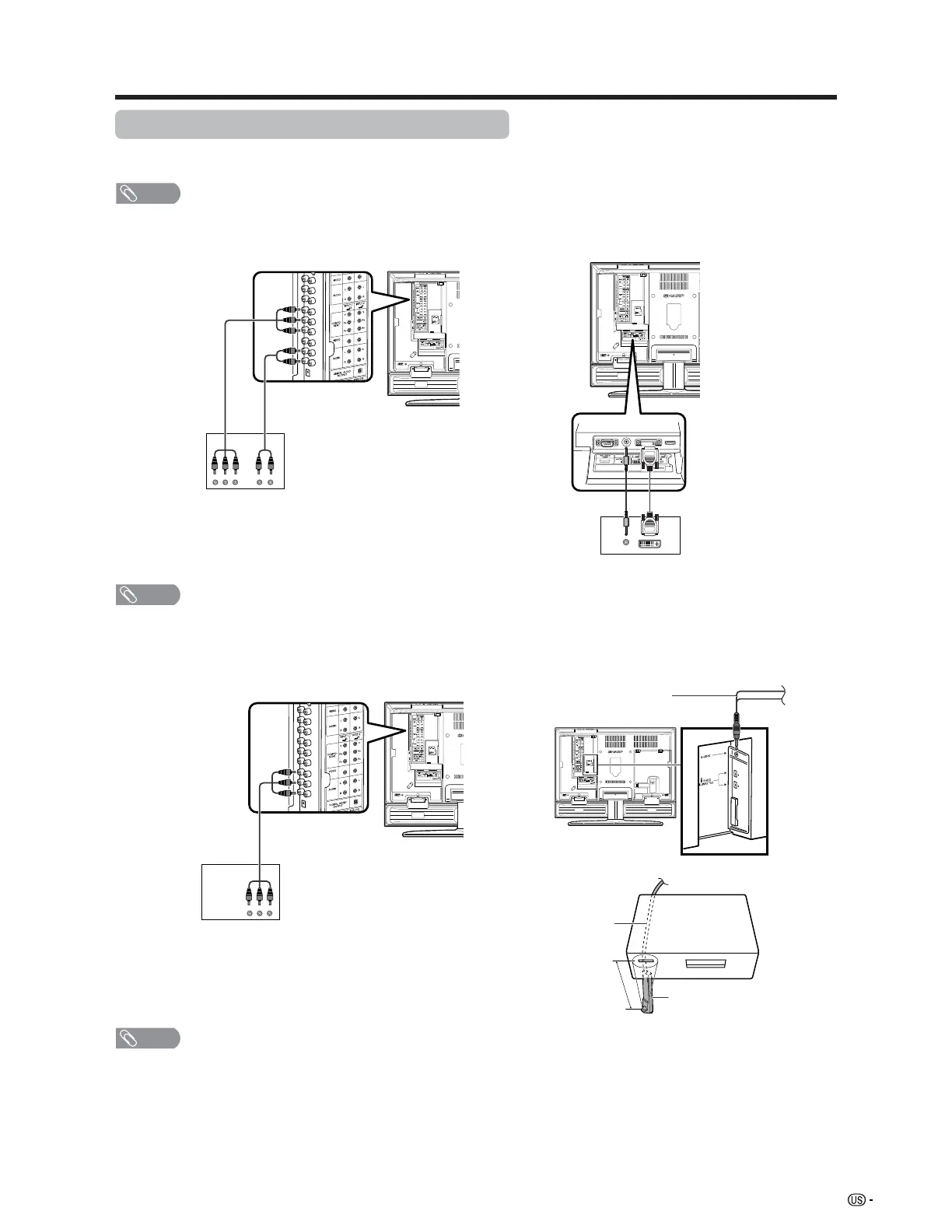
Connecting a Digital TV STB (Air or Cable)
You can use the INPUT 1, INPUT 2, INPUT 4 or INPUT 5 terminals when connecting a Digital TV STB (Air or
Cable) and other audiovisual equipment.
Digital TV STB
Component video
cable
(commercially
available)
Audio cable
(commercially available)
NOTE
• See page 56 for connecting a Digital TV STB to HDMI terminal.
AV cable
(commercially available)
Digital TV STB
Digital TV STB
ø 3.5 mm stereo
minijack cable
(commercially
available)
DVI cable
(commercially available)
When using component cable.
When using composite cable.
When using DVI cable. (INPUT 5)
NOTE
• If your cable-TV company has CableCARD available, you can also use the CableCARD to receive
HDTV programs. (See page 37.)
G-LINK cable
G-LINK
cable
This end is connected
to the TV.
1 inch
Cable Box
G-LINK wand
Cable box connection
(for TV Guide On Screen)
NOTE
• To receive TV program listings in the TV Guide On Screen system, please connect your cable box
using this input, marked “VIDEO”. Do not connect the cable box to the “COMPONENT” video as you
will not receive any TV program listings.








 To Next Page