- 1 -
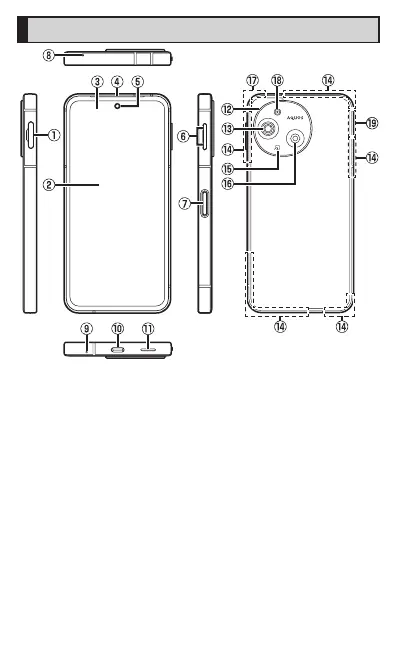
Names and Functions of Parts
A
SIM card/microSD memory
card tray
B
Display (Touch panel)
C
Proximity sensor/Light
sensor
Proximity sensor prevents
inadvertent operations of the
touch panel during a call.
Light sensor detects the
ambient brightness and adjusts
the brightness of display.
D
Earpiece (Receiver)/
Speaker
*1
E
In camera lens
F
u Volume up key/d
Volume down key
Adjust the volume. Also, set/
disable manner mode.
G
f Power key/Fingerprint
sensor
Use to turn the power on/off
and turn the screen on/off.
•
Press and hold this key to
launch the set app.
•
Keep touching this key with
u at the same time
displays a “Power menu” to
allow you to operate the
power off, etc.
H
Sub microphone
*1
I
Mouthpiece (Microphone)
*1













 To Next Page