22
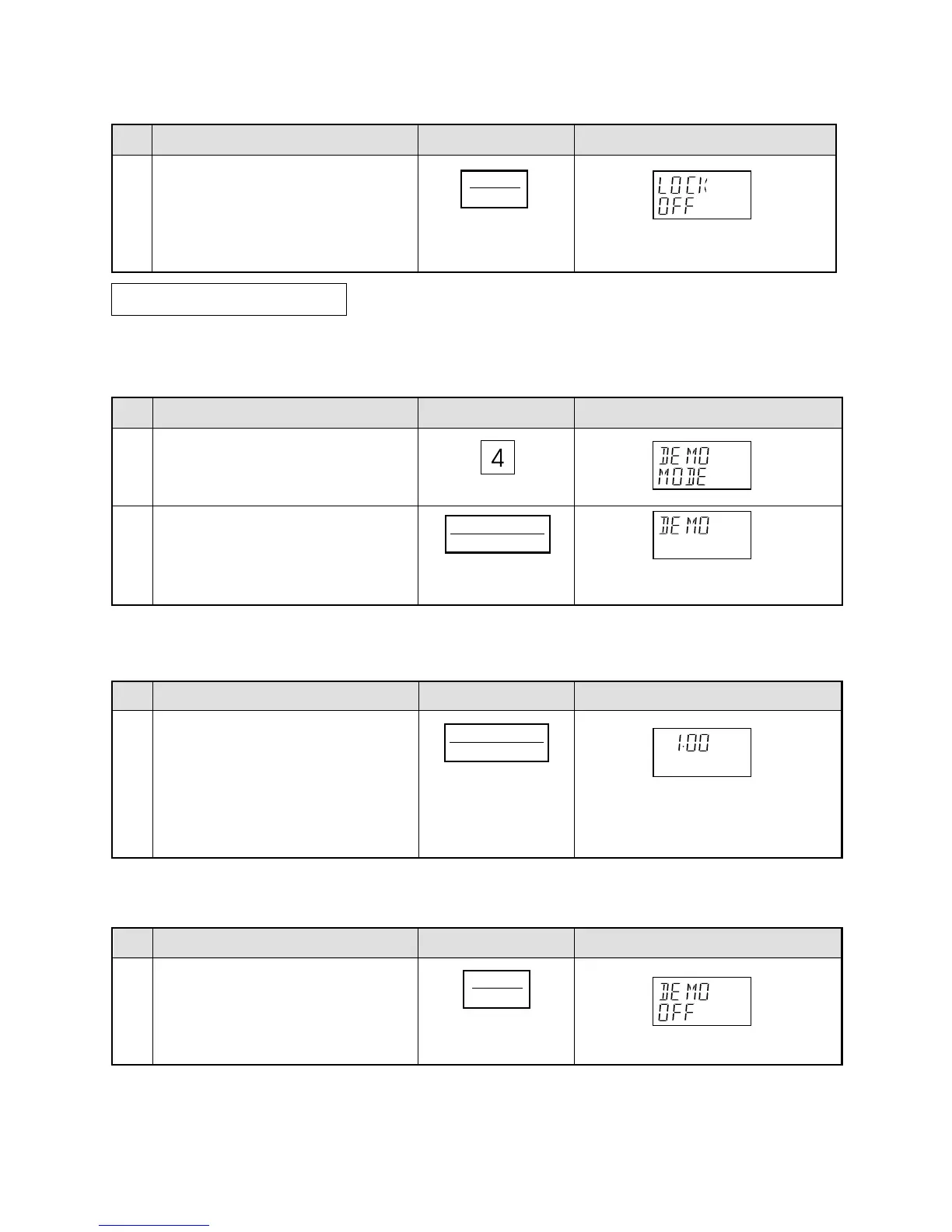
* To unlock the control panel.
After step 2 for Child Lock.
Step
Procedure Pad Order Display
This feature is mainly for use by retail outlets, and also allows you to practice key operations.
* To demonstrate.
After step 1 for Auto start.
Demonstration Mode
The time of day will appear in the
display. The oven is ready to use.
Press the STOP/CLEAR pad.
Step
Procedure Pad Order Display
Press the number 4 pad.
Cooking operations can now be demonstrated with no power in the oven.
* Suppose you demonstrate Instant Cook.
Press the INSTANT COOK/START
pad.
Then DEMO,SHARP, MICROWAVE,
OVEN will appear repeatedly.
2
3
Step
Procedure Pad Order Display
Press the INSTANT COOK/START
pad.
The cooking time will begin counting
down to zero at ten times the speed.
When the timer reaches zero,
END will appear in the display.
1
Step
Procedure Pad Order Display
* To cancel the Demonstration Mode.
After step 2 above.
Press the STOP/CLEAR pad.
The time of day will appear in the display.
3
3
COOK
STOP
CLEAR
INSTANT COOK
START
INSTANT COOK
START
STOP
CLEAR



 To Next Page