04/1/28 CD-DH790N_03 EN
E-8
2
1
7
6
5
4
3
2
1
Listening to the iPod (continued)
Simply remove the iPod from the iPod dock. It is safe to do
so even during playback.
Note:
When navigating the iPod menus with remote control, do
not operate any of the buttons on the iPod unit. The volume
level is adjusted by pressing the VOL (+ or –) button on the
main unit or the remote control. Adjusting the volume on
the iPod unit gives no effect.
iPod operation:
The operations described below depend on the generation
iPod you are using.
System on operation:
When the main unit is powered on, the iPod unit will
automatically power on when docked in the unit (including
TIMER function/exclude USB function).
System off (stand-by operation):
When the main unit is turned to stand-by mode, the docked
iPod unit will automatically turn to stand-by mode.
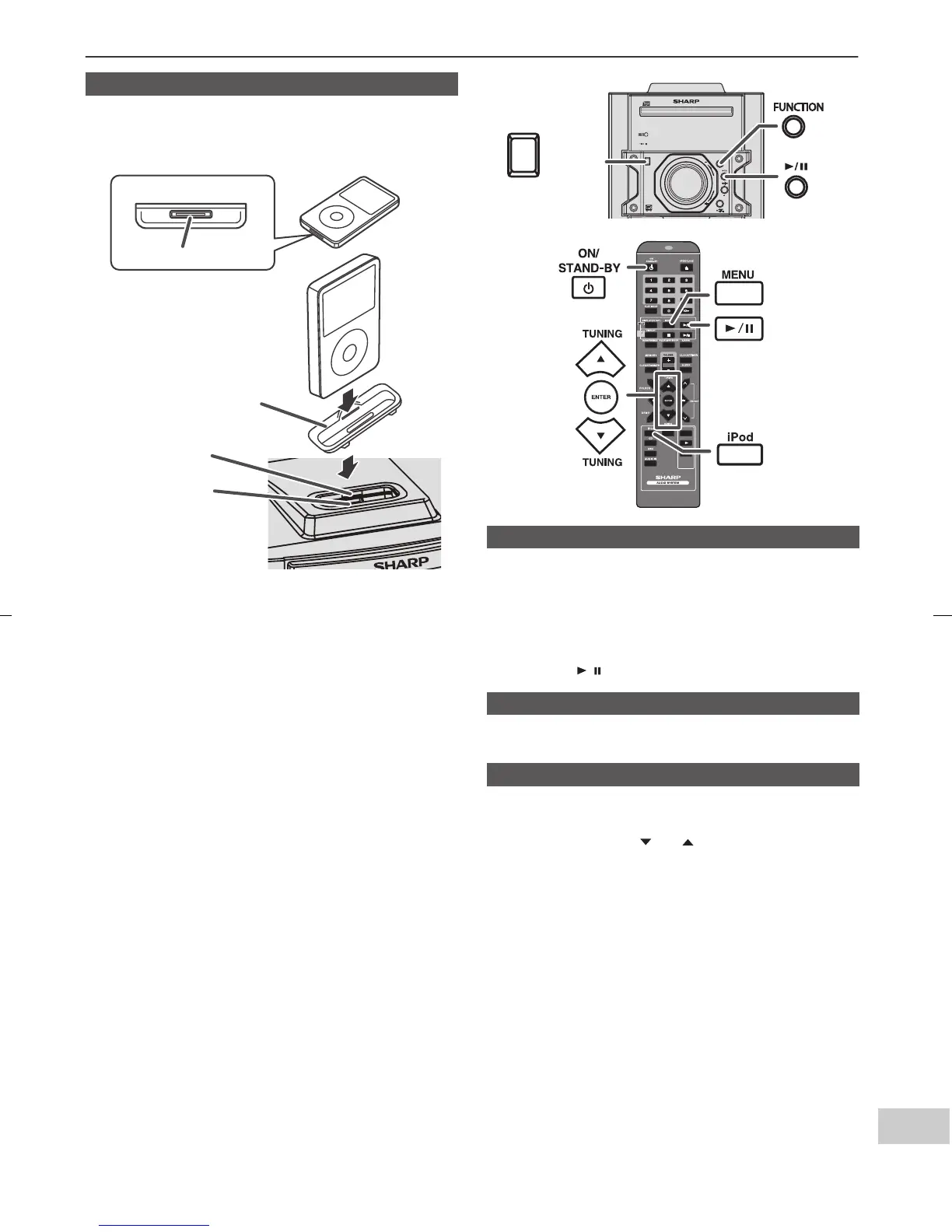
■ To insert iPod adaptor
1
Press the ON/STAND-BY button to turn the power on.
2 Insert the iPod adaptor into the iPod dock and connect
your iPod.
iPod
Dock connector
iPod (bottom)
iPod dock
iPod connector
iPod adaptor
(not supplied)
■ iPod playback
1
Press the ON/STAND-BY button to turn the power on.
2 Press the iPod button on the remote control or
FUNCTION button repeatedly on the main unit to
select iPod function.
3 Insert iPod unit in iPod dock of main unit.
4 Press the / button to start playback.
■ To disconnect iPod
■ Navigating the iPod menus
1
Press the MENU button to view the menu on iPod unit.
Press it again to go back to previous menu.
2 Use the TUNING ( or ) button on the remote
control to select an item on the menu and then press
ENTER button.
CD
USB
TAPE
FUNCTION
VOL
POWER
ON/STAND-BY
MINI COMPONENT SY STEM
CD-DH790
POWER
ON/STAND-BY


 To Next Page