03/2/17 CD-E250E(E)1.fm
10
CD-E250E
Preparation for Use
System connections
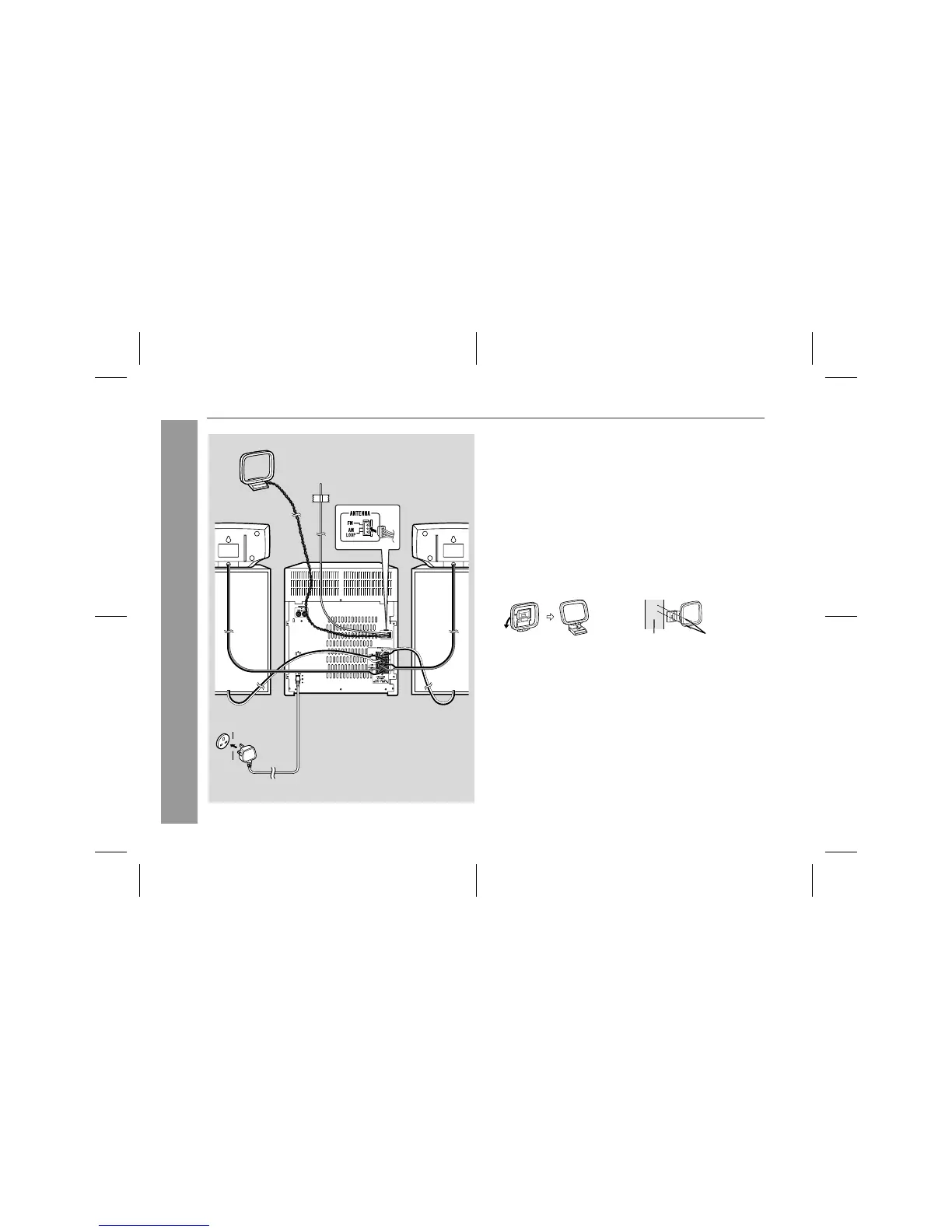
! FM/AM loop aerial connection
Connect the FM/AM loop aerial to the ANTENNA socket.
Position the FM aerial wire and rotate the AM loop aerial for opti-
mum reception. Place the AM loop aerial on a shelf, or attach it to a
stand or a wall.
Notes:
"
Placing the aerial on the stereo system or near the AC power
lead may cause noise pickup. Place the aerial away from the ste-
reo system for better reception.
"
Do not connect the attached FM aerial to an external aerial as
this may cause trouble.
Installing the AM loop aerial:
AM loop aerial
Surround
speaker (right)
Surround
speaker (left)
FM aerial
Front
speaker (right)
Front
speaker (left)
Wall socket
(AC 230 - 240 V, 50 Hz)
< Assembling > < Attaching to the wall >
Wall Screws (not supplied)



 To Next Page