EasyManua.ls Logo

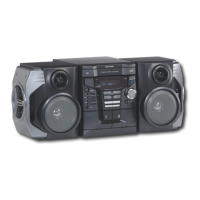
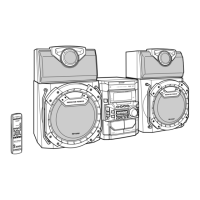
Sharp CD-M10000W - User Manual

Sharp CD-M10000W
34 pages
Print Icon
To Next Page IconTo Next Page
Loading...
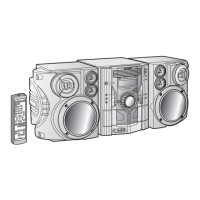
MINI COMPONENT SYSTEM
MINI-CHAÎNE
SISTEMA MINI
MODEL MODELO
MODÈLE
CD-M10000W
SPEAKER SYSTEM
ENCEINTES ACOUSTIQUES
SISTEMA DE ALTAVOCES
MODEL MODELO
MODÈLE
CP-M10000
OPERATION MANUAL MANUAL DE MANEJO
MODE D’EMPLOI
Please refer to pages E-1 to E-32.
Se reporter aux pages F-1 à F-32.
Consulte las páginas S-1 a S-32.
ENGLISH
FRANÇAIS
ESPAÑOL
SHARP CORPORATION
CD-M10000W(FRONT) 01.10.2, 15:081
Downloaded from: http://www.usersmanualguide.com/

Other manuals for Sharp CD-M10000W

Questions and Answers

  • D
    Daniel LittleAug 16, 2025
    Why is the remote control for my Sharp CD-M10000W not working?
    • C
      Charlotte HernandezAug 16, 2025
      If the remote control for your Sharp Stereo System isn't working, verify that the unit is plugged in, the batteries are correctly inserted and not dead, the distance and angle to the unit are correct, and there's no strong light interfering with the remote control sensor.
  • G
    Gregory PowellAug 19, 2025
    What to do if my Sharp CD-M10000W has no sound?
    • M
      Michael HuffSep 12, 2025
      If no sound is coming from your Sharp Stereo System, make sure the volume isn't set to "0", headphones aren't connected, speaker wires are properly connected, and the karaoke mode is not set to "L-CH", "R-CH" or "V-CANCEL".
  • A
    Andrew SaundersAug 22, 2025
    What to do if playback on my Sharp CD-M10000W Stereo System doesn't start or stops?
    • M
      Michael CallahanAug 22, 2025
      If playback on your Sharp Stereo System doesn't start, stops midway, or isn't working correctly, check if the disc is loaded correctly, meets the required standards, and isn't distorted or scratched.
  • J
    Jacqueline MoralesAug 25, 2025
    What to do if buttons on my Sharp CD-M10000W don't respond?
    • A
      Alexis BakerAug 26, 2025
      If your Sharp Stereo System isn't responding when you press a button, set the unit to the power stand-by mode and then turn it back on. If the unit still malfunctions, reset it.
  • J
    Jordan TerryAug 28, 2025
    Why does my Sharp CD-M10000W Stereo System skip during playback?
    • T
      tiffanyjenkinsAug 28, 2025
      If the Sharp Stereo System skips or stops during playback, verify that the unit isn't near excessive vibrations, the disc is clean, and there's no condensation inside the unit.
  • R
    Renee AllenAug 31, 2025
    Why can't I record properly on my Sharp CD-M10000W?
    • L
      Laura HinesAug 31, 2025
      If you cannot record tracks with proper sound quality or cannot erase completely on your Sharp Stereo System, use a normal tape. You cannot record on a metal or CrO tape.
  • A
    Anthony WilliamsonSep 3, 2025
    Why is my Sharp Stereo System radio making unusual noise?
    • M
      Martha BrownSep 3, 2025
      If your Sharp Stereo System radio is making unusual noise, move the AC power lead away from the aerial. Also, check if the unit is placed near the TV or computer and ensure the FM aerial or AM loop aerial is placed properly.
  • S
    susanmillerSep 6, 2025
    What to do if vocal part is not heard on my Sharp Stereo System?
    • N
      Nicholas LindseySep 6, 2025
      If the vocal part of a multiplexed disc is not heard on your Sharp Stereo System, check if the karaoke mode is set correctly.
  • K
    Katie DixonSep 9, 2025
    What to do if I cannot remove the tape from my Sharp CD-M10000W Stereo System?
    • K
      Kimberly LewisSep 9, 2025
      If you cannot remove the tape from your Sharp Stereo System, especially after a power failure during playback, do not force the compartment open. Wait until electricity resumes.
  • T
    Theresa SpenceSep 12, 2025
    How to fix Sharp CD-M10000W when it cannot record?
    • K
      Kimberly ReeseSep 12, 2025
      If your Sharp Stereo System cannot record, check the erase-prevention tab.

Summary

Introduction

Product Introduction and Special Notes

Welcomes the user and highlights important safety and operating notes.

Laser Safety Precautions

Details safety warnings related to the unit's laser product classification.

Included Accessories

Remote Control and Batteries

Lists and illustrates the remote control and required batteries.

Audio and Speaker Accessories

Shows AM/FM aerials and speaker wires for system setup.

Safety and Usage Precautions

General Environmental and Placement Guidelines

Ensures proper ventilation, surface, and environmental conditions for operation.

Volume, Condensation, and Electrical Safety

Addresses volume levels, condensation issues, and electrical safety measures.

Compact Disc Handling and Care

Provides guidance on safe listening levels and compact disc care.

Unit Controls and Indicators

Front Panel Controls and Displays

Identifies and explains all buttons and indicators on the front of the main unit.

Display Indicators and Rear Panel Connections

Details the unit's display indicators and rear panel connections.

Remote Control Functions Overview

Lists and explains the buttons and operation of the remote control transmitter.

Remote Control Setup

Remote Control Battery Installation and Testing

Instructions for installing batteries and testing the remote control's functionality.

System Connections Guide

Connecting Aerials and Speakers

Guides on connecting aerials and speaker systems to the unit.

Power, Voltage, and Tuner Span Setup

Instructions for setting AC voltage, connecting power, and configuring tuner span.

Basic Operation and Settings

General Control Functions

Covers volume, display brightness, demonstration mode, bass, and equalizer settings.

Setting and Adjusting the Clock

Step-by-step guide to setting the unit's clock and time display format.

CD Playback Features

Playing Audio CDs

How to load, play, stop, and remove CDs from the player.

Track Navigation and Searching

Methods for locating specific tracks or parts of a CD.

Repeat, Random, and Programmed Playback

Instructions for various playback modes including repeat, random, and custom sequences.

Radio Operation

Tuning and Listening to Radio Stations

Steps for manual and auto-tuning FM and AM broadcasts.

Managing Memorised Radio Presets

Procedures for storing, accessing, scanning, and erasing favorite radio stations.

Cassette Tape Playback

Playing TAPE 1 Cassettes

Instructions for playing cassette tapes in the TAPE 1 compartment.

Playing TAPE 2 Cassettes

Instructions for playing cassette tapes in the TAPE 2 compartment.

Karaoke Functionality

Using the Karaoke Feature

How to connect a microphone and adjust levels for karaoke.

Karaoke Audio Mode Adjustments

Selecting audio modes like STEREO, L-CH, R-CH, and V-CANCEL.

Tape Recording and Dubbing

Recording from Radio to Tape

Steps for recording audio from the radio onto a cassette tape.

Recording from CD to Tape

How to copy music from CDs onto cassette tapes.

Dubbing and Erasing Cassette Tapes

Instructions for copying tapes and erasing content from cassette tapes.

Advanced Features

Timer for Playback and Recording

Setting timers for automatic unit activation for playback or recording.

Sleep Timer Operation

How to set the unit to turn off automatically after a specified period.

Enhancing System with External Devices

Steps for connecting and listening to external sources like VCRs or DVDs.

Headphone Usage Guide

Information on connecting and using headphones with the system.

References and Specifications

Troubleshooting Common Issues

Guide to resolving problems with the CD player, tuner, cassette deck, and remote control.

System Maintenance and Transport Prep

Instructions for cleaning, system reset, and preparing the unit for transport.

Technical Specifications

Detailed specifications for power, dimensions, performance, and components.

Sharp CD-M10000W Specifications

General IconGeneral
BrandSharp
ModelCD-M10000W
CategoryStereo System
LanguageEnglish

Related product manuals