EasyManua.ls Logo

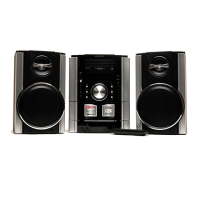
Sharp cd-mpx880 - User Manual

Sharp cd-mpx880
53 pages
Print Icon
To Next Page IconTo Next Page
Loading...
27/3/08 CD-MPX880H_FRONT.fm
TINSZA165AWZZ
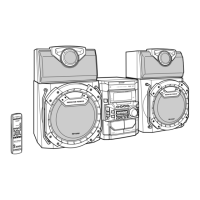
MINI KOMPONENTEN SYSTEM
MINI-CHAÎNE
SISTEMA MINI
MINI KOMPONENT SYSTEM
MINI SISTEMI
MINI SYSTEEM
SISTEMA DE MINI COMPONENTE
MINI COMPONENT SYSTEM
MODELL
MODÈLE
MODELO
MODELL
MODELLO
MODEL
MODELO
MODEL
CD-MPX880H
BEDIENUNGSANLEITUNG
MODE D’EMPLOI
MANUAL DE MANEJO
BRUKSANVISNING
MANUALE DI ISTRUZIONI
GEBRUIKSAANWIJZING
MANUAL DE OPERAÇÃO
OPERATION MANUAL
Das Mini Komponenten System CD-MPX880H besteht aus CD-MPX880H
(Hauptgerät) und CP-MPX880H (Lautsprechersystem).
Mini-chaîne CD-MPX880H composée de CD-MPX880H (appareil principal) et
de CP-MPX880H (enceinte acoustique).
CD-MPX880H Sistema de Mini Componente consistente en CD-MPX880H
(unidad principal) y CP-MPX880H (sistema de altavoces).
CD-MPX880H Minikomponentsystem bestående av CD-MPX880H
(huvudenhet) och CP-MPX880H (högtalarsystem).
CD-MPX880H Mini Component System, composto dal CD-MPX880H (unità
principale) e dal CP-MPX880H (sistema di diffusori).
CD-MPX880H Mini Component Systeem bestaande uit CD-MPX880H
(hoofdunit) en CP-MPX880H (luidsprekersysteem).
CD-MPX880H Mini Component System consistindo de CD-MPX880H (unidade
principal) e CP-MPX880H (sistema de alto-falante).
CD-MPX880H Mini Component System consisting of CD-MPX880H (main unit)
and CP-MPX880H (speaker system).
Siehe Seiten i bis viii und D-1 bis D-42.
Se reporter aux pages i à viii et F-1 à F-42.
Consulte las páginas i a viii y S-1 a S-42.
DEUTSCH
Favor consultar as páginas i a viii e P-1 a P-42.
PORTUGUÊS
FRANÇAIS
ESPAÑOL
Hänvisa till sidorna i till viii och V-1 till V-42.
Leggere le pagine i a viii e I-1 a I-42.
Raadpleeg de bladzijden i t/m viii en N-1 t/m N-42.
SVENSKA
ITALIANO
NEDERLANDS
Please refer to pages i to viii and E-1 to E-42.
ENGLISH

Downloaded From Disc-Player.com Sharp Manuals

Questions and Answers

  • J
    Jacob WalkerAug 16, 2025
    What to do if the Sharp cd-mpx880 remote control does not operate?
    • U
      unguyenAug 16, 2025
      If the remote control for your Sharp Stereo System isn't working, try these steps: * Ensure that the AC power lead of the unit is properly plugged in. * Verify that the batteries are correctly inserted, paying attention to the polarity. * Replace the batteries if they are dead. * Adjust the distance or angle between the remote and the unit. * Make sure that the remote control sensor isn't exposed to strong light; if it is, move the remote away from the light source.
  • J
    Jean BlairAug 19, 2025
    Why is there no sound coming from my Sharp Stereo System?
    • M
      Michael AdamsAug 19, 2025
      If your Sharp Stereo System is producing no sound, there are several things to check: * Ensure the volume isn't set to '0'. If it is, adjust the volume accordingly. * Verify that headphones are not connected, as this may mute the speakers. * Confirm that the speaker wires are properly connected. If disconnected, reconnect them.
  • M
    marissataylorAug 22, 2025
    Why does the Sharp cd-mpx880 Stereo System skip or stop during playback?
    • E
      Erica WardAug 22, 2025
      If your Sharp Stereo System is skipping sounds or stopping during playback, consider the following: * Relocate the unit away from sources of excessive vibration. * Clean the disc if it's dirty. * If condensation has formed inside the unit, allow it to dry out.
  • N
    Nicolas WebbAug 25, 2025
    Why won't my Sharp cd-mpx880 Stereo System play the disc properly?
    • J
      Jasmine CombsAug 26, 2025
      If your Sharp Stereo System is not playing discs correctly, consider these points: * Make sure that the disc is loaded with the correct side facing down. * Verify that the disc meets the required standards. * Check the disc for any signs of distortion or scratches.
  • E
    Emily RiveraAug 27, 2025
    Why is my Sharp Stereo System radio making unusual noises?
    • S
      Sherry StevensAug 27, 2025
      If your Sharp Stereo System's radio is making unusual noises, try the following: * Move the unit away from other electronic devices like TVs or computers. * Ensure that the FM aerial or AM loop aerial is properly positioned, and move it away from the AC power lead if it's nearby.
  • M
    Martha AndersonAug 30, 2025
    What to do if my Sharp cd-mpx880 does not respond when a button is pressed?
    • S
      Sean HernandezAug 30, 2025
      If your Sharp Stereo System is not responding when you press a button, try setting the unit to the power stand-by mode and then turning it back on.
  • J
    jbrownSep 2, 2025
    How to fix Sharp cd-mpx880 when it cannot record?
    • N
      nsullivanSep 2, 2025
      If your Sharp Stereo System cannot record, please check the erase-prevention tab on the tape.
  • M
    Michael MooreSep 4, 2025
    What to do if condensation inside the Sharp cd-mpx880 may cause malfunction?
    • A
      Angela GuzmanSep 4, 2025
      If condensation inside the cabinet of your Sharp Stereo System may cause malfunction, leave the power on with no disc (or cassette) in the unit until normal playback is possible (about 1 hour). Before operating the unit, wipe off any condensation on the transmitter with a soft cloth.
  • D
    Donna AndersonSep 7, 2025
    Why is the clock on my Sharp cd-mpx880 not set to the correct time?
    • C
      Cameron StoutSep 7, 2025
      If your Sharp Stereo System clock is not set to the correct time, it may be due to a power failure. Reset the clock.
  • G
    Gregory ContrerasSep 10, 2025
    What to do if Sharp cd-mpx880 Stereo System has a problem due to strong external interference?
    • B
      Brenda MarquezSep 12, 2025
      If a problem occurs with your Sharp Stereo System due to strong external interference or incorrect operation, set the unit to the stand-by mode and turn the power on again. If this does not work, unplug and plug in the unit, and then turn the power on.

Summary

General Information

Precautions and Safety Guidelines

General safety and usage guidelines for the equipment.

Preparation for Use

System Connections

Instructions for connecting speakers, aerials, and power supply.

AC Power Connection and Initialisation

Steps for connecting the unit to the AC power source and notes on initialisation.

Basic Operation

General Controls and Features

Overview of main unit and remote control functions.

CD or MP3;WMA disc Playback

CD and MP3;WMA Disc Playback Basics

Information on playing discs and automatic power functions.

Radio

Listening to the Radio

How to tune in to radio stations using manual and auto tuning.

Tape Playback

Listening to Cassette Tapes

Instructions for playing cassette tapes and related precautions.

Tape Recording

Recording from Discs

How to record audio from discs onto a cassette tape.

Advanced Features

Using the Radio Data System (RDS)

Explanation of RDS features and details on displayed information.

Auto Station Programme Memory (ASPM)

How to automatically scan and store RDS radio stations.

Timer and Sleep Operation

Setting timers for playback or recording specific programs.

References

Troubleshooting Chart

A guide to common problems and their solutions.

Sharp cd-mpx880 Specifications

General IconGeneral
BluetoothNo
CD PlayerYes
Disc CompatibilityCD, CD-R, CD-RW
TunerFM
SpeakersYes, 2 speakers

Related product manuals