EasyManua.ls Logo

Sharp CE-150 - Page 372

Sharp CE-150
412 pages
Print Icon
To Next Page IconTo Next Page
To Previous Page IconTo Previous Page
Loading...
132
A
ll
and more about Sharp PC-1500
at
http://www.PC-1500.info
(j)
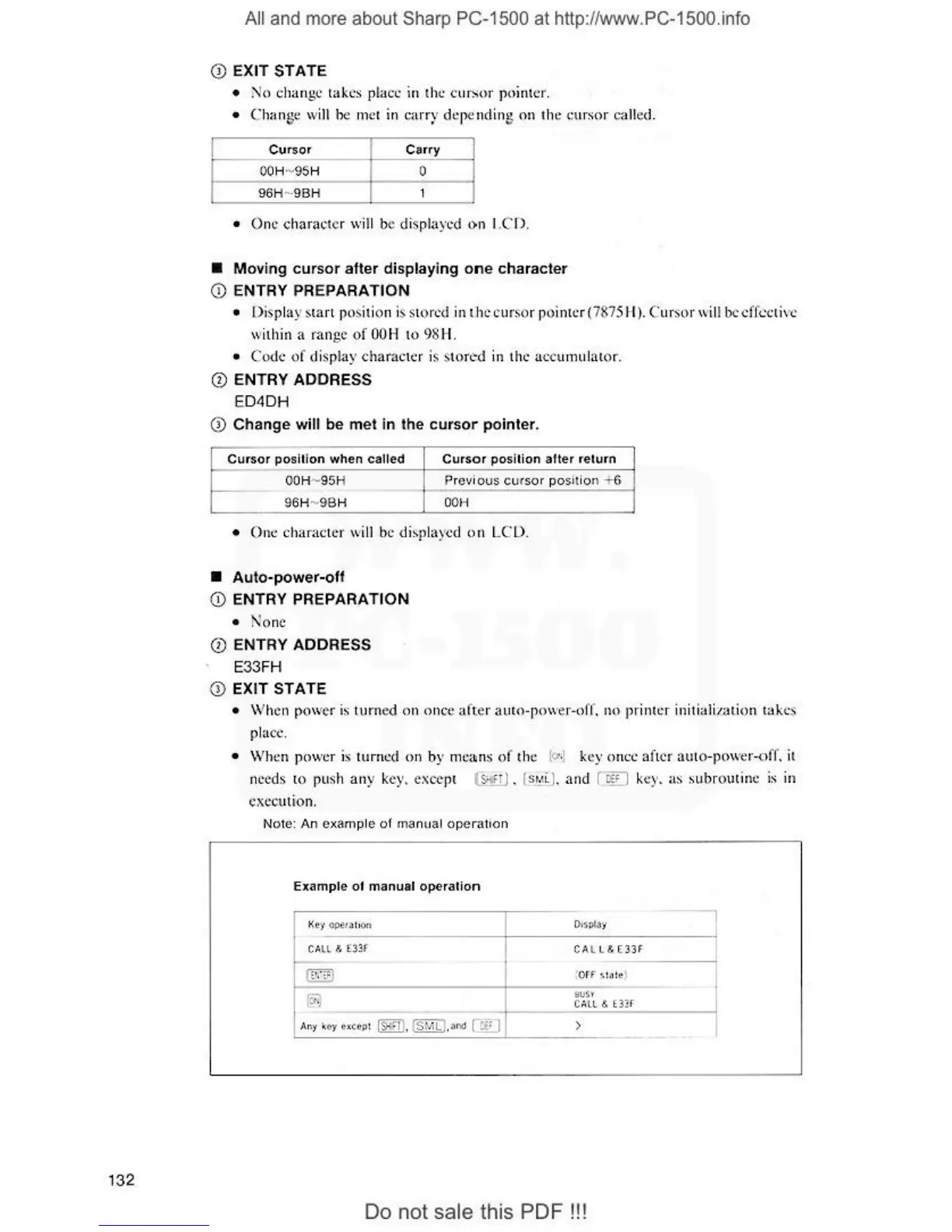
EXIT STATE
•
!\
1
o
chang
e::
takes pl
ace
in the curs()f
poin
ter
.
• Chanse \V
iii
be
n1
et in
c.<
1r
r~
'
depending on the cur
sor
c<.
t11
ed.
Cursor
Ca:rry
O
OH
- 95H
0
96H
-·
9BH
1
•
One
charac
te
r wi
ll
be displ
ayed
<>n
I
.C
D.
• Moving
cur
sor
after displaying
on
e character
(j)
ENTRY PREPARATION
•
()
is
pl
ay
S
tart
position is stor
ed
in the cur
so
r pointer
(7
87
5
H).
C
ur
so
r will bc cffcctivc
wi1hin a
ran
ge
of
OOH
to
98H
.
•
Co
d('
of
displ
ay
character is stored in t
he
a
c::c
urnul
ator
.
(J)
ENTRY ADDRESS
ED4DH
(j)
Change
will
be
met
in the
cursor
pointer.
Cursor
posUion when called
Cursor
position
after
return
O
OH
·-
95H Previous
cu
r
sor
po
s
it
io
n +6
96H-
9B
H O
OH
•
One
c
ha
ract
er
will be d isplayed o n
LCD
.
•
Auto-power-off
(1)
ENTRY PREPARATION
• None
Q)
ENTRY ADDRESS
E33FH
Q) EXIT STATE
• \Vhen
po,
ver is
turn
ed on on
ce
afte
r a uto-
po,
ver-off.
no
prin
te
r initializ
ation
take
s
pla
ce
.
•
\
Vht~n
po\ver is tu
rn
ed
()
n by
n1e
ai
ns
of
the
(<:t
•J key
once
af
t
er
au
to-
po
,ver-c)
ff
. it
needs to push any
ke
y.
exce
pc
(&.;r:
r)
. ls@ . and ( r:Ef) key. as subrout
ine
is in
execut
ion
.
Note:
An
example
of
1
nanu
al
ope
rat
i
on
Example
of
manual
operalion
I
Ke
y OPt
.a
1o
on
CA
LL
&
t3
!f
~
A
ny
key ex
ct:ti
!
ISHFTI
, ISMLl.al'ld
CWJ
CA
l
l&E'31f
iOFf
:>111
!
1!
)
>
Do
not sale this
PDF!!!
l