EasyManua.ls Logo

Sharp CE-150 - Page 375

Sharp CE-150
412 pages
Print Icon
To Next Page IconTo Next Page
To Previous Page IconTo Previous Page
Loading...
All and
mor
e about Sharp PC-1500
at
http://www.PC-1500.info
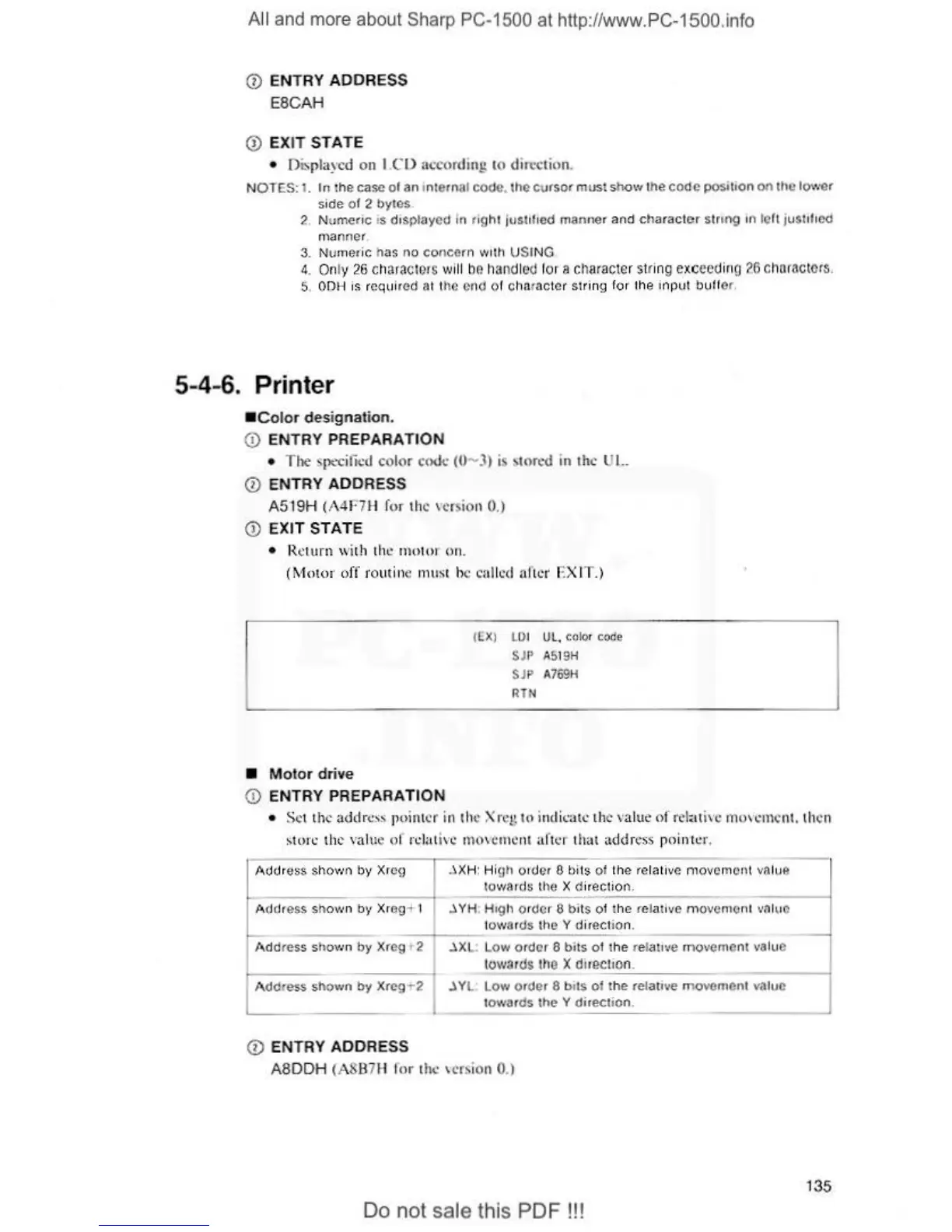
0 ENTRY ADDRESS
ESCAH
Q)
E
XIT
STAT
E
• Displayed on
I.Cl)
3ccordi
ng
10
direction.
N
OTES:
1.
In
ihe
case
al
an
1n1e1na1
cooe
.
the
cursor
must
st10\•1
lhe
code
POSi
t1on on
the
10\"'
er
side
o f 2
by•es
.
?.
Numeric
is displayed in
rig
h1
j
uslll
1ed manner and ch
aracter
string
1n left jus
t1l1
ed
r
nan
ne
r.
3. Nurneric has
no
concern
\Vllh U
SI
NG
4.
On
ly
26
c
hnra
cte1s
will
bo
h
and
led
for
a
character
slfing
ex
c
eed
in
g
?G
ch
orncte
rs.
5.
OOH
is
required at the end of character
si
ri
ng f
or
th
e inpl1t
buff
e
t.
5-4-
6.
Printer
•
Color
des
ignation.
Q)
ENTRY PREPARATI
ON
•
The
specified color
code
(0
- 3) is >torcd
in
the
UI..
0 ENTRY ADDRESS
A519H (A4F7H
for
the
\cr
s
io
n 0.)
Q)
EXIT STATE
•
l{.
ctu
rn
,,
·i
th
th
..:
ntt>l o 1
on
.
(Motor
off
ro
ut
in
e m
us
t he called
aftc1
· EXIT.)
•
Motor
drive
0 ENTRY PREPARATION
f
(X
) L
OI
UL. color
code
SJP A519H
SJP A769H
RTN
•
Se
t the adrlrt:ss point
er
in the Xr
cg
to
indit·atc the val
ue
of rel
;:
lli\'c
1no,...:n
1cn
1.
then
~ton:
the value
of
r
1.:
lati
\'C
1n<l\cn
tcn1
aftc..::
r th
at
addr~s
s
pointer.
I
A
dd
r
ess
s
ho,
•11)
by
d r
c9
..\
XH:
Hi
gh
01
<J
er
~
bils
of
the relative
n1o
vomont vniue
10
,v
a1
ds
tt
' e X direc1io
1,
,
----1
AcJdress sh
o'''"
by
Xr
eg
; 1
.l
YH High order 6 b
it
s o1 'he relative
mo
vc
r1'1
e
rH
vn
luo
lov
..
ar
<Js
t
h ~
Y d
ir
ec
tion.
--~--
Addres.s s
hov
..
n
by
Xreg 1 2
.lXL
: L
ow
order 8
bits
o1
1
he
relative r
novemcnt
value
towa
r
ds
the
X cirection.
- - -
---
-
A ddress sho,·1n
by
Xreg
,.-
2
.l
YL.
Low
order 8 bi
l.s
of
the
re
1a11vc
movemenl
value
1owards
the Y direc11on.
© ENTRY ADDRESS
ASDDH (A8B7H l
or
t
he
\cr,ion 0.)
Do
not sale this PDF !!!
135