EasyManua.ls Logo

Sharp CE-150 - Page 378

Sharp CE-150
412 pages
Print Icon
To Next Page IconTo Next Page
To Previous Page IconTo Previous Page
Loading...
138
All and more about Sharp PC-1500
at
http://www.PC-1500.info
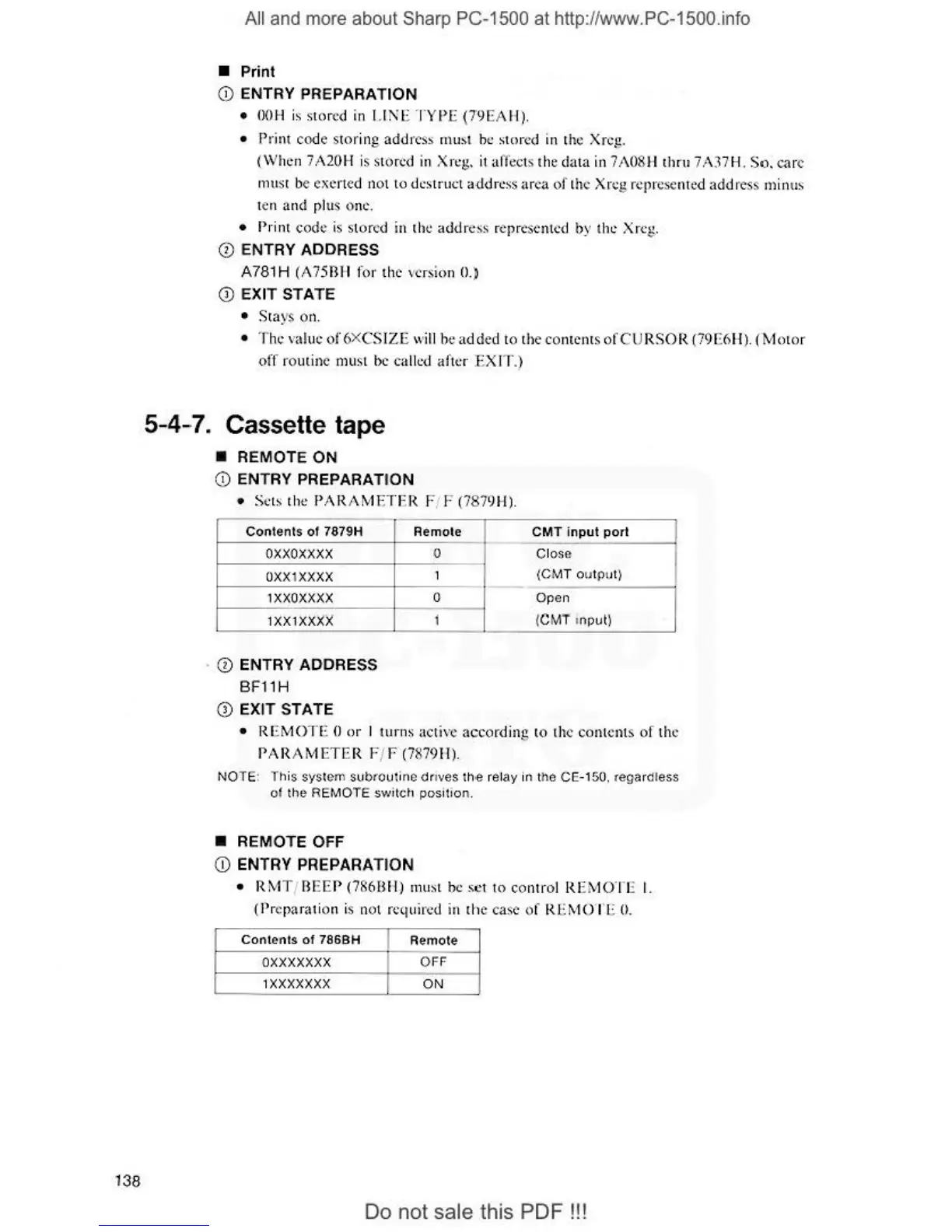
• Print
(i)
ENTRY PREPARATION
•
OOH
is s
tor
ed
in
1.1
!\E
TYPE
(79EAH)
.
• Print
code
st
or
ing
address
£nu
st be
stor
ed in t
he
Xrcg.
(Whe
n 7.A20H is stored in Xrcg. it affects the d
ata
in 7
A0
8H
thrn
7 A
37
H.
So
.
ca
re
rn
us
t be exerted not lo dcstr
u<.:l
address area
of
t
he
Xn.:
g_
repre
se
nted
addres
s
1nin
us
ten and pl
us
on
e.
•
t>
rint
code
is stor
ed
in
the
addre
ss
n
::p
rcsent
ed
by t
ht:
Xrc
g.
0 ENTRY ADDRESS
A781 H (A
75Bll
for the
ve
rsion 0.)
Q)
EXIT STATE
• St
ays
o
n.
• The value
of
6XCS
IZE
wi
ll
be added to t
he
co
ntents
of
CU
RSOR
(79E6H).
(Mo
tor
off
ro
utine must be
ca
lled
af
ter EX IT
.)
5-4-7. Cassette tape
• REMOTE ON
(i) ENTRY PREPARATI
ON
• Sets the
PAR
AMETER
Fi F
(78
7
9H)
.
Contents
of
7379H
oxxoxxxx
OXX
I
XXXX
lXXOXXXX
IXXIXXX
X
· 0 ENTRY ADDRESS
BF
11H
(i)
EX
IT
STATE
Remote
0
1
0
j
CMT
input
port
Close
I
(CM
T out
p<J
t)
Open
{CMT
in
put!
• R
EMOTE
0
or
I
turns
acti
ve
according
to the
conlcnls
of
the
PARAMETER
F/ F (7879
11
).
NOTE: l
t,
is syst
e1n
subtoutin
e
dnves
th
.e
rel
ay
in
the CE-150. re
ga
rdless
ot
th
e REMOTE switch pos
it
ion
.
• REMOTE OFF
(j)
ENTRY PREPARATION
•
RMT
/ B
EE
P (786B H) must be
set
lo
cont
rol R
EMOTE
I.
{Preparation is nol required in
the
case
of
RE
MOT
E
O.
Contents
of
786BH Remote
o
xxxxxxx
OFF
IXXXXXXX
ON
Do
not sale this
PDF!!!