Page
92
93
164
A
ll
and more about Sharp P
C-
1500 at http://
www
.PC-1500.info
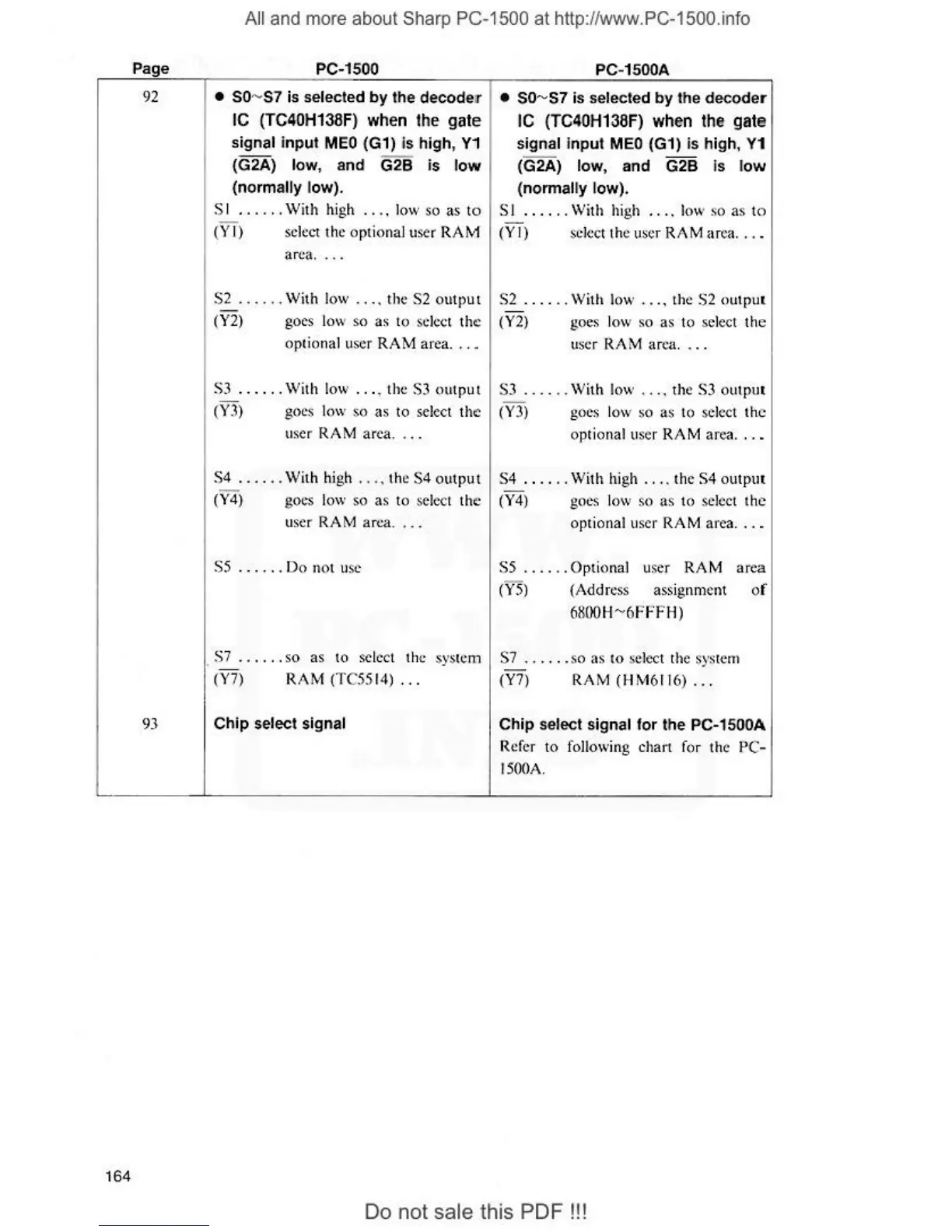
PC-1500
•
so
~
s1
is selected
by
the decode:r
IC (TC40H138F) when the gate
signal input
MEO
(G1) Is high,
Y1
(G2A)
low
, and G2B is
low
(normally low).
PC
-1500A
•
so~s1
is selected
by
the decoder
IC (TC4
0H138F
)
wh@n
the gate
signal Input M
EO
(G 1) is high, Y1
(G2A) low, and G2B is
low
(norma
lly
low).
S I .
...
..
With high .
...
low
so
as to
SI
......
Wi
th h
ig
h .
...
low so as to
(Y
I) sclc,1 thc optional user
RAf
v1
(Y
I) select the user R
AM
ar
ea .
..
.
area
.
...
S2
...
. . . With low
..
. . the
S2
output
S2
..
....
With low
..
.. the
S2
<)u
t
pu1
(Y2)
goes low so as t
(>
select t
he
(Y2)
goes l
ow
so
as to select
th
e
optional user
RAM
area. . . . user RAM area
..
..
S3
......
With low . . .• the S3
outp
ut
S3
.....
. With low .
...
the S3
outp
ul
(Y3) goes l
ow
so as to select t
he
(Y3)
goes low so as to se
le
ct
the
user RAM area. . . .
op
tional user RAM area . .
.•
$4
...
.
..
With
hi
gh
..
..
th
e $4
output
S4 . .
.. ..
With
hi
gh .
...
the S4 outplll
(Y4)
goes low so as to select the
(Y
4) goes l
ow
so
as
to select t
he
user RAM area. . . . optional user RAM area .
..
•
S5
....
..
Do not use
S7
...
...
so
as
to
select the system
(Y
7) RAM
(T
C5514)
...
Ch
ip
select signal
SS
.
...
.. Optional user
RAM
area
(VS)
(A
dd
ress
assignment of
6800H
~
6FFFH)
$7
......
so as
to
select the syst
em
(Y?) RAM
(H
M
61
1
6)
...
Chip
select signal for the PC-1
SOO
A
Refer to following chart for the PC-
I
500A
.
Do
not sale this
PDF!!!


 To Next Page