MAINTENANCE
Be sure to disconnect the power from the wall socket before cleaning.
CLEANING THE FILTER
If the lter is clogged with dust, the airow will be reduced, resulting in poor cooling per-
formance. The lter should be cleaned every two weeks.
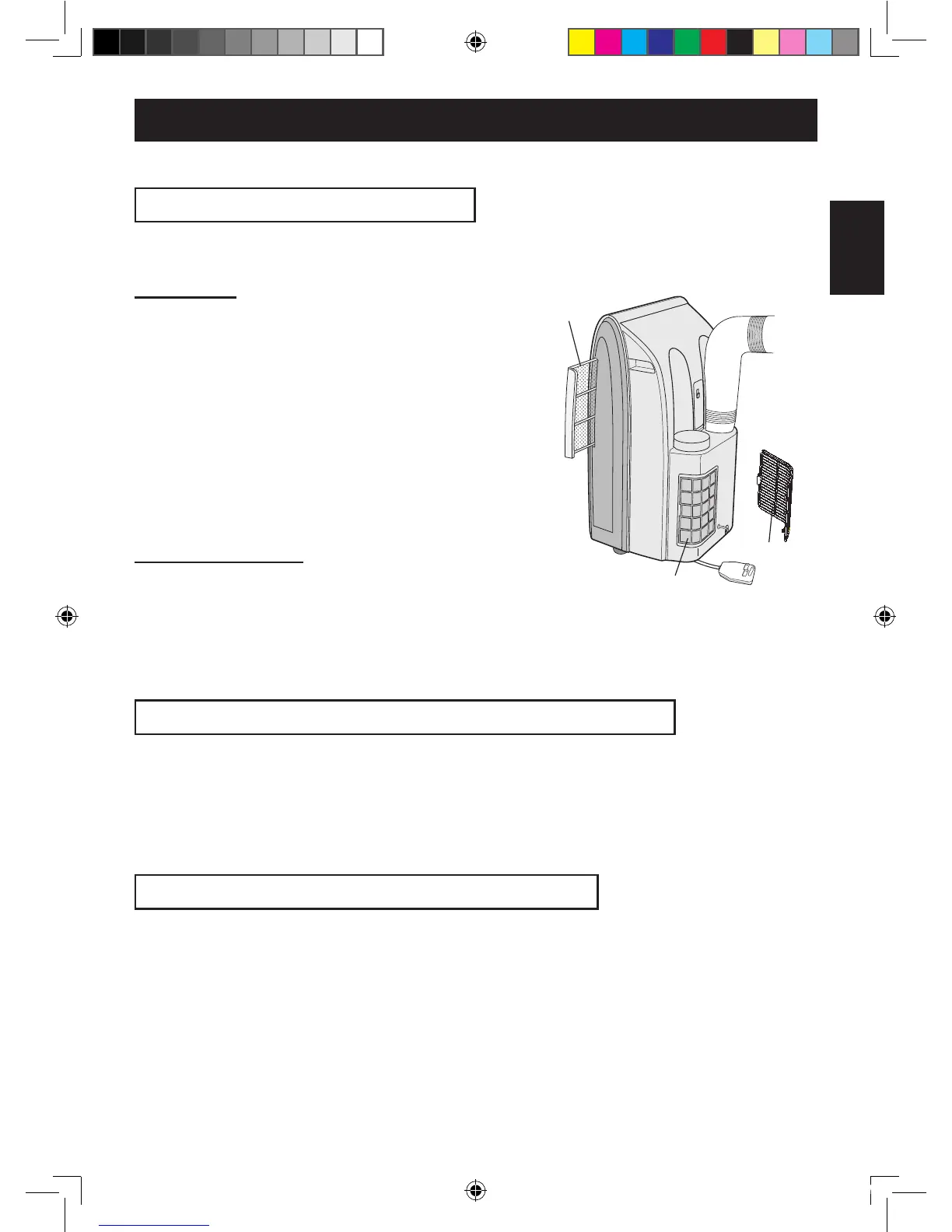
AIR FILTER
1
REMOVE THE FILTER
• Pull the lter to the right.
2
CLEAN THE FILTER
• Use a vacuum cleaner to remove any dust. If the
lter is very dirty, wash it with detergent and rinse
carefully with clean water. Dry the lter before re-
installing them. Do not leave it in direct sun light.
3
REINSTALL THE FILTER
AIR INLET FILTER
Remove the grill and clean the air inlet lter
with a vacuum cleaner.
CAUTION:
Never operate the unit without the lter. Doing so may
result in serious damage to the unit.
CLEANING THE UNIT AND THE REMOTE CONTROL
Wipe them with a soft, dry cloth or with a cloth moistened with a mild soap. Carefully re-
move any residue by wiping with a damp cloth and dry completely.
Avoid splashing water onto the unit. Water can dangerously damage the electrical insula-
tion.
Never use harsh chemicals or abrasive cleaners on any part of the unit. To avoid damag-
ing the unit, do not use hot water (120°F/50°C or hotter) when cleaning.
BEFORE NON-USE FOR A LONG PERIOD
1
Perform drainage to drain out water within the unit and replace the
stopcock securely to the drainpipe.
2
Operate the unit in the FAN or VENTILATION mode for about half a day
to thoroughly dry inside the unit.
3
Cleanthelters,thenreinstallthem.
4
Disconnect the power from the wall socket.
Air inlet lter
Air lter
Grill


 To Next Page