13
DW-71-H
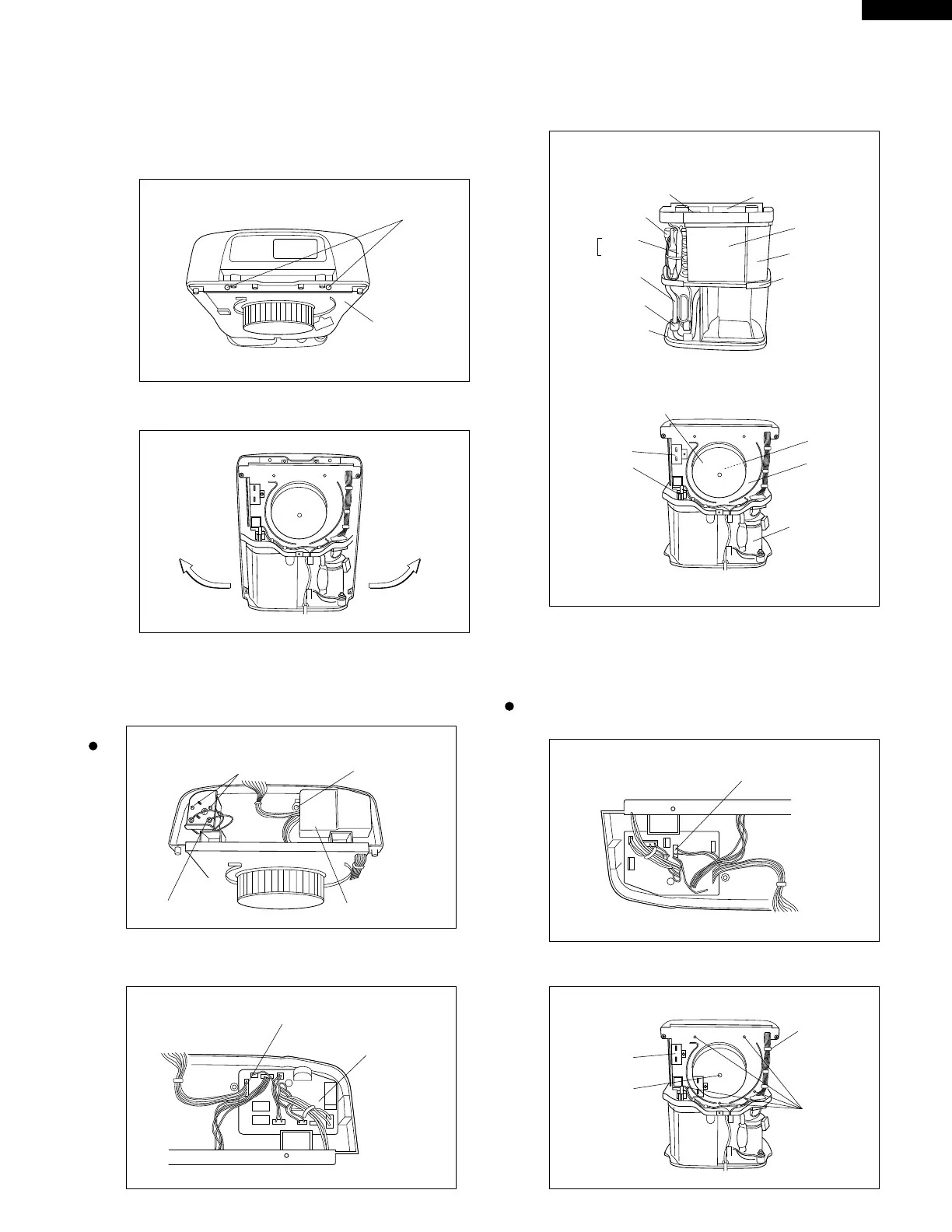
3. Removing the main unit front part
(1) Remove the casing SK fixing screws (2 pcs.).
(Handle reinforcement angle fixing screws)
(2) Widen outward the lower parts of main unit front
part, and withdraw to this side.
(3) Remove the power supply cover inside the evaporator
top box.
(4) Holding the power supply PWB, withdraw the harness
of operation section.
Main parts
(2) Release the harness from the casing.
(3) Remove the screws fixing the casing to the main unit.
4. Removing the fan motor
(If the fan motor failed to run, be sure to replace the fan
together with the fan motor.)
(The fan vibrates more remarkably, causing growing
noise.)
After removing the front and rear parts of main unit
(1) Disconnect the connector of power supply PWB.
Display PWB harness
Power supply PWB
Harness
fixing rib
Fan fixing
screw
Screw
Casing
ScrewScrew
Transfomer cover (The transformer is under the cover)
Power supply cover
Earth terminal
Dew pan
Magnetic coil
Dryer
Filter
Suction pipe ass'y
Butyl rubber
Bottom plate
ass'y
Power supply PWB
Evaporator top box
Evaporator
Fin cover
Fan motor
Casing
Capacitor
Compressor
FULL switch
Sirocco fan



 To Next Page