EasyManua.ls Logo

Sharp EL-6660 - Page 30

Sharp EL-6660
50 pages
Print Icon
To Next Page IconTo Next Page
To Previous Page IconTo Previous Page
Loading...
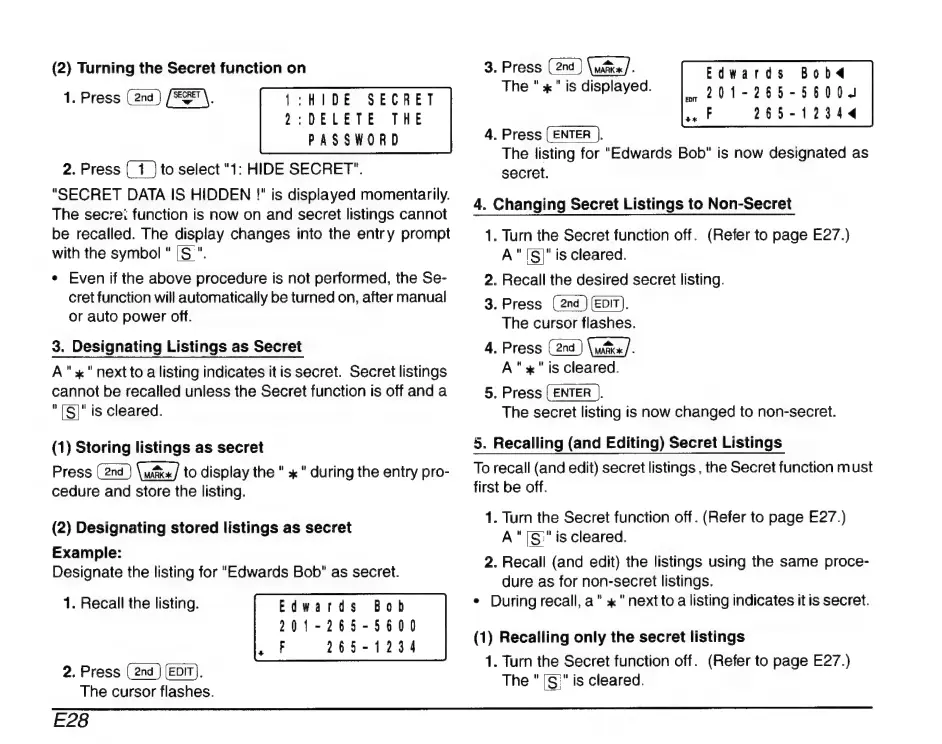
(2)
Turning
the
Secret
function
on
1.
Press
(
2na
)
(ESEN,
1:HIDE
SECRET
2:DELETE
THE
PASSWORD
2.
Press
to
select
"1:
HIDE
SECRET".
"SECRET
DATA
IS
HIDDEN
!"
is
displayed
momentarily.
The
secre:
function
is
now
on
and
secret
listings
cannot
be
recalled.
The
display
changes
into
the
entry
prompt
with
the
symbol
"
[S
".
*
Even
if
the
above
procedure
is
not
performed,
the
Se-
cret
function
will
automatically
be
turned
on,
after
manual
or
auto
power
off.
3.
Designating
Listings
as
Secret
A"
x"
next
to
a
listing
indicates
itis
secret.
Secret
listings
cannot
be
recalled
unless
the
Secret
function
is
off
and
a
"[S!"
is
cleared.
(1)
Storing
listings
as
secret
Press
to
display
the
"
x
"
during
the
entry
pro-
cedure
and
store
the
listing.
(2)
Designating
stored
listings
as
secret
Example:
Designate
the
listing
for
"Edwards
Bob"
as
secret.
1.
Recall
the
listing.
Edwards
Bob
201-265-5600
265-1234
PA
à
2.
Press
(EDIT).
The
cursor
flashes.
3.
Press
im
The
"x"
is
displayed.
Edwards
Bobd
«201-265-5600.
TE:
265-12344
4.
Press
(ENTER
),
The
listing
for
"Edwards
Bob"
is
now
designated
as
secret.
4.
Changing
Secret
Listings
to
Non-Secret
1.
Turn
the
Secret
function
off.
(Refer
to
page
E27.)
A"
[S]"
is
cleared.
2.
Recall
the
desired
secret
listing.
3.
Press
(EDIT).
The
cursor
flashes.
4.
Press
Que].
A"
x"
is
cleared.
5.
Press
{ENTER
).
The
secret
listing
is
now
changed
to
non-secret.
5.
Recalling
(and
Editing)
Secret
Listings
To
recall
(and
edit)
secret
listings
,
the
Secret
function
must
first
be
off.
1.
Turn
the
Secret
function
off.
(Refer
to
page
E27.)
A"IS
"is
cleared.
2.
Recall
(and
edit)
the
listings
using
the
same
proce-
dure
as
for
non-secret
listings.
e
During
recall,
a"
x"
nextto
a
listing
indicates
it
is
secret.
(1)
Recalling
only
the
secret
listings
1.
Turn
the
Secret
function
off.
(Refer
to
page
E27.)
The
"
[S;"
is
cleared.
E28

Related product manuals