EasyManua.ls Logo

Sharp EL-6660 - Page 36

Sharp EL-6660
50 pages
Print Icon
To Next Page IconTo Next Page
To Previous Page IconTo Previous Page
Loading...
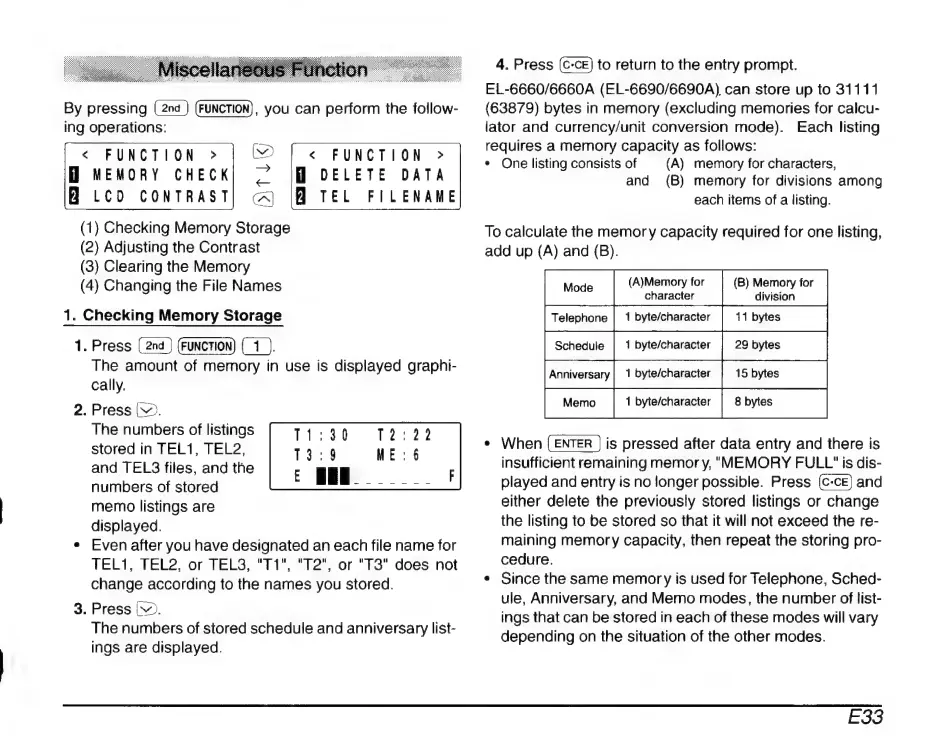
By
pressing
(FUNCTION),
you
can
perform
the
follow-
ing
operations:
«
FUNCTION
»
eO
|
<
FUNCTION
>
MEMORY
CHECK|
Z
DELETE
DATA
B
LCD
CONTRAST]
A
|H
TEL
FILENAME
(1)
Checking
Memory
Storage
(2)
Adjusting
the
Contrast
(3)
Clearing
the
Memory
(4)
Changing
the
File
Names
1.
Checking
Memory
Storage
1.
Press
EU
The
amount
of
memory
in
use
is
displayed
graphi-
cally.
2.
Press
(>.
The
numbers
of
listings
stored
in
TEL1,
TEL2,
and
TELS
files,
and
the
numbers
of
stored
memo
listings
are
displayed.
*
Even
after
you
have
designated
an
each
file
name
for
TEL1,
TEL2,
or
TELS,
"T1",
"T2",
or
"T3"
does
not
change
according
to
the
names
you
stored.
3.
Press
v.
The
numbers
of
stored
schedule
and
anniversary
list-
ings
are
displayed.
T4131
13:9
1439523
4.
Press
to
return
to
the
entry
prompt.
EL-6660/6660A
(EL-6690/6690A)
can
store
up
to
31111
(63879)
bytes
in
memory
(excluding
memories
for
calcu-
lator
and
currency/unit
conversion
mode).
Each
listing
requires
a
memory
capacity
as
follows:
*
One
listing
consists
of
(A)
memory
for
characters,
and
(B)
memory
for
divisions
among
each
items
of
a
listing.
To
calculate
the
memor
y
capacity
required
for
one
listing,
add
up
(A)
and
(B).
(A)Memory
for
(B)
Memory
for
character
division
*
When
is
pressed
after
data
entry
and
there
is
insufficient
remaining
memor
y,
MEMORY
FULL"
is
dis-
played
and
entry
is
no
longer
possible.
Press
and
either
delete
the
previously
stored
listings
or
change
the
listing
to
be
stored
so
that
it
will
not
exceed
the
re-
maining
memory
capacity,
then
repeat
the
storing
pro-
cedure.
e
Since
the
same
memor
y
is
used
for
Telephone,
Sched-
ule,
Anniversary,
and
Memo
modes,
the
number
of
list-
ings
that
can
be
stored
in
each
of
these
modes
will
vary
depending
on
the
situation
of
the
other
modes.
E33

Related product manuals