10
Advanced Keyboard/STATISTICS USING THE SHARP EL-9900
Copyright © 2002, Sharp Electronics Corporation. Permission is granted to photocopy for educational use only.
Steps for creating a weighted two-variable data set
1. Turn the calculator on and press STAT to enter the statistics menu.
Press A (EDIT) ENTER to view the data-entry screen. If old data
is present, delete it by moving the highlighter over L1 and pressing
DEL ENTER . Repeat for other lists.
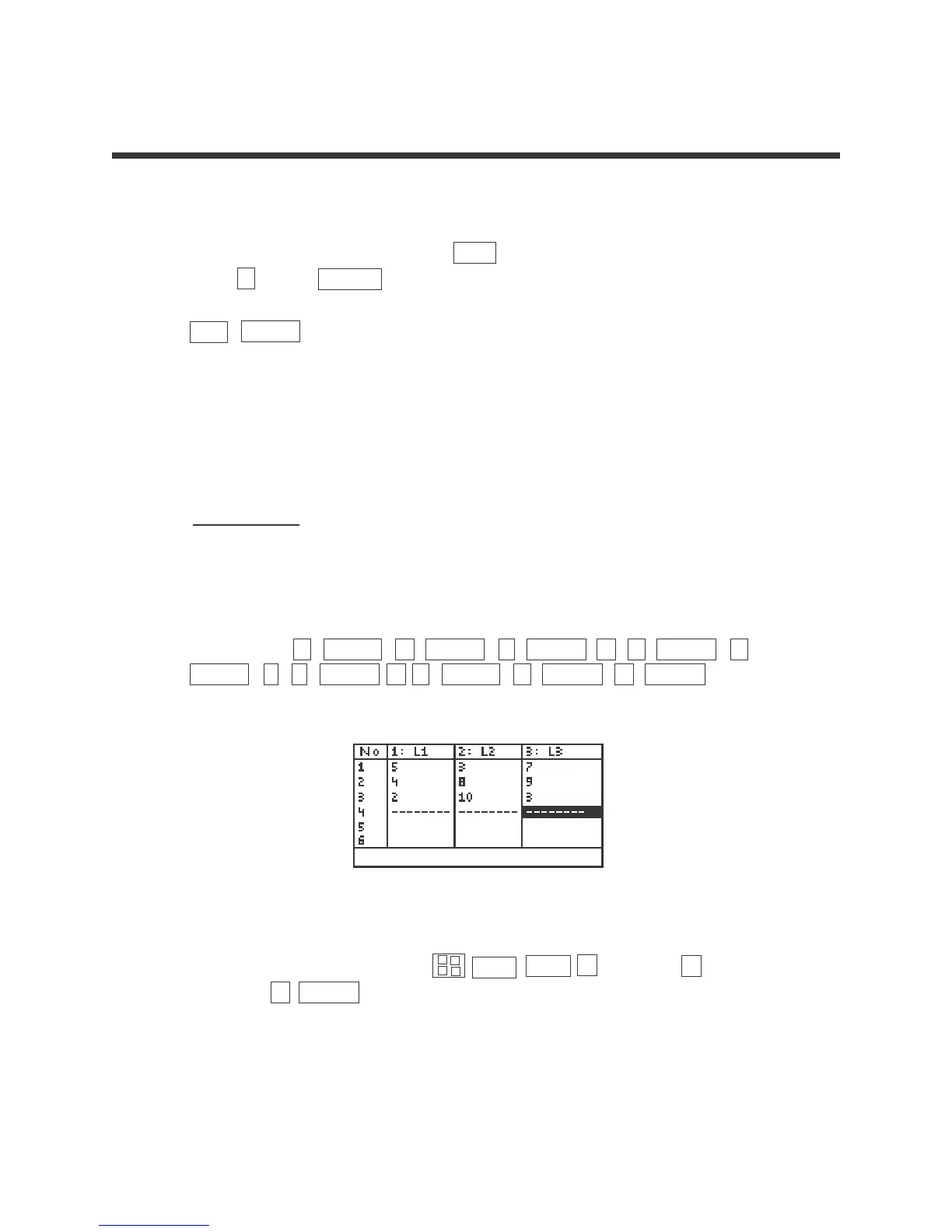
2. Each row will contain a data point (X, Y) and weight or frequency of
occurrence. If a point (X,Y) appears four times within a data set, its weight
or frequency is 4. Enter the following data set in L1 and L2 using L3 for the
weights:
X Y W
537
489
210 3
by pressing 5 ENTER 4 ENTER 2 ENTER 3 ENTER 8
ENTER 1 0 ENTER 7 ENTER 9 ENTER 3 ENTER .
3. Save this data set by pressing 2ndF LIST C (L_DATA) 1 (StoLD)
and press 2 ENTER .
CREATION OF A TWO-VARIABLE DATA SET
▼
▼
×
+
–
÷



 To Next Page