EasyManua.ls Logo

Sharp GF-777H - Page 10

Sharp GF-777H
35 pages
Print Icon
To Next Page IconTo Next Page
To Previous Page IconTo Previous Page
Loading...
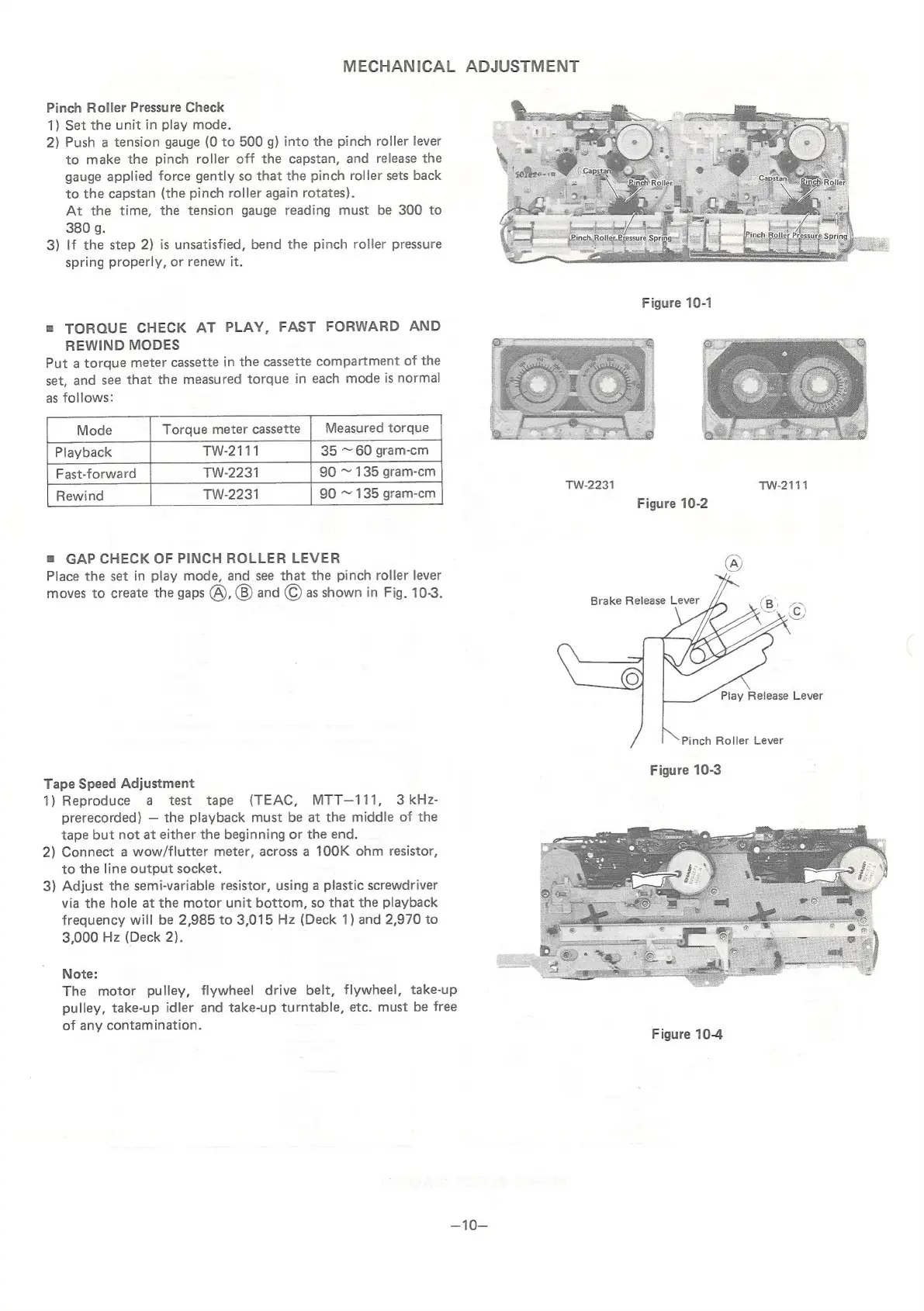
MECHANICAL
ADJUSTMENT
Pinch
Roller
Pressure
Check
1)
Set
the
unit
in
play
mode.
2)
Push
a
tension
gauge
(0
to
500
g)
into
the
pinch
roller
lever
to
make
the
pinch
roller
off
the
capstan,
and
release
the
gauge
applied
force
gently
so
that
the
pinch
roller
sets
back
to
the
capstan
(the
pinch
roller
again
rotates).
At
the
time,
the
tension
gauge
reading
must
be
300
to
380
g.
3)
If
the
step
2)
is
unsatisfied,
bend
the
pinch
roller
pressure
spring
properly,
or
renew
it.
=
TORQUE
CHECK
AT
PLAY,
FAST
FORWARD
AND
REWIND
MODES
Put
a
torque
meter
cassette
in
the
cassette
compartment
of
the
set,
and
see
that
the
measured
torque
in
each
mode
is
normal
as
follows:
Mode
Torque
meter
cassette
|
Measured
torque
Playback
TW-2111
35
~
60
gram-cm
Fast-forward
TW-2231
90
~
135
gram-cm
TW-2231
90
~
135
gram-cm
Tw-2231
TwW-2111
Figure
10-2
=
GAP
CHECK
OF
PINCH
ROLLER
LEVER
©
Place
the
set
in
play
mode,
and
see
that
the
pinch
roller
lever
moves
to
create
the
gaps
(A),
(B)
and
©
as
shown
in
Fig.
10-3.
Play
Release
Lever
Pinch
Roller
Lever
:
Figure
10-3
Tape
Speed
Adjustment
1)
Reproduce
a
test
tape
(TEAC,
MTT—111,
3
kHz-
prerecorded)
the
playback
must
be
at
the
middle
of
the
tape
but
not
at
either
the
beginning
or
the
end.
2)
Connect
a
wow/flutter
meter,
across
a
100K
ohm
resistor,
to
the
line
output
socket.
3)
Adjust
the
semi-variable
resistor,
using
a
plastic
screwdriver
via
the
hole
at
the
motor
unit
bottom,
so
that
the
playback
frequency
will
be
2,985
to
3,015
Hz
(Deck
1)
and
2,970
to
3,000
Hz
(Deck
2).
Note:
The
motor
pulley,
flywheel
drive
belt,
flywheel,
take-up
pulley,
take-up
idler
and
take-up
turntable,
etc.
must
be
free
of
any
contamination.
Figure
10-4
~10—

Related product manuals