EasyManua.ls Logo

Sharp GF-777H - Electrical Adjustment

Sharp GF-777H
35 pages
Print Icon
To Next Page IconTo Next Page
To Previous Page IconTo Previous Page
Loading...
ELECTRICAL
ADJUSTMENT
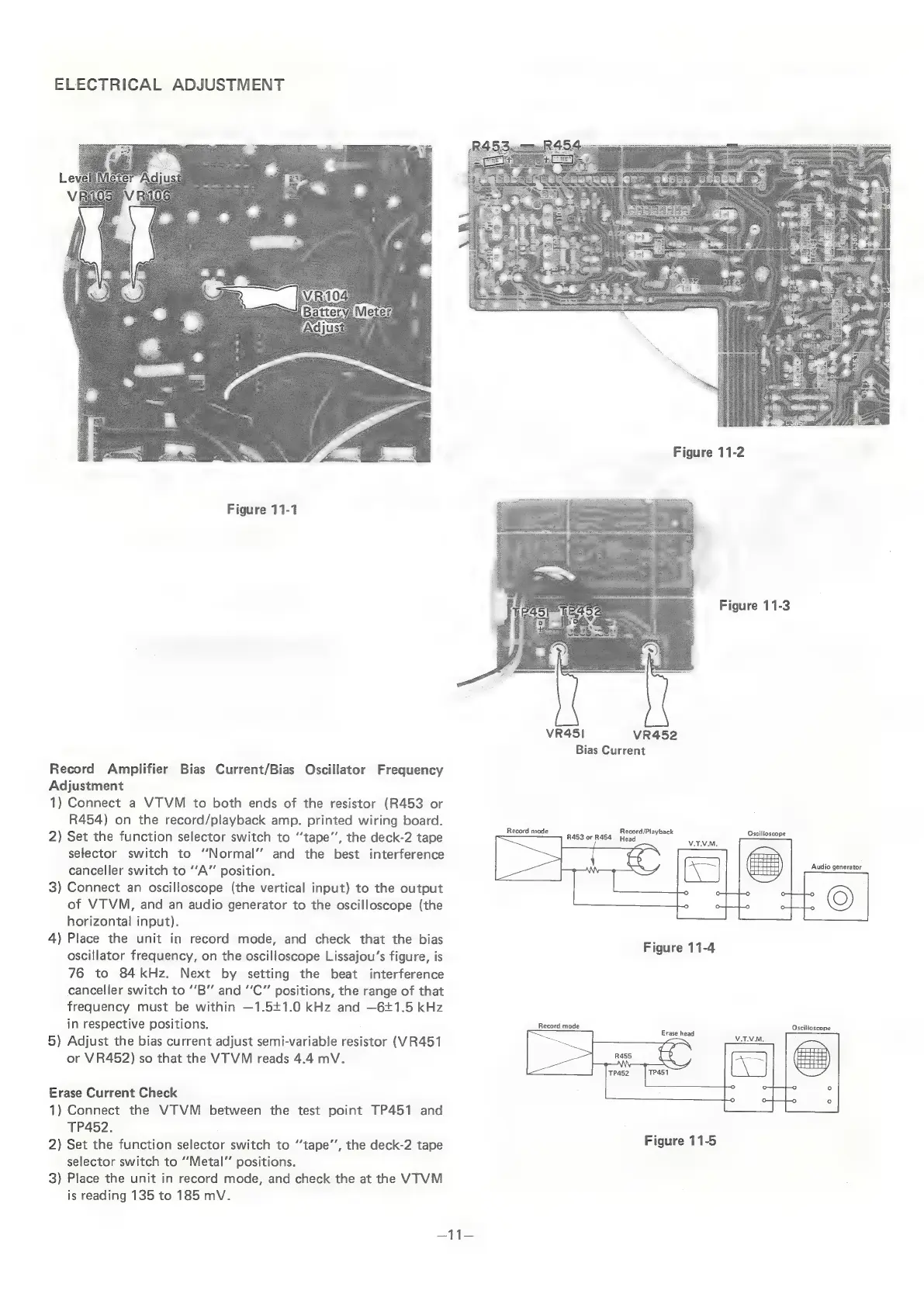
Figure
11-1
Record
Amplifier
Bias
Current/Bias
Oscillator
Frequency
Adjustment
1)
Connect
a
VTVM
to
both
ends
of
the
resistor
(R453
or
R454)
on
the
record/playback
amp.
printed
wiring
board.
2)
Set
the
function
selector
switch
to
‘tape’,
the
deck-2
tape
selector
switch
to
“‘Normal’’
and
the
best
interference
canceller
switch
to
“A”
position.
3)
Connect
an
oscilloscope
(the
vertical
input)
to
the
output
of
VTVM,
and
an
audio
generator
to
the
oscilloscope
(the
horizontal
input).
4)
Place
the
unit
in
record
mode,
and
check
that
the
bias
oscillator
frequency,
on
the
oscilloscope
Lissajou’s
figure,
is
76
to
84kHz.
Next
by
setting
the
beat
interference
canceller
switch
to
“’B”
and
“‘C”
positions,
the
range
of
that
frequency
must
be
within
—1.541.0
kHz
and
—6£1.5
kHz
in
respective
positions.
5)
Adjust
the
bias
current
adjust
semi-variable
resistor
(VR451
or
VR452)
so
that
the
VTVM
reads
4.4
mV.
Erase
Current
Check
1)
Connect
the
VTVM
between
the
test
point
TP451
and
TP452.
2)
Set
the
function
selector
switch
to
‘‘tape’’,
the
deck-2
tape
selector
switch
to
“Metal”
positions.
3)
Place
the
unit
in
record
mode,
and
check
the
at
the
VTVM
is
reading
135
to
185
mV.
R45,
R&S.
Sa
a
cle
eer
eer
.
eee
————
eapese
c=
iat
ees
SEEEEEES
a
EE
8
MG
P|.
EES
ae
6
“a
BALLS
ane
:
;
2
=
=
axe
*
im
ae
e
S
N
Le
ole
EB
Figure
11-2
Figure
11-3
VR451
VR452
Bias
Current
Oscilloscope
Audio
generator
Record
mode
Oscilloscope
Figure
11-5
4g

Related product manuals