EasyManua.ls Logo

Sharp GF-777H - Page 12

Sharp GF-777H
35 pages
Print Icon
To Next Page IconTo Next Page
To Previous Page IconTo Previous Page
Loading...
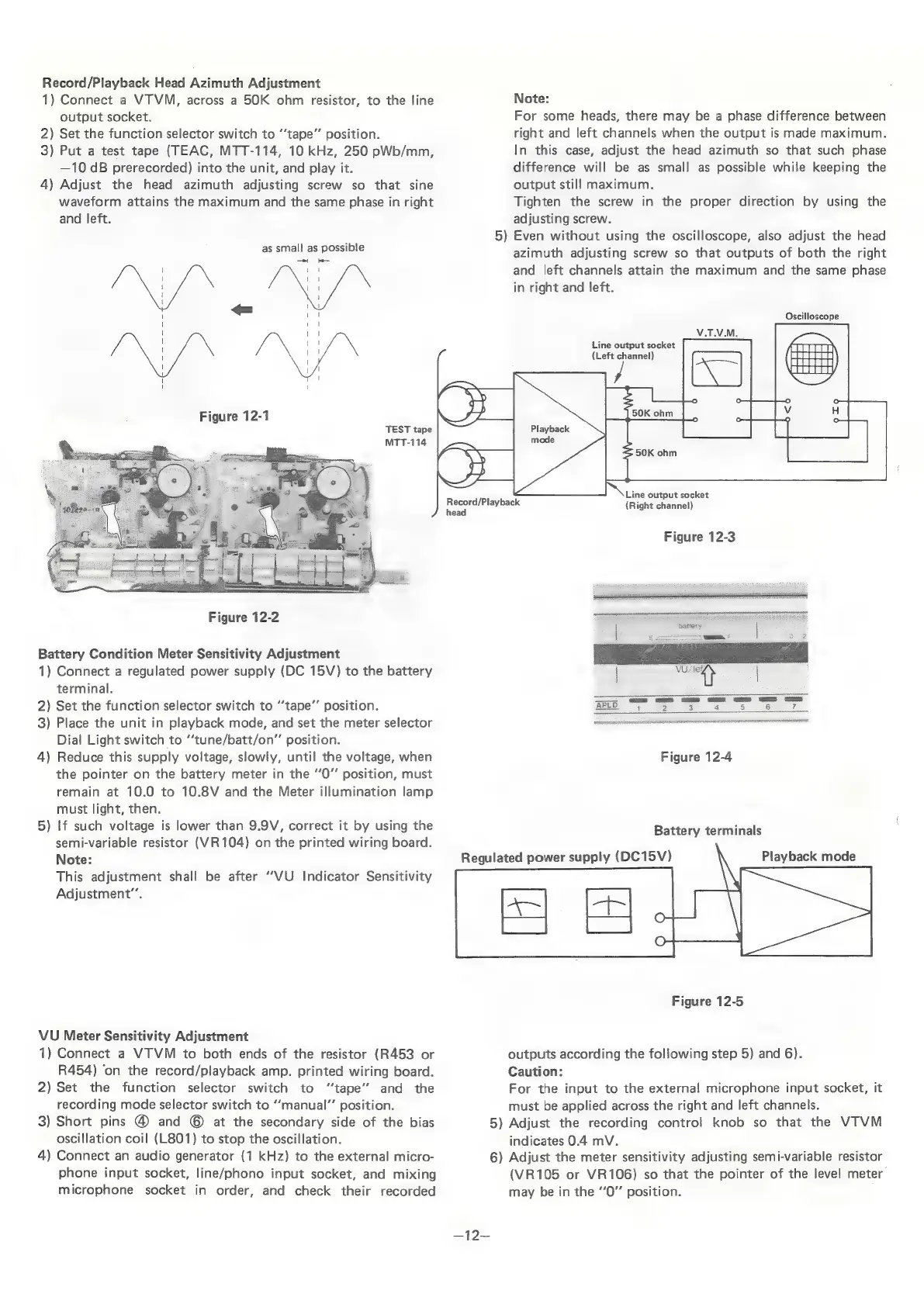
Record/Playback
Head
Azimuth
Adjustment
1)
Connect
a
VTVM,
across
a
50K
ohm
resistor,
to
the
line
output
socket.
2)
Set
the
function
selector
switch
to
“‘tape’’
position.
3)
Put
a
test
tape
(TEAC,
MTT-114,
10
kHz,
250
pWb/mm,
—10
dB
prerecorded)
into
the
unit,
and
play
it.
4)
Adjust
the
head
azimuth
adjusting
screw
so
that
sine
waveform
attains
the
maximum
and
the
same
phase
in
right
and
left.
as
small
as
possible
TEST
tape
MTT-114
ee
Figure
12-2
Battery
Condition
Meter
Sensitivity
Adjustment
1)
Connect
a
regulated
power
supply
(DC
15V)
to
the
battery
terminal.
2)
Set
the
function
selector
switch
to
“tape”
position.
3)
Place
the
unit
in
playback
mode,
and
set
the
meter
selector
Dial
Light
switch
to
“tune/batt/on”’
position.
4)
Reduce
this
supply
voltage,
slowly,
until
the
voltage,
when
the
pointer
on
the
battery
meter
in
the
“0”
position,
must
remain
at
10.0
to
10.8V
and
the
Meter
illumination
lamp
must
light,
then.
5)
If
such
voltage
is
lower
than
9.9V,
correct
it
by
using
the
semi-variable
resistor
(VR104)
on
the
printed
wiring
board.
Note:
This
adjustment
shall
be
after
“‘VU
Indicator
Sensitivity
Adjustment”’.
VU
Meter
Sensitivity
Adjustment
1)
Connect
a
VTVM
to
both
ends
of
the
resistor
(R453
or
R454)
‘on
the
record/playback
amp.
printed
wiring
board.
2)
Set
the
function
selector
switch
to
“‘tape’’
and
the
recording
mode
selector
switch
to
“‘manual”’
position.
3)
Short
pins
@
and
©
at
the
secondary
side
of
the
bias
oscillation
coil
(L801)
to
stop
the
oscillation.
4)
Connect
an
audio
generator
(1
kHz)
to
the
external
micro-
phone
input
socket,
line/phono
input
socket,
and
mixing
microphone
socket
in
order,
and
check
their
recorded
Record/Playback
Regulated
power
supply
(DC15V)
Note:
For
some
heads,
there
may
be
a
phase
difference
between
right
and
left
channels
when
the
output
is
made
maximum.
In
this
case,
adjust
the
head
azimuth
so
that
such
phase
difference
will
be
as
small
as
possible
while
keeping
the
output
still
maximum.
Tighten
the
screw
in
the
proper
direction
by
using
the
adjusting
screw.
5)
Even
without
using
the
oscilloscope,
also
adjust
the
head
azimuth
adjusting
screw
so
that
outputs
of
both
the
right
and
left
channels
attain
the
maximum
and
the
same
phase
in
right
and
left.
Oscilloscope
Line
output
socket
(Left
channel)
Playback
Line
output
socket
(Right
channel)
Figure
12-3
at
|
ee
2
ct
a
a
a
APED
2
oa Se
td
onaartet
irish
vee
Figure
12-4
Battery
terminals
Playback
mode
Figure
12-5
outputs
according
the
following
step
5)
and
6).
Caution:
For
the
input
to
the
external
microphone
input
socket,
it
must
be
applied
across
the
right
and
left
channels.
5)
Adjust
the
recording
control
knob
so
that
the
VTVM
indicates
0.4
mV.
6)
Adjust
the
meter
sensitivity
adjusting
semi-variable
resistor
(VR105
or
VR106)
so
that
the
pointer
of
the
level
meter
may
be
in
the
“0”
position.

Related product manuals