EasyManua.ls Logo

Sharp GF-777H - Page 13

Sharp GF-777H
35 pages
Print Icon
To Next Page IconTo Next Page
To Previous Page IconTo Previous Page
Loading...
Oscilloscope
Recording
input
socket
(external)
microphone
input
socket,
line/phono
input
socket
and
mixing
microphone
socket
Audio
generator
Attenuator
©
Record
mode
R453
or
R454
Figure
13-1
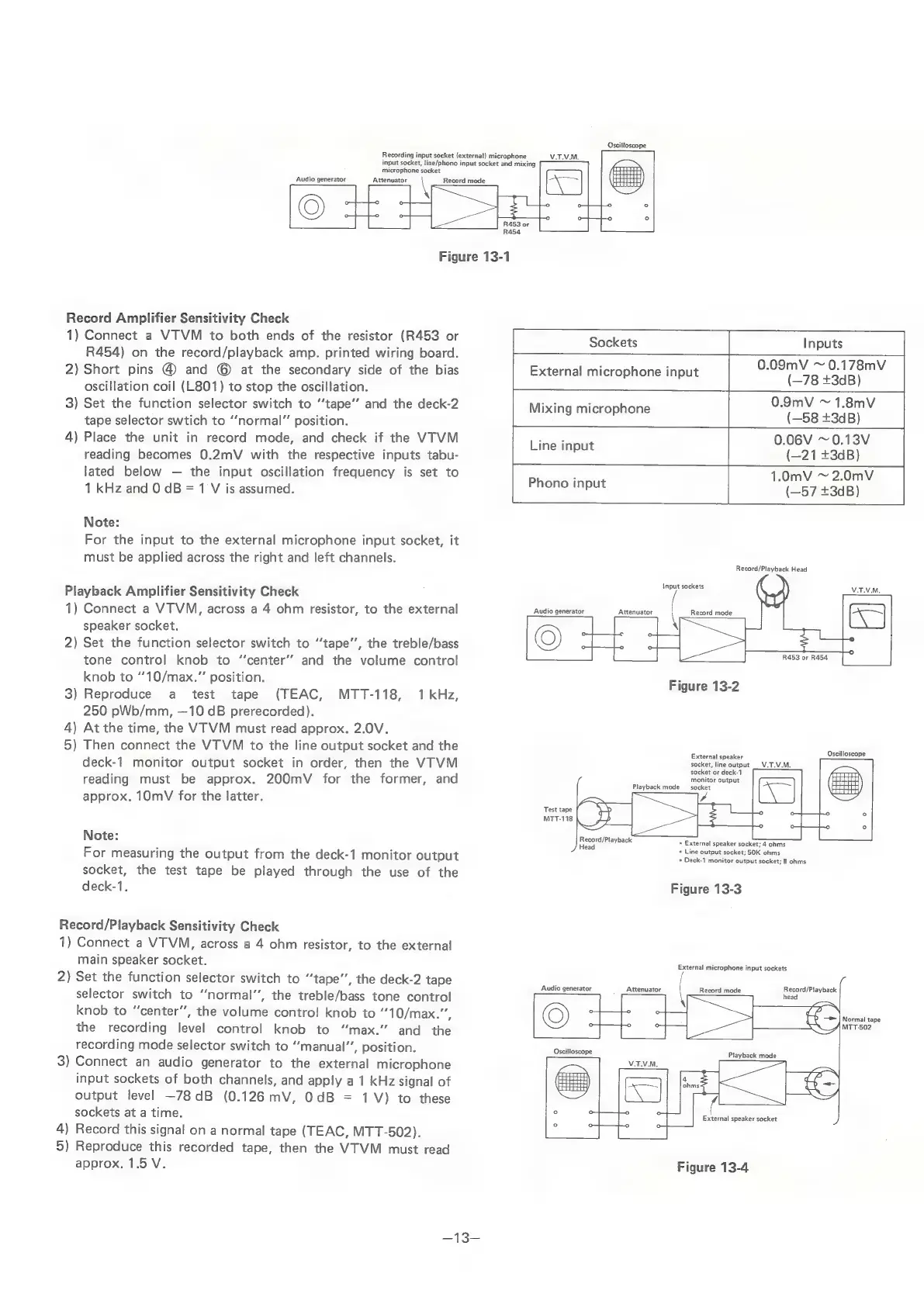
Record
Amplifier
Sensitivity
Check
1)
Connect
a
VTVM
to
both
ends
of
the
resistor
(R453
or
/
a
Baa
Sockets
Inputs
R454)
on
the
record/playback
amp.
printed
wiring
board.
=
2)
Short
pins
@
and
©
at
the
secondary
side
of
the
bias
External
microphone
input
ae
feed
oscillation
coil
(L801)
to
stop
the
oscillation.
~
3)
Set
the
function
selector
switch
to
“‘tape’’
and
the
deck-2
Mixing
microphone
eae
saute
tape
selector
swtich
to
“‘normal”
position.
vos
4)
Place
the
unit
in
record
mode,
and
check
if
the
VTVM
Line
input
0.06V
~0.13V
reading
becomes
0.2mV
with
the
respective
inputs
tabu-
(—21
+3dB)
lated
below
the
input
oscillation
frequency
is
set
to
Ear
1.0mV
~
2.0mV
1
kHz
and
0
dB
=
1
V
is
assumed.
pana
(—57
+3dB)
Note:
For
the
input
to
the
external
microphone
input
socket,
it
must
be
applied
across
the
right
and
left
channels.
se
raiiceies
Input
sockets
VM,
Playback
Amplifier
Sensitivity
Check
1)
Connect
a
VTVM,
across
a
4
ohm
resistor,
to
the
external
Audio
generator
Attenuator
Record
mode
speaker
socket.
2)
Set
the
function
selector
switch
to
“‘tape’’,
the
treble/bass
tone
control
knob
to
“‘center’’
and
the
volume
control
knob
to
““10/max.”’
position.
R453
or
R454
Figure
13-2
3)
Reproduce
a
test
tape
(TEAC,
MTT-118,
1
kHz,
250
pWb/mm,
—10
dB
prerecorded).
4)
At
the
time,
the
VTVM
must
read
approx.
2.0V.
5)
Then
connect
the
VTVM
to
the
line
output
socket
and
the
welt
Sicaiodses
deck-1
monitor
output
socket
in
order,
then
the
VTVM
socket,
line
output
_V.T.V.M,
reading
must
be
approx.
200mV
for
the
former,
and
approx.
10mV
for
the
latter.
Playback
mode
Test
tape
MTT-118
Note:
For
measuring
the
output
from
the
deck-1
monitor
output
socket,
the
test
tape
be
played
through
the
use
of
the
Record/Playback
lead
*
Line
socket
or
deck-1
monitor
output
socket
*
External
speaker
socket;
4
ohms
output
socket;
50K
ohms
+
Deck-1
monitor
output
socket;
8
ohms
deck-1.
Figure
13-3
Record/Playback
Sensitivity
Check
1)
Connect
a
VTVM,
across
a
4
ohm
resistor,
to
the
external
main
speaker
socket.
2)
Set
the
function
selector
switch
to
“tape”,
the
deck-2
tape
selector
switch
to
“normal”,
the
treble/bass
tone
control
knob
to
“center”,
the
volume
control
knob
to
“*10/max.””,
©)
the
recording
level
control
knob
to
“max.”
and
the
Audio
generator
Attenuator
External
microphone
input
sockets
Record
mode
Record/Playback
head
Normal
tape
MTT-502
recording
mode
selector
switch
to
“manual”,
position.
3)
Connect
an
audio
generator
to
the
external
microphone
input
sockets
of
both
channels,
and
apply
a
1
kHz
signal
of
output
level
—78dB
(0.126
mV,
0dB
=
1V)
to
these
sockets
at
a
time.
4)
Record
this
signal
on
a
normal
tape
(TEAC,
MTT-502).
5)
Reproduce
this
recorded
tape,
then
the
VTVM
must
read
Oscilloscope
Playback
mode
External
speaker
socket
approx.
1.5
V.
Figure
13-4

Related product manuals