EasyManua.ls Logo

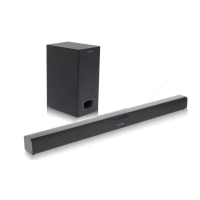
Sharp GX-BT7 - User Manual

Sharp GX-BT7
24 pages
Print Icon
To Next Page IconTo Next Page
Loading...
iPad, iPhone, iPod, iPod classic, iPod nano, and
iPod touch are trademarks of Apple Inc., registered
in the U.S. and other countries. Lightning is a
trademark of Apple Inc.
WIRELESS BLUETOOTH
®
LAUTSPRECHER SYSTEM
ENCEINTES SANS FIL BLUETOOTH
®
SISTEMAS DE ALTAVOCES BLUETOOTH
®
INALÁMBRICOS
TRÅDLÖST BLUETOOTH
®
HÖGTALARSYSTEM
SISTEMA DI ALTOPARLANTI BLUETOOTH
®
WIRELESS
DRAADLOOS BLUETOOTH
®
LUIDSPREKERSYSTEEM
SISTEMA DE ALTIFALANTES SEM FIOS BLUETOOTH
®
LANGATON BLUETOOTH
®
-KAIUTINJÄRJESTELMÄ
WIRELESS BLUETOOTH
®
SPEAKER SYSTEM
MODELL
MODÈLE
MODELO
MODELL
MODELLO
MODEL
MODELO
MALLI
MODEL
GX-BT7
BEDIENUNGSANLEITUNG
MODE D’EMPLOI
MANUAL DE MANEJO
BRUKSANVISNING
MANUALE DI ISTRUZIONI
GEBRUIKSAANWIJZING
MANUAL DE OPERAÇÃO
YTTÖOHJE
OPERATION MANUAL
MUTE
ON/
STAND-BY
TREBLE
AUDIO IN
BASS
PAIRING
VOL
E SOUND
USB
BLUETOOTH
DIMMER
RRMCGA342AWSA
ECO MODE
DEUTSCH
PORTUGUÊ
S
FRANÇAI
S
ES
PAÑOL
S
VENS
KA
ITALIANO
NEDERLANDS
SUOMI
ENGLISH
Siehe Seiten i bis viii und D-1 bis D-14.
Se reporter aux pages i à viii et F-1 à F-14.
Consulte las páginas i a viii y S-1 a S-14.
Hänvisa till sidorna i till viii och V-1 till V-14.
Leggere le pagine i a viii e I-1 a I-14.
Raadpleeg de bladzijden i t/m viii en N-1 t/m N-14.
Favor consultar as páginas i a viii e P-1 a P-14.
Sivut i - viii sekä SU-1 - SU-14.
Please refer to pages i to viii and E-1 to E-14.
This audio system supports NFC-enabled device with Android 4.1, Jelly Bean and higher.
For device with a lower Android version, refer the operation manual of the device for recommended
app (application).
GX-BT7_OM_FRONT.indd 1GX-BT7_OM_FRONT.indd 1 2013-07-29 22:21:282013-07-29 22:21:28

Other manuals for Sharp GX-BT7

Questions and Answers

  • J
    Janet MccormickSep 3, 2025
    Why does my iPhone say 'This accessory is not made to work with iPhone' on my Sharp Speaker System?
    • M
      Melissa VasquezSep 3, 2025
      If you see the message "This accessory is not made to work with iPhone" or "This accessory is not supported by iPhone", it could be because the iPhone battery is low, so please charge the iPhone. Alternatively, the iPhone might not be properly plugged in; ensure it is correctly connected.
  • V
    vmclaughlinSep 2, 2025
    What to do if my device is not detected or playback won't start on my Sharp GX-BT7?
    • M
      michellebeckerSep 2, 2025
      If your device cannot be detected or playback doesn't start, first ensure that the device contains MP3/WMA files. Next, verify that the device is properly plugged in. Disconnect any MTP devices. If the device contains only AAC files, add MP3/WMA files. Finally, ensure you are not trying to play a copyright-protected WMA file or a false MP3 file; use non-copyright-protected files.
  • R
    Richard BlairAug 31, 2025
    Why is my iPod, iPhone, or iPad not producing sound on my Sharp GX-BT7?
    • C
      castilloamyAug 31, 2025
      If your iPod, iPhone, or iPad is not producing sound, first ensure that the device is playing. Second, check that the device is properly plugged into the unit. Lastly, confirm that the AC power cord of the unit is plugged in.
  • S
    sheilawatsonAug 29, 2025
    How to fix interrupted or distorted Bluetooth sound on Sharp GX-BT7 Speaker System?
    • A
      Alan BrownAug 29, 2025
      If the Bluetooth sound is interrupted or distorted, the unit might be too near a device that generates electromagnetic radiation; move the unit away from such devices. Also, there might be an obstacle between the unit and the Bluetooth stereo audio source device; remove any obstacles.
  • C
    Crystal JacobsonAug 27, 2025
    Why is there no sound coming from my Sharp Speaker System?
    • E
      eparkerAug 28, 2025
      If no sound is being produced, ensure that the device connected to the speaker is actually playing. Also, verify that the device is properly plugged into the unit. Finally, check that the AC power cord of the unit is plugged in.
  • P
    Philip BarryAug 26, 2025
    What to do if I hear no sound from my Sharp GX-BT7 Speaker System?
    • W
      William GrantAug 27, 2025
      If you're not hearing any sound, first, make sure the volume level isn't set to the minimum; if it is, increase the volume. Also, if you are using a Bluetooth connection, the unit might be too far from the Bluetooth stereo audio source device, so move it closer. Finally, confirm that the unit is paired with the Bluetooth stereo audio source device.
  • D
    Daniel GibsonAug 25, 2025
    Why is the remote control not working on my Sharp Stereo System?
    • P
      Pamela IngramAug 25, 2025
      If the remote control for your Sharp Stereo System isn't working, try these steps: * Ensure the AC power lead of the unit is plugged in. * Replace the batteries in the remote. * Adjust the distance and angle between the remote and the unit. * Make sure there's no strong light interfering with the remote control sensor.
  • K
    Krista WileyAug 23, 2025
    What to do if my iPod, iPhone, or iPad won't charge on my Sharp GX-BT7?
    • A
      Alexandra FloydAug 23, 2025
      If your iPod, iPhone, or iPad isn't charging, ensure it's making full contact with the connector. Also, check if your iPod or iPhone model is supported.

Summary

SHARP GX-BT7 Special Notes and Licensing

Content Distribution Licensing

Information regarding licensing for content distribution with the product.

SHARP GX-BT7 Controls and Indicators Overview

Front Panel Controls

Description of buttons and indicators located on the front panel of the unit.

Remote Control Overview

Details on the buttons and functions of the remote control.

SHARP GX-BT7 General Control Operations

SHARP GX-BT7 NFC Bluetooth Connection Guide

NFC Audio Playback Connection

Steps to connect and play audio via NFC and Bluetooth.

SHARP GX-BT7 Listening via Bluetooth

Pairing Bluetooth Devices

Procedure for pairing the unit with Bluetooth source devices.

Listening to Sound via Bluetooth

How to play audio from a connected Bluetooth device.

SHARP GX-BT7 Listening to Android Devices

Android Device Connection (USB)

How to connect Android devices using a USB cable.

Android Device Playback

Playing audio from connected Android devices.

SHARP GX-BT7 Listening to iPod, iPhone, iPad

iPod, iPhone, iPad Connection (USB)

Connecting iPod, iPhone, or iPad to the unit via USB.

iPod, iPhone, iPad Playback

Playing audio from connected iPod, iPhone, or iPad.

SHARP GX-BT7 USB;MP3 Player Playback

SHARP GX-BT7 Troubleshooting Guide

NFC and Bluetooth Troubleshooting

Addressing issues with NFC pairing and Bluetooth audio.

iPod, iPhone, iPad Troubleshooting

Troubleshooting specific issues with iPod, iPhone, and iPad connectivity.

SHARP GX-BT7 Technical Specifications

Sharp GX-BT7 Specifications

General IconGeneral
Karaoke-
Speaker type2-way
Audio amplifierYes
RMS rated power20 W
Number of speakers2
Cassette deckNo
Product colorBlack, Silver
Audio formats supportedMP3, WMA
Display typeLED
Backlight colorBlue
Apple docking compatibilityiPad 2, iPhone, iPod
Input voltage100-240 V
Input frequency50 - 60 Hz
Power consumption (standby)0.4 W
Weight and Dimensions IconWeight and Dimensions
Weight2280 g

Related product manuals