Need help?
Do you have a question about the Sharp PS-919 and is the answer not in the manual?
Essential safety instructions, warnings, and explanations of safety symbols for product operation.
Critical warnings and precautions regarding the built-in battery, including fire risk and handling.
Instructions and warnings related to the safe removal and disposal of the unit's battery.
Detailed description of all buttons and indicators on the speaker's top panel for user interaction.
Identification and function of the DC 18V input, USB port, and AUX IN jack on the rear panel.
Instructions for charging the speaker's built-in batteries using the AC adapter.
Steps to power on the speaker, initial pairing mode indication, and procedure to turn it off.
Steps to connect the speaker to a Bluetooth device for audio streaming.
Guide for connecting two PS-919 speakers for stereo sound using TWS.
Instructions for connecting and playing music from external devices via AUX input.
Details on using the USB port for music playback and charging mobile devices.
How to control and change the speaker's lighting effects.
Detailed technical data including output power, battery, connectivity, and dimensions.
Links to download the user manual and other related documents for the PS-919 speaker.
List of other user manuals and guides for similar or related speaker products.
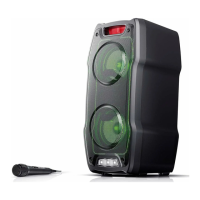
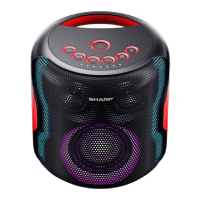
The SHARP PS-919 is a party speaker system designed to deliver a powerful audio experience with integrated lighting effects, making it suitable for various social gatherings. It offers versatile connectivity options and user-friendly controls, ensuring an enjoyable and dynamic sound environment.
The primary function of the SHARP PS-919 is to serve as a portable party speaker, capable of playing music from multiple sources and enhancing the atmosphere with synchronized light shows. It features a built-in rechargeable battery, allowing for wireless operation and portability. The speaker supports Bluetooth connectivity, enabling seamless streaming from smart devices. Additionally, it includes a USB port for playing audio files directly from a USB drive and an AUX-in jack for connecting external audio devices via a 3.5mm cable.
A key feature of the PS-919 is its "Duo Mode" or "True Wireless Stereo (TWS)" functionality, which allows two PS-919 speakers to be connected wirelessly to create a stereo sound system. In this setup, one speaker acts as the master (left channel) and the other as the slave (right channel), providing a more immersive audio experience.
The integrated lighting system offers various flashing modes, including gradual color changes, dynamic flashing synchronized with music, color rotation, and monochrome rotation. These light effects can be adjusted to suit different moods and events, with options to control both front and sidelights, or to turn them off completely.
The speaker also incorporates sound enhancement features, such as "3D Bass" and "3D Surround" modes, which can be toggled to optimize the audio output for a richer and more expansive sound. Voice prompts are included to guide users through various operations, such as Bluetooth pairing and mode changes, which can be enabled or disabled.
To power on the unit, a short press of the power button on the top panel is required. A long press of the same button will turn the unit off. The speaker is designed with an automatic power-off feature that activates after 15 minutes of inactivity or disconnection to conserve battery life.
The "SOURCE" button allows users to switch between different playback modes: Bluetooth, AUX, and USB. A long press of this button also activates the TWS/Duo mode function when connecting two speakers. The "Source indicator" LED provides visual feedback on the current mode and pairing status. For instance, a flashing blue light indicates Bluetooth pairing mode, while a solid blue light signifies a successful Bluetooth connection.
Volume adjustment is managed by the "+/" and "-/" buttons. A short press of "+/" increases the volume, while a short press of "-/" decreases it. For track navigation, a long press of "+/" skips to the next track, and a long press of "-/" skips to the previous track.
The "▷/" button serves as the play/pause control for audio playback. A long press of this button will disconnect the current Bluetooth connection.
The dedicated light button on the top panel allows users to cycle through the various flashing modes for the center lights with a short press. A 2-second long press changes the sidelight mode, and a 4-second long press switches off all the lights. The "3D/Bass indication" LED provides visual feedback on the status of the Bass and 3D surround modes.
To connect a Bluetooth device, users select "Bluetooth" mode via the "SOURCE" button. The speaker will enter pairing mode, indicated by a flashing blue light. Users then select "Sharp PS-919" from their device's Bluetooth list. A voice prompt confirms a successful connection, and the "Source indicator" turns solid blue. The speaker supports automatic reconnection with previously paired devices. To pair with a new device, the current Bluetooth connection must be disconnected first.
For a stereo setup, two PS-919 speakers can be linked. One speaker is designated as the master, and the other as the slave. To initiate Duo Mode, a long press of the "SOURCE" button on the second speaker (slave) is required until it announces "Duo Mode pairing." Once connected, the speakers will announce "Duo Mode connected." The master speaker is then paired with the smart device. If one speaker is powered off in Duo Mode, both will power off. They will automatically reconnect when powered on again.
Inserting a USB drive into the USB port automatically switches the unit to USB mode and begins playing songs. The USB port also functions as a charging port for mobile devices, providing 5V/1A output.
External audio devices can be connected via the 3.5mm AUX-in jack. After connecting, users switch to AUX mode using the "SOURCE" button. The blue light will flash slowly and continuously in AUX mode.
The unit is compatible with voice assistants on smart devices, enhancing user interaction.
Before cleaning, the power cable should be unplugged from the power source. The exterior of the unit can be cleaned with a soft and clean rag. Chemical cleaners should not be used.
The PS-919 features a built-in rechargeable battery. To prolong battery life, it is recommended to unplug the charger once the battery is fully charged, as overcharging can shorten its lifespan. If the device is left unused, a fully charged battery will gradually lose its charge. Storing the product in hot or cold environments (e.g., a closed car) can reduce battery capacity and lifetime. The ideal storage temperature is between 5 °C and 20 °C. For long-term storage (over six months), it is advised to charge the battery to 50% every six months.
The speaker is charged by connecting the supplied AC power adapter to the DC 18V input port on the rear of the unit and then to a wall outlet. The "RECHARGING INDICATOR" light turns red during charging and turns off when the device is fully charged. Only the supplied AC adapter should be used to avoid potential damage or charging issues.
Users are advised to follow basic safety precautions, especially regarding children. The power cord should not be damaged, stretched, or bent, and heavy objects should not be placed on it. If the supply cord is damaged, it must be replaced by the manufacturer or an authorized service agent. The unit should be plugged into an AC 220-240V 50Hz power source. The power plug should not be forced into the socket. Connecting or disconnecting the power cord with wet hands should be avoided. For complete disconnection, the AC power plug should be removed from the wall socket, especially if the system will not be used for a long time. The mains plug should always be easily accessible.
The product should not be exposed to direct sunlight, dust, rain, or moisture, nor to dripping or splashing liquids. Objects filled with liquids, such as vases, should not be placed on the apparatus. It should not be installed near heat sources or in areas with high humidity. Adequate ventilation clearance (at least 30 cm from the rear and top, and 5 cm from each side) should be maintained, and ventilation openings should not be blocked. Children should be prevented from inserting objects into holes or slots.
In case of a fault, users should contact the manufacturer or authorized service department, as the product does not contain user-serviceable parts. Unauthorized repairs will void the warranty and may expose users to dangerous internal parts. The product should be allowed to warm up to room temperature before use if it has been in a cold environment. It should be used in moderate climates only, not tropical or subtropical.
The product and its batteries should not be disposed of as unsorted municipal waste. They should be returned to a designated collection point for the recycling of WEEE (Waste Electrical and Electronic Equipment) in accordance with local laws. This helps conserve resources and protect the environment. Batteries may contain traces of mercury (Hg) or lead (Pb) and should be recycled appropriately. Batteries should not be exposed to high temperatures, thrown into fire, or disassembled, as they may leak or explode. Charging batteries under conditions other than specified may cause overheating, gas emission, leakage, ignition, or bursting.
 General
| Tweeter | Yes |
|---|---|
| Number of speakers | 1 |
| Audio output channels | 2.1 channels |
| Woofer diameter (imperial) | 4 \ |
| Tweeter diameter (imperial) | 2 \ |
| FM radio | - |
| Certification | CE (RED, RoHS, ErP), REACH/PAH/SCCP |
| Recommended usage | Universal |
| Card reader integrated | No |
| RMS rated power | 130 W |
| Battery type | Built-in battery |
| Battery capacity | 2600 mAh |
| Battery life (max) | 14 h |
| AC adapter output voltage | 18 V |
| Power consumption (typical) | 19 W |
| Bluetooth version | 5.0 |
| Bluetooth profiles | A2DP, AGHFP, AVCTP, AVDTP, AVRCP, HFP, HID |
| USB connector type | Micro-USB B |
| Connectivity technology | Wired & Wireless |
| Package type | Box |
| Package width | 280 mm |
| Package height | 310 mm |
| Package weight | 3519 g |
| Product type | 2.1 portable speaker system |
| Product color | White |
| Volume control | Buttons |
| Housing material | Plastic |
| Illumination color | Multi |
| Protection features | Waterproof |
| International Protection (IP) code | IPX5 |
| Manual languages | DEU, ENG, ESP, FRE, ITA, POL |
| Quantity per pack | 1 pc(s) |
| Master (outer) case width | 571 mm |
| Master (outer) case height | 335 mm |
| Master (outer) case length | 300 mm |
| Master (outer) case weight | 7500 g |
| Quantity per master (outer) case | 2 pc(s) |
| Sustainability certificates | RoHS, CE, REACH, ErP |
 Weight and Dimensions
| Depth | 224 mm |
|---|---|
| Width | 220 mm |
| Weight | 2670 g |

 To Next Page